
How to Become an AI Automation Builder: Complete Roadmap
I created a course/community to master Openclaw and Claude AI agent automations for beginners to start making money and selling to companies
Check it out here: https://www.skool.com/raycfu/about
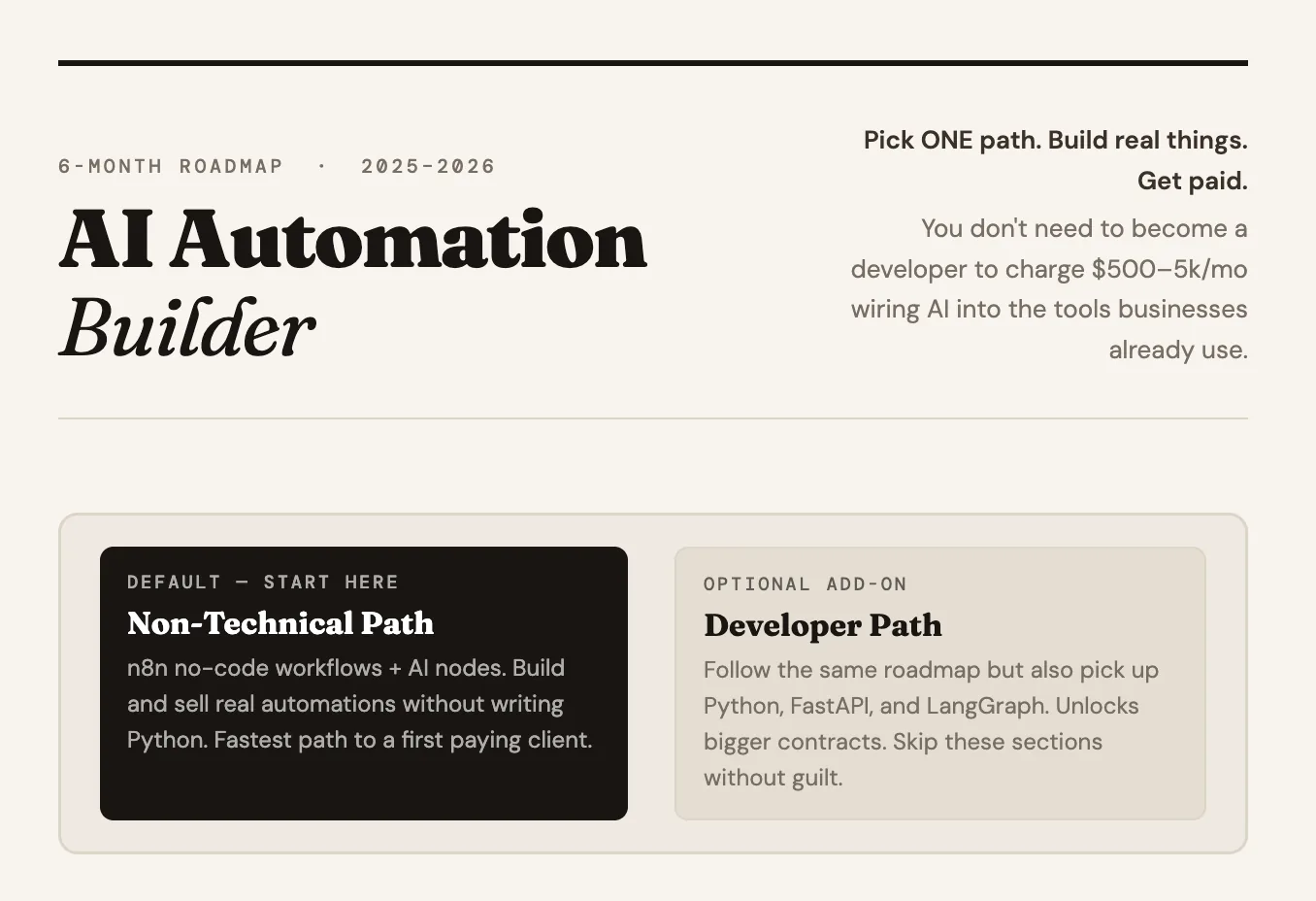
AI automation is the highest-ROI skill in the entire AI space right now. There are 310 million companies worldwide that have not added any kind of automation to their business processes. Only about 1 million people on the planet can provide this service at a decent level. That is 8 billion people and almost nobody doing this work.
The problem is most people entering this field get stuck the same way. Some open a Python tutorial on day one, hit a wall in week two, and never touch a no-code tool. Some get lost in 8-hour YouTube tutorials without ever building a single workflow for a real business. Others jump straight into "AI agents" without understanding how a basic workflow or an API actually works.
Here is the truth nobody tells beginners: you do not need to become a software developer. You do not need to learn machine learning. You do not need to fine-tune a model. You need to learn how to connect AI to the tools companies already use and automate the boring repetitive work they are currently paying humans to do.
This guide gives you a practical 6-month roadmap. For every skill you need to learn, there are resources and clear explanations of what to do. You can start earning within the first 1 to 2 months.
WHAT AN AI AUTOMATION BUILDER ACTUALLY DOES
Most people hear "AI automation" and imagine shiny agents that replace entire teams. In reality, most of the work is much more boring and much more profitable.
You take expensive repetitive business processes and rebuild them as AI-powered workflows that run 24/7 without humans babysitting them. That usually includes connecting LLMs to tools companies already use like CRMs, email, Slack, Notion, and databases. Turning triggers from one system into actions in another. Adding AI decision-making into previously manual workflows. Replacing human triage, classification, and routing work with LLM calls. Building internal knowledge bots over company docs. Automating lead generation, outreach, content, and support pipelines.
In practice, an AI Automation Builder sits somewhere between workflow automation (n8n, Make, Zapier), applied AI (LLMs, prompts, simple agents), business process consulting (knowing what is actually worth automating), and light technical glue work (reading docs, fixing small things, debugging).
Every SMB, agency, and SaaS company in 2026 has 20 repetitive workflows they are paying humans too much to run. They do not need researchers or fine-tuners. They need someone who can walk in, find the bleeding, and stop it with a workflow that pays for itself in the first month.
WHAT YOU CAN CHARGE
These are average prices across freelance and outsource platforms plus rates from people doing this professionally. They can be much higher depending on the company size.
$500 to $5,000/month to build automated workflows for businesses $1,000 to $3,000/month to automate lead generation systems $500 to $2,000/month for AI-powered content pipelines $1,000 to $4,000/month to automate customer support with AI agents $500 to $2,000/month for automated reporting and data dashboards $500 to $2,000/month for AI-powered cold outreach systems $1,000 to $3,000/month to set up internal automation assistants $500 to $1,500 for AI workflow training for teams $300 to $1,000 for 1:1 automation consulting
NON-TECHNICAL VS DEVELOPER PATH
Before you start, pick which path you are on.
Non-technical path is the default and where most people should start. You have never coded or you know a little but you do not want to become a developer. Your superpower is going to be no-code tools, specifically n8n, connected to AI through simple nodes. You can build and sell real automations without ever writing a line of Python. This is the fastest most realistic path to your first paying client.
Developer path is optional. You already code or you really want to learn. You follow the same roadmap but also pick up Python, LangGraph, and custom backend pieces. This unlocks bigger contracts and more complex work later but it is completely optional.
One rule: pick a lane and stop switching. People who bounce between "I will learn no-code" and "I will learn Python" for 6 months end up with neither.
MONTH 1: BUILD YOUR FIRST WORKFLOW
Your goal this month: Build your first real automation in n8n, understand how APIs and webhooks work at a conceptual level, and learn enough about prompting to make an LLM do what you want.
- Pick n8n and go deep
n8n is the default recommendation for this entire roadmap. Open source, generous free tier, best-in-class AI nodes, self-hostable, and the automation agencies making real money are all using it.
Resources:
n8n Official Docs (free): https://docs.n8n.io/ Start with "Quickstart" and work through every core concept.
n8n Academy (free): https://docs.n8n.io/courses/ Official free courses covering beginner to advanced workflow patterns including AI integration. This is the single best resource in Month 1.
Productive Dude (YouTube, free): https://www.youtube.com/@productivedude n8n-focused, extremely practical, beginner-friendly.
Nick Saraev (YouTube, free): https://www.youtube.com/@nicksaraev Focused specifically on making money with automation. High signal.
What to focus on: Triggers (cron, webhook, app events) vs actions. How data moves from one step to the next. Error handling and fallback paths. Using the HTTP Request node when there is no native integration. Reading and debugging execution logs.
Practice: Automate something in your own life. Auto-save email attachments to Google Drive. Scrape a product price daily into a Google Sheet. Send yourself a Telegram message when a keyword appears in your inbox. Build the muscle with low stakes before you build for clients.
- APIs, webhooks, and JSON
Every automation you ever build connects two systems through APIs. You do not need to code APIs. You need to understand them enough to read a doc, know what a webhook is, and know what JSON looks like.
Resources:
What is a Webhook (Zapier blog, free): https://zapier.com/blog/what-are-webhooks/
HTTP basics (MDN Web Docs, free): https://developer.mozilla.org/en-US/docs/Web/HTTP/Overview
Postman Learning Center (free): https://learning.postman.com/ The universal tool for testing APIs. No code required.
REST API Tutorial (free): https://restfulapi.net/
What to focus on: GET vs POST vs PUT vs DELETE. What JSON looks like (curly braces, key-value pairs, arrays). HTTP status codes: 200 (good), 401 (bad auth), 404 (not found), 429 (rate limited), 500 (broken). API keys and bearer tokens at a conceptual level. Webhooks vs polling.
Practice: Use Postman to call a free public API (try https://api.github.com/users/torvalds). See the JSON come back. Recreate the exact same call inside an n8n HTTP Request node. Compare. This one exercise unlocks half the mystery of APIs for non-technical people.
- Reading API docs without panicking
Every real automation eventually requires reading an API doc. This is the skill that separates people who ship from people who wait forever for a YouTube tutorial that covers their exact use case.
Resources:
How to Read API Documentation (Postman Blog, free): https://blog.postman.com/how-to-read-api-documentation/
Stripe API Docs (free): https://docs.stripe.com/api Study this even if you never use Stripe. It is the gold standard for API documentation design.
What to focus on: Finding the authentication section first. Identifying the base URL, endpoint paths, methods, and required parameters. Reading request/response examples. Spotting rate limits and pagination patterns.
- Basic prompt engineering
You do not need to become a prompt wizard. You need to understand system vs user prompts, specificity, examples, and how to force structured output so the rest of your workflow can use it.
Resources:
Anthropic Interactive Prompt Engineering Tutorial (free): https://github.com/anthropics/prompt-eng-interactive-tutorial The best hands-on intro to prompting.
OpenAI Prompt Engineering Guide (free): https://platform.openai.com/docs/guides/prompt-engineering
Learn Prompting (free): https://learnprompting.org/ Full free course from basics to advanced.
What to focus on: System prompts vs user prompts. Why specificity beats cleverness. Giving examples (few-shot prompting). Asking for structured output (JSON, CSV, specific formats) because this is what makes AI usable inside automations.
- What LLMs are actually good at
This saves you from embarrassing yourself in front of a client. Knowing when NOT to use AI is just as valuable as knowing when to use it.
Resources:
Andrej Karpathy YouTube talks (free): https://www.youtube.com/@AndrejKarpathy
Simon Willison Blog (free): https://simonwillison.net/
Good at: classification, summarization, extraction, translation, drafting, decision trees with clear criteria. Bad at: exact math, real-time data without retrieval, tasks requiring perfect consistency, anything safety-critical.
MONTH 1 MILESTONE
By the end of this month you should be able to build a 3 to 5 step workflow in n8n that solves a real problem in your own life. Explain what webhooks, API keys, JSON, and HTTP status codes are in plain English. Read an unfamiliar API doc and successfully make a test call with Postman. Write a clear system prompt that returns consistent structured output. List 5 tasks LLMs are good at and 5 where they will embarrass you.
MONTH 2: EMBED AI INTO YOUR WORKFLOWS
Your goal this month: Stop using ChatGPT manually. Start making AI run automatically inside your n8n workflows, reacting to real triggers, making decisions, and writing to real systems without you pressing a button.
- n8n AI nodes
n8n has built-in nodes for OpenAI, Anthropic, and a full AI Agent node. For 90% of what you will ever need to ship, you do not need to touch Python.
Resources:
n8n AI Nodes and LangChain Docs (free): https://docs.n8n.io/integrations/builtin/cluster-nodes/root-nodes/n8n-nodes-langchain.agent/
n8n Academy AI Workflows Course (free): https://docs.n8n.io/courses/ There is a dedicated AI track.
n8n AI Templates (free): https://n8n.io/workflows/?categories=AI 100+ real importable templates. Import one, run it, see exactly how it is wired.
Practice: Build a workflow that watches a Google Form, sends new responses to an LLM for classification (urgent, normal, spam), and writes the classified response into different Airtable tables based on category. No code. Pure n8n.
- The core skeleton
Almost every AI automation you will ever build fits this skeleton: Trigger (something happens) then AI decision (classify, extract, generate) then Action (write to a system) then Output (notify, log, confirm). Master this one skeleton and you can build 80% of real-world automations.
Resources:
Anthropic Building Effective Agents (free): https://www.anthropic.com/research/building-effective-agents Read the workflow patterns section.
Practice: Build a workflow that reads incoming emails (Gmail trigger), uses AI to classify into support, sales, personal, and spam, and routes each category to a different action. Create a ticket, create a CRM lead, forward, or archive. No agents. Just a clean chain.
- Error handling
Your workflows will fail in production. APIs go down. Rate limits get hit. The LLM returns malformed JSON. Clients pay you for things that work 99.9% and gracefully handle the other 0.1%.
Resources:
n8n Error Handling and Error Workflows (free): https://docs.n8n.io/flow-logic/error-handling/
Nate Herk Error Handling Video (free): https://www.youtube.com/watch?v=bTF3tACqPRU Covers 95% of potential errors.
What to focus on: Enabling retry on fail on every API-calling node. Building one central error workflow that catches failures. Re-prompting the LLM when it returns malformed JSON. Notifying yourself in Slack or Telegram when a critical workflow breaks.
- Cost awareness
Shipping AI automations without understanding token costs is how you end up with a surprise bill. This skill pays for itself in the first month.
Resources:
OpenAI Pricing: https://openai.com/api/pricing Anthropic Pricing: https://www.anthropic.com/pricing OpenAI Tokenizer (free): https://platform.openai.com/tokenizer
What to memorize: Input tokens are cheap, output tokens are expensive (usually 4 to 5x more). Cheap models are good enough for classification, routing, and extraction. Use expensive models only for creative generation and complex reasoning. Calculate the monthly cost of a workflow before you ship it.
MONTH 2 MILESTONE
By the end of this month you should be able to drop AI into any n8n workflow with confidence. Design a clean trigger, AI, action, output chain for any common business task. Handle API failures, bad JSON, and rate limits. Estimate the monthly cost of any AI workflow before deploying it. Point at one of your workflows and say "a business would pay me to set this up" and mean it.
EARLY MONETIZATION: YOUR FIRST $500 GIG (MONTH 2 TO 3)
You can and should start earning in Month 2 or 3. You do not need a portfolio of 10 case studies. You need one working workflow, a 3-minute Loom walkthrough, and the willingness to be awkward in sales conversations for about 2 weeks.
Where to find clients:
Upwork (https://www.upwork.com/): Create a profile called "AI Automation Builder" or "n8n Automation Specialist." Apply to jobs tagged Zapier, Make, n8n, automation, AI workflow. Price yourself at $30 to $50/hour for the first 2 to 3 jobs. Build reviews.
Fiverr (https://www.fiverr.com/): Create 2 to 3 fixed-price offers like "I will build you an AI lead qualification workflow in n8n for $200."
Contra (https://contra.com/): Better rates, less competition. Good for $500 to $2,000 projects.
n8n Template Marketplace (https://n8n.io/creators/): Publish a free template. People who import it will DM you asking for help customizing. Cheapest lead-gen channel in the entire space.
Your own X and LinkedIn: Post every workflow you build. Screenshot the canvas, record a 2-minute Loom, write a short caption about the problem it solves.
What to sell first:
Lead qualification bot: $300 to $500. Form submissions go to AI, scored against an ICP, high-score leads get routed to CRM or Slack.
Email triage assistant: $300 to $500. Incoming emails get classified by AI, auto-replied to, or routed to the right person.
Meeting notes to CRM: $400 to $700. Meeting transcript goes to AI, extracts action items and CRM fields, writes to HubSpot automatically.
Content repurposer: $250 to $400. One long-form post goes to AI, generates variants for X, LinkedIn, and newsletter, posts drafts to Notion for approval.
What to deliver with every gig: The n8n workflow exported as JSON. A 3 to 5 minute Loom walkthrough. A one-page Notion doc with what it does, how to monitor it, and what to do if it breaks. 7 days of free support after handoff. Do all four and you will get 5-star reviews.
MONTH 3: BUILD REPEATABLE SERVICE WORKFLOWS
Your goal this month: Build 1 to 2 polished, repeatable automations that solve a real business problem and that you can resell to multiple clients with light customization. Pick 1 to 2 from this list. Do not try to build all 6.
USE CASE 1: LEAD GENERATION (HIGHEST DEMAND)
Resources:
Apify (free tier): https://apify.com/ Pre-built scrapers for LinkedIn, Google Maps, Crunchbase. Clay (free trial): https://www.clay.com/ Industry-standard enrichment platform. Apollo.io API (free tier): https://docs.apollo.io/ Hunter.io API (free tier): https://hunter.io/api-documentation Phantombuster (free trial): https://phantombuster.com/
Build this: Company domains go in, scraper pulls website and LinkedIn data, enrichment adds contact info, AI scores each lead against an ICP you define, top-scoring leads get written to a CRM or Google Sheet. Sell as "Lead Qualification Pipeline" at $1,500 one-time plus $500/month.
USE CASE 2: AI-POWERED COLD OUTREACH
Resources:
Instantly.ai (free trial): https://instantly.ai/ Smartlead.ai (free trial): https://smartlead.ai/ Lemlist API (free trial): https://developer.lemlist.com/ Clay Cold Email Playbooks (free): https://www.clay.com/learn
Build this: A lead enters from Airtable, n8n pulls their recent LinkedIn posts and company website, an LLM writes a personalized opener referencing specifics, Instantly sends it, replies get classified by AI (interested, not now, not interested, unsubscribe), interested leads auto-create a CRM task. Sell as "Personalized Outreach System" at $2,000 setup plus $1,000/month.
USE CASE 3: CRM AUTOMATION
Resources:
HubSpot API (free tier): https://developers.hubspot.com/docs/api/overview Pipedrive API (free tier): https://developers.pipedrive.com/ Attio API (free tier): https://developers.attio.com/
Build this: Every meeting triggers a transcript, AI extracts key fields (next steps, pain points, decision maker, timeline), HubSpot deal auto-updates, follow-up task assigned to the right person. Sell as "CRM Autopilot" at $1,500 setup plus $750/month.
USE CASE 4: CONTENT PIPELINES
Resources:
Blotato API (free trial): https://www.blotato.com/ Posts to every platform from one API call. Buffer API: https://buffer.com/developers/api Notion API (free): https://developers.notion.com/
Build this: A topic enters from Notion, AI generates 6 platform-specific variants (X, LinkedIn, Instagram, TikTok, newsletter, thread), workflow waits for human approval in Slack, auto-schedules via Buffer at optimal times. Sell as "AI Content Engine" at $2,500 setup plus $1,000/month.
USE CASE 5: MEETING AUTOMATION
Resources:
Fireflies.ai API (free trial): https://docs.fireflies.ai/ Otter.ai API: https://otter.ai/api AssemblyAI (free tier): https://www.assemblyai.com/docs OpenAI Whisper (free): https://github.com/openai/whisper
Build this: Zoom meeting ends, Fireflies transcript arrives via webhook, AI extracts action items, blockers, and next meeting date, action items go into Linear or Asana, CRM deal auto-updates, follow-up email draft sent to rep. Sell as "Meeting Autopilot" at $1,200 setup plus $600/month.
USE CASE 6: INTERNAL KNOWLEDGE BOTS
Resources:
n8n RAG Templates (free): https://n8n.io/workflows/?q=rag Supabase Vector (free tier): https://supabase.com/docs/guides/ai
Build this: Documents pulled from Notion or Google Drive, chunked and embedded, stored in Supabase Vector, an internal Slack bot answers questions by retrieving relevant chunks and citing them. Sell as "Internal Knowledge Bot" at $2,500 setup plus $500/month.
MONTH 3 MILESTONE
By the end of this month you should have 1 to 2 polished repeatable workflows. Priced as productized services with fixed scope and fixed price. Demoed in under 3 minutes on a Loom. At least 1 paying client or 1 free pilot in exchange for a case study.
MONTH 4: ADD AI AGENTS (CAREFULLY)
Your goal this month: Understand what AI agents actually are, know when to use them, and more importantly when NOT to use them.
Warning: 70% of the time an agent is the wrong choice. Learning when it IS the right choice makes you worth more than 90% of people selling agent services today.
- What agents actually are
An agent is a loop: the LLM thinks, picks a tool, the tool runs, the result goes back into the prompt, repeat until the task is done. Every agent framework just wraps this same loop differently.
Resources:
Anthropic Building Effective Agents (free, mandatory): https://www.anthropic.com/research/building-effective-agents The single best piece of writing on agents in production.
OpenAI Practical Guide to Building Agents (free PDF): https://cdn.openai.com/business-guides-and-resources/a-practical-guide-to-building-agents.pdf
- Build your first agent in n8n
Resources:
n8n AI Agent Node Docs (free): https://docs.n8n.io/integrations/builtin/cluster-nodes/root-nodes/n8n-nodes-langchain.agent/
n8n AI Agent Templates (free): https://n8n.io/workflows/?categories=AI Import 3 agent templates and reverse-engineer them.
Practice: Build a support agent that classifies tickets, looks up fixes in a knowledge base for known issues, pulls account info via tool calls, and escalates anything else to Slack with a full context summary. Never sends a reply without a confidence check.
- When to use agents vs simple chains
Single LLM call: if the task can be solved in one prompt with enough context. Fixed chain: if the steps are predictable and always run in the same order. This is most workflows. Agent: only if the number of steps is genuinely unknown and depends on the input.
Memorize this: A fixed chain of 3 LLM calls will always be faster, cheaper, and more debuggable than an agent that makes 3 calls. Reserve agents for genuinely open-ended tasks.
- Human-in-the-loop checkpoints
Most business automations need a human approval step somewhere, especially before irreversible actions like sending emails, posting publicly, or updating deal stages.
Resources:
n8n Wait Node (free): https://docs.n8n.io/integrations/builtin/core-nodes/n8n-nodes-base.wait/
Slack Block Kit Builder (free): https://api.slack.com/block-kit For interactive approval buttons in Slack.
MONTH 4 MILESTONE
Build a working AI agent in n8n with 3 to 5 tools. Confidently decide whether a task needs a single call, a chain, or an agent. Add human-in-the-loop approval to any workflow. Know when to tell a client "an agent is overkill here" and offer a simpler solution.
MONTH 5: MAKE IT PRODUCTION-READY
Your goal this month: Deploy, monitor, and hand off automations to non-technical clients.
- Deployment
Resources:
Railway (free tier): https://railway.app/ Search for "n8n" in their templates and click deploy. Production n8n instance in 5 minutes.
Render (free tier): https://render.com/docs/deploy-n8n Another one-click option.
n8n Cloud (paid): https://n8n.io/cloud/ Zero-hassle option if the client does not want any infrastructure.
- Logging and monitoring
Resources:
n8n Built-in Execution Logs (free): https://docs.n8n.io/workflows/executions/ Master this first.
Better Stack (free tier): https://betterstack.com/ Uptime monitoring. Get paged when your instance goes down.
Langfuse (free tier): https://langfuse.com/ LLM-specific observability. Traces every prompt, response, token count, and latency.
- Prompt versioning
Store every prompt in a Notion database or Google Doc. Label each version with a date. Always know which version is live. Never edit a live prompt without testing it first. Keep the last 3 versions so you can roll back.
- Security basics
Resources:
OWASP Top 10 for LLM Apps (free): https://genai.owasp.org/llm-top-10/
n8n Credentials Docs (free): https://docs.n8n.io/credentials/ Never paste a key into a node parameter. Always use the credentials system.
- Documentation and client handoff
The difference between a $500 project and a $5,000 project is often just documentation.
Deliver with every project: A one-page overview doc per automation (what it does, what triggers it, what it updates, what to do if it breaks). Loom walkthroughs of 3 to 5 minutes. Sticky notes inside every n8n canvas explaining why things are set up a certain way. A simple runbook listing the 5 most likely failure modes and how to resolve them. Training the client on how to check the monitoring dashboard themselves.
MONTH 5 MILESTONE
Deploy any workflow to Railway in under 10 minutes. Set up monitoring that alerts you before clients notice something broke. Hand off a clean package to any client. Write and negotiate a basic SLA for retainer work.
MONTH 6: PICK YOUR DIRECTION AND SCALE
By this point you have 1 to 2 workflows that work, at least 1 paying client, a deployed production setup, and the beginnings of a portfolio. Pick one direction and go all in.
DIRECTION 1: FREELANCE AUTOMATION BUILDER
Best if you want clients fast and income in 30 to 60 days. You sell workflow builds and retainers directly to SMBs, agencies, coaches, and SaaS founders.
Productize your services: Stop selling hours. Start selling outcomes. "Lead Gen Pipeline Setup at $1,500" converts 10x better than "Custom automation work, hourly rate." Pick 2 to 3 services, write fixed scopes and fixed prices for each.
Cold outreach: Build a lead list of 500 to 1,000 companies in your target niche. Write a personalized cold email pitching one specific automation with a clear ROI claim. Book 3 to 5 discovery calls per week.
Case studies: One well-documented case study brings more clients than 500 outreach emails. Include before/after metrics, a clear problem to solution to result story, a Loom walkthrough, and a client testimonial.
Resources:
Instantly Blog (free): https://instantly.ai/blog Nick Saraev (YouTube, free): https://www.youtube.com/@nicksaraev
DIRECTION 2: IN-HOUSE AUTOMATION BUILDER
Best if you want stability and a salary. You build internal automation systems inside one company.
Resources:
Retool (free tier): https://retool.com/ Standard for internal tools. Streamlit (free): https://streamlit.io/ Fastest way to build Python-powered internal tools. Budibase (free): https://budibase.com/ Open source Retool alternative.
Focus on: Identifying the highest-value automation targets inside your company. Tracking before/after metrics for every automation you ship. Presenting numbers in monthly wins docs. Sharing case studies on LinkedIn.
DIRECTION 3: AI AUTOMATION AGENCY
Best if you want to scale beyond trading time for money. Highest ceiling but hardest path.
Niche down: Generalist agencies die. Pick one industry and own it. Research 3 to 5 industries and pick one where you have context, pricing is high, and the problem is universal.
Build a repeatable service: Document every step of your delivery process as SOPs. Define deliverables and timelines explicitly. Productized pricing like "Lead Gen Package at $3,500 one-time plus $750/month."
Hiring: Start with operators who can run existing workflows and talk to clients. Write task-level SOPs before hiring anyone. Keep the first hire part-time until you are sure the work is there. Do not hire until you have at least 3 paying clients.
Resources:
The E-Myth Revisited (book): https://www.amazon.com/E-Myth-Revisited-Small-Businesses-About/dp/0887307280
Built to Sell (book): https://www.amazon.com/Built-Sell-Creating-Business-Without/dp/1591845823
Practice: Pick one industry like real estate. Build 3 workflows that solve the 3 biggest repetitive problems (lead qualification, listing description generation, appointment reminders). Package as "Real Estate AI Automation Suite" with fixed pricing.
THE BOTTOM LINE
Month 1: Build your first workflow in n8n, understand APIs and prompting. Month 2: Embed AI into your workflows, start looking for your first gig. Month 3: Build 1 to 2 repeatable services, land your first paying client. Month 4: Add agents carefully, learn when NOT to use them. Month 5: Deploy, monitor, document, and hand off like a professional. Month 6: Pick freelance, in-house, or agency and scale.
The people making $5,000 to $15,000 a month doing this started exactly where you are now. They just picked a lane, built one workflow, and took the first gig before they felt ready. Every single one of them felt like a fraud for the first 2 weeks. The only way out is through.
Start with n8n. Build one automation for yourself. Then build one for someone else. The rest follows.
You just read the full playbook. Most people will close this tab and never implement it. The ones who do usually hit a wall around the technical setup and quit.
Inside the Skool, I walk you through the exact build step-by-step, troubleshoot your setup live in the community, and share the scripts and templates I use to actually land paying clients.
If you want the shortcut instead of the long way around: