
How to Automate Your Entire YouTube Channel
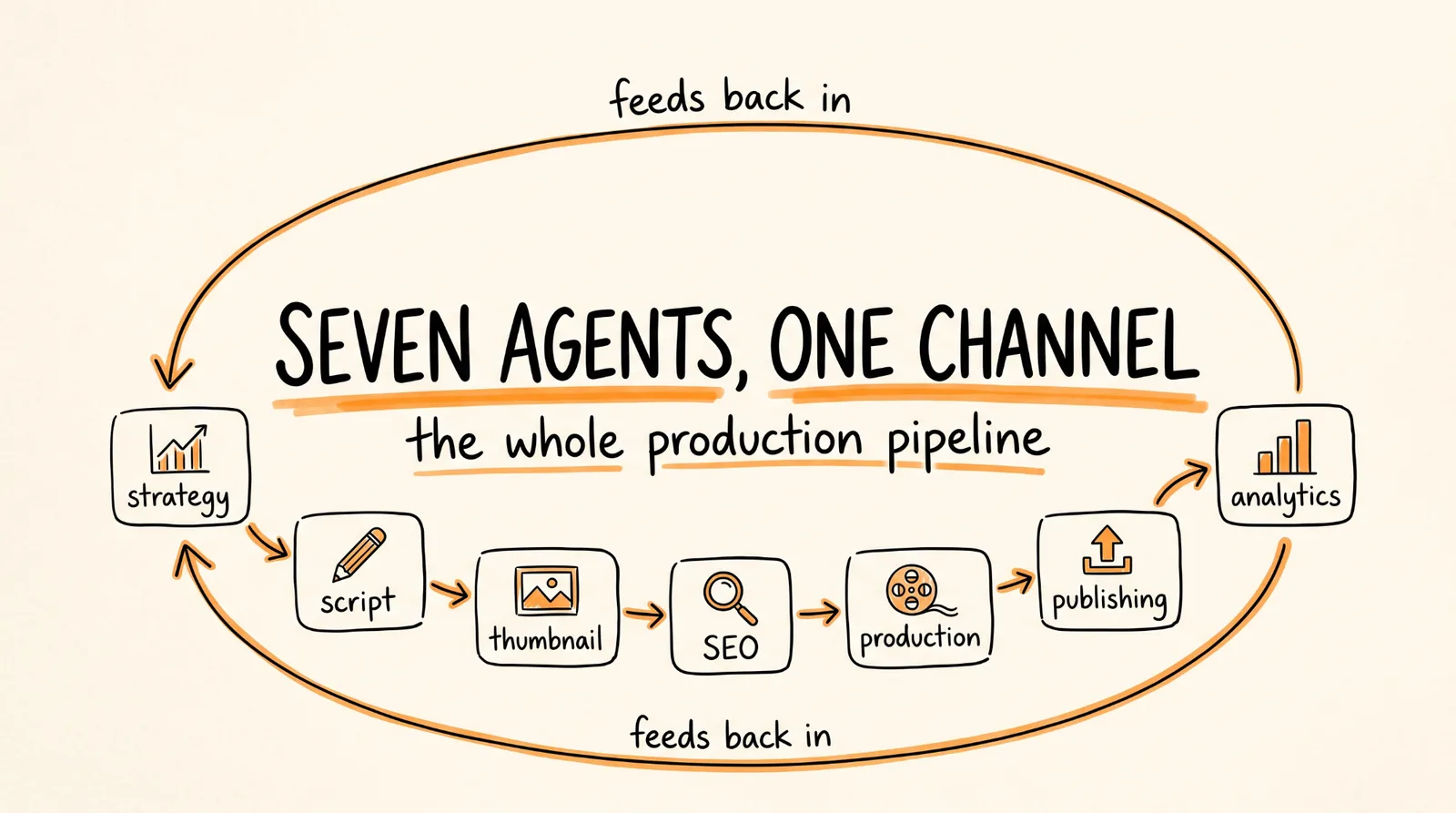
This is the full guide from the video. There is a free open source repo that gives you 7 AI agents covering the whole YouTube production pipeline, from finding topics to uploading the finished video and feeding the results back into what you make next.
The repo: github.com/darkzOGx/youtube-automation-agent
This guide covers what each agent does, how to install it, and the one thing that decides whether the channel you build makes money or gets denied monetization. Read that last part before you publish anything.
Don't want to figure this out alone? I walk members through every step inside the community. Join the Skool → skool.com/raycfu
The 7 Agents
They run as a chain, and the last one loops back into the first.
The Content Strategy Agent pulls YouTube trend data, checks what your competitors are doing, identifies topics worth making, and plans the calendar.
The Script Writer Agent turns an approved topic into a full script with a hook, a story, and a CTA, using different templates depending on whether it is a tutorial, an explainer, a list, or a review.
The Thumbnail Designer Agent generates thumbnails and sets up A/B variations to test click-through rate.
The SEO Optimizer Agent researches keywords and writes the title, description, and tags so the video is findable.
The Production Management Agent does the assembly: text-to-speech for the voiceover, image and video assets, and stitching the finished file together.
The Publishing and Scheduling Agent uploads, schedules for the right time, and manages the video settings, playlists, and end screens.
The Analytics Agent tracks how each video actually performed and feeds that back to the Content Strategy Agent, so next month's topics are chosen using your own channel's results rather than generic advice.
That feedback loop is the part that matters. A pipeline that produces videos is a factory. A pipeline that learns which of its videos worked is a system.
What You Need
Node.js on your machine. YouTube Data API credentials, which are free from Google Cloud Console. And one AI provider key. Gemini has a free tier that works for this, or you can use OpenAI, Claude, or anything OpenAI-compatible through OpenRouter. ElevenLabs is optional for better voiceover.
Realistically you can run the whole thing on free tiers while you learn it, and start paying only when you know it is worth it.
The Install
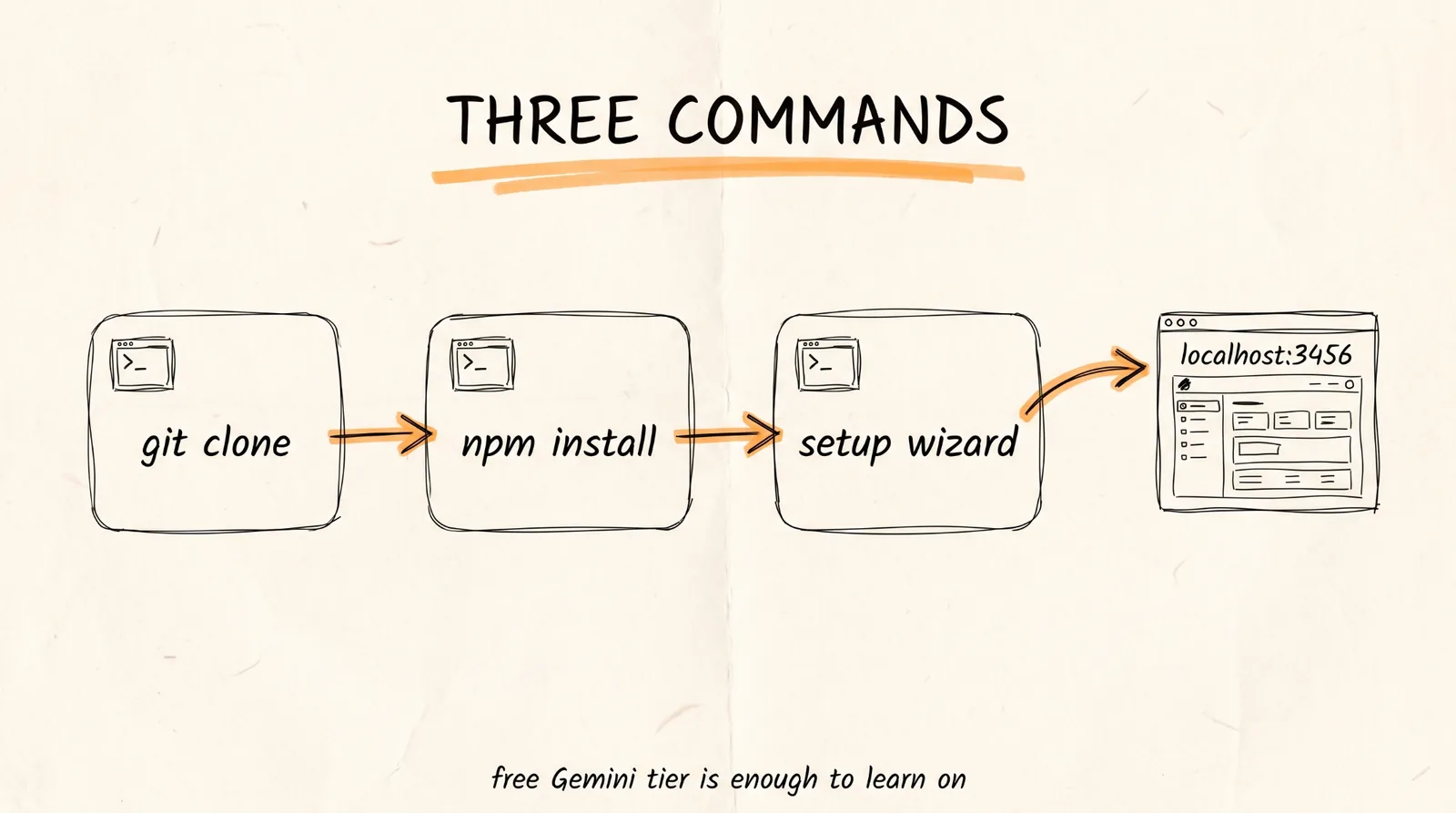
Three commands:
git clone https://github.com/darkzOGx/youtube-automation-agent.git
cd youtube-automation-agent
npm install
Then run the setup wizard, which walks you through the API keys and channel connection. The dashboard opens at localhost:3456, and that is where you monitor runs, review what each agent produced, and approve or reject videos.
One thing to check while you are in there: the repo ships with approval gates on by default, so finished videos wait for factual review, media rights confirmation, and your sign-off before the publishing agent touches them. Leave those on. That default is the single best decision the authors made, and the next section is why.
The Part That Decides Whether This Makes Money
Here is what nobody covering this repo mentions, and it is the whole ballgame.
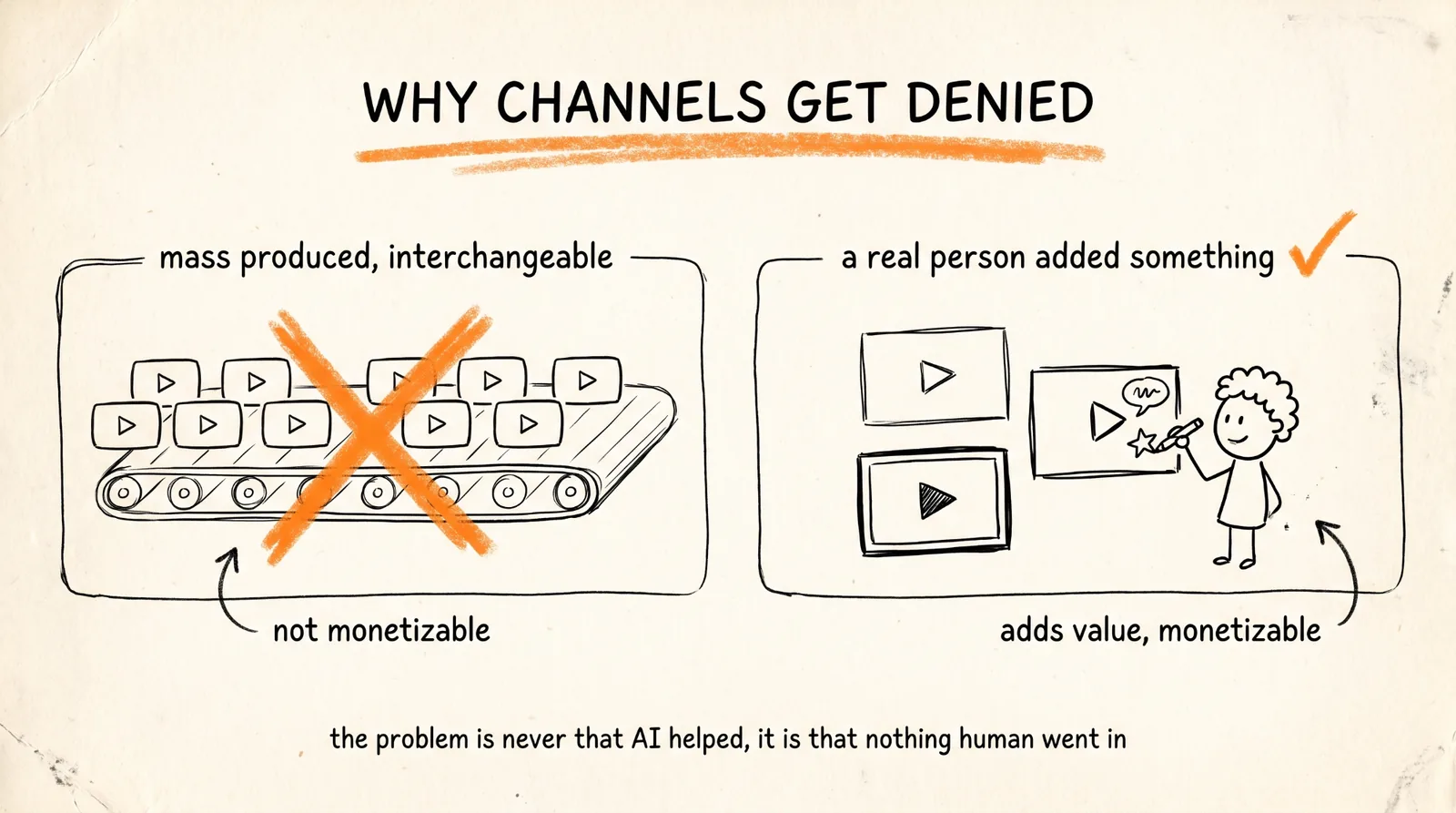
YouTube's monetization policies require content to be original and authentic. Mass-produced and repetitive content is not eligible for the YouTube Partner Program, and YouTube specifically updated its guidance in 2025 to be clearer about this: templated content churned out at volume with no meaningful human contribution does not monetize, no matter how much of it there is.
So a fully autonomous channel publishing three identical-format videos a day is the exact pattern that gets denied. Not because AI was involved, AI-assisted content monetizes fine, but because the output is mass-produced and interchangeable. The distinction YouTube draws is whether a human added something real: your commentary, your expertise, your specific take, your editorial judgment about what is worth covering and what is not.
Which means the way to use these 7 agents is as a production crew, not as a replacement for you.
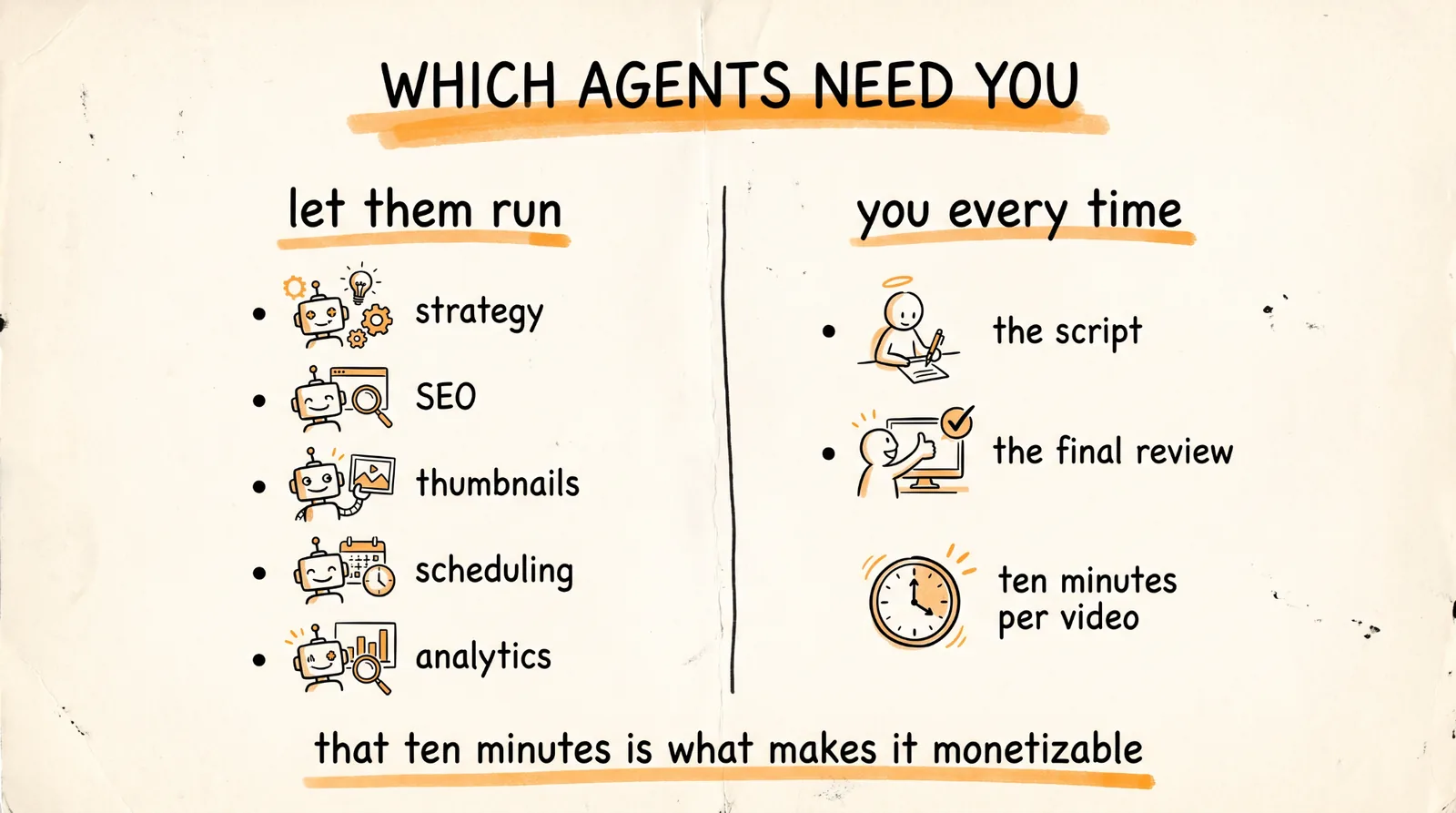
The agents that can run with very little supervision: strategy, SEO, thumbnails, scheduling, and analytics. These are research, metadata, and logistics, and there is no authenticity question about having a machine pick your keywords or find your posting time.
The agents that need you every time: the script and the final video. That is where your voice, your expertise, and your judgment go in. Read every script and change it. Add the thing only you know, the client story, the number from your own business, the reason the obvious answer is wrong. Ten minutes per video, and it is the ten minutes that makes the channel monetizable.
Also, disclose. YouTube requires creators to label realistic synthetic content in the upload flow, and there is a checkbox for it. It costs you nothing.
The honest version of this whole play: 7 agents remove roughly 90 percent of the labor, which is the boring 90 percent, and you keep the 10 percent that is actually you. That is a genuinely great trade and it is a real business. What does not work is removing 100 percent, because the missing 10 percent is exactly what YouTube is checking for.
The Workflow That Actually Works
Run the strategy agent weekly and read its topic list. Kill anything you have no genuine angle on, because a topic you cannot add anything to is a video that will not monetize.
Let the script agent draft, then rewrite the hook and add at least one thing from your own experience that is not in the source material. This is the highest-leverage ten minutes in the whole pipeline.
Let production, thumbnails, and SEO run mostly unsupervised, checking the output rather than the process.
Review before publishing, every time, with the approval gates left on. Watch the finished video once at speed. Check that the voiceover did not mangle anything, that the thumbnail matches the content, and that no claim in the script is invented.
Then read the analytics agent's report monthly and actually act on it. The feedback loop only compounds if you let it change what you make.
Publish less than the system technically can. A channel that puts out two genuinely good videos a week beats one that puts out fourteen interchangeable ones, and only one of those two channels is still monetized in six months.
Before You Start
Install from the original repository. There are forks of this project under other names, and forks are not always the same version or maintainer.
Check the LICENSE file before you build a business on it.
Do not point it at an existing monetized channel while you are learning. Test on a new channel, get the output to a standard you would put your name on, then decide.
And check your API costs after the first week. Free tiers cover experimentation, but a system that runs 24/7 by design will find the edge of them faster than you expect.
The Recap
Clone darkzOGx/youtube-automation-agent, run npm install, complete the setup wizard, and open the dashboard at localhost:3456. Let the strategy, SEO, thumbnail, production, scheduling, and analytics agents do the work you were never going to enjoy. Rewrite every script yourself and add something only you could say. Keep the approval gates on, disclose synthetic content at upload, and publish fewer, better videos than the machine could technically produce.
The agents handle the 90 percent. The 10 percent you keep is what makes it a channel instead of a content farm.
Don't want to figure this out alone? I walk members through every step inside the community. Join the Skool → skool.com/raycfu