
How to Make $15K a Month With Claude and Etsy
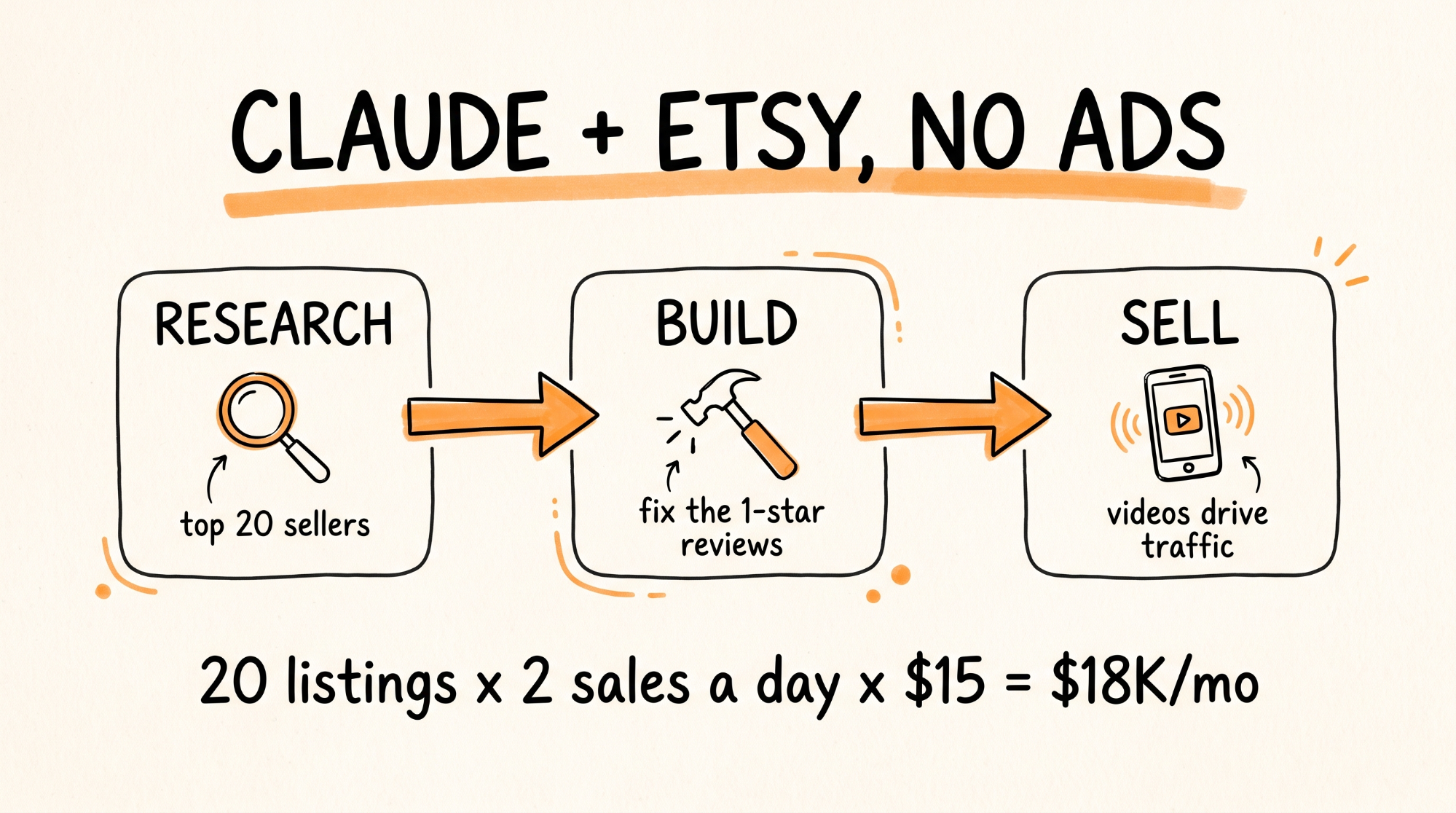
This guide walks you through building a digital product business on Etsy without spending a dollar on ads. You will use three prompts in Claude to research the top sellers in a niche, build a better product that fixes their one-star complaints, and write short-form videos that send buyers straight to your listing. You get all three prompts, a bonus listing prompt, the Etsy rules you have to follow so your shop does not get pulled, and the comment-to-DM setup. First product takes about a weekend. After that, each new product takes a few hours.
Before the math gets exciting, here is what $15K a month actually looks like. At $15 a product, that is 1,000 sales a month, about 33 a day. Nobody hits that with one listing in week one. The sellers who get there run 10 to 30 listings in one niche and drive their own traffic with video. That is the system below.
Don't want to figure this out alone? I walk members through every step inside the community. Join the Skool → skool.com/raycfu
What You Need
Claude with the Claude in Chrome extension installed, so Claude can read Etsy pages in your browser. Get it from the Chrome Web Store and sign in with your Claude account.
An Etsy seller account. It is free to open. Each listing costs $0.20 and Etsy takes a transaction fee plus payment processing on each sale, which works out to roughly 10% of the sale price in the US. Check Etsy's fee page for your country.
A tool to build the product. Notion for templates, Canva or Google Docs for PDFs and swipe files. All free.
Higgsfield or any AI video tool for the short-form videos.
An Instagram Business or Creator account, and optionally a TikTok Business account.
ManyChat for the comment-to-DM automation. The free plan works to start. Pro is $15 a month once you outgrow it.
Step 1: Pick a Niche That Already Sells
Do not invent demand. Find a category where people are already paying.
Good digital product niches on Etsy right now: Notion templates (budget trackers, content calendars, habit trackers, student planners), business swipe files (email templates, sales scripts, DM scripts for coaches), AI prompt packs for a specific job (real estate agents, Etsy sellers, therapists writing notes), printable planners and workbooks, and small business kits (client onboarding packets, invoice templates, social media calendars).
The test: search the niche on Etsy. If the top listings show thousands of reviews and "in 20+ carts" tags, people are buying. If the top result has 12 reviews, move on.
Go narrow. "Notion template" is a war. "Notion content calendar for real estate agents" is a lane.
Step 2: Research the Top Sellers (Prompt 1)
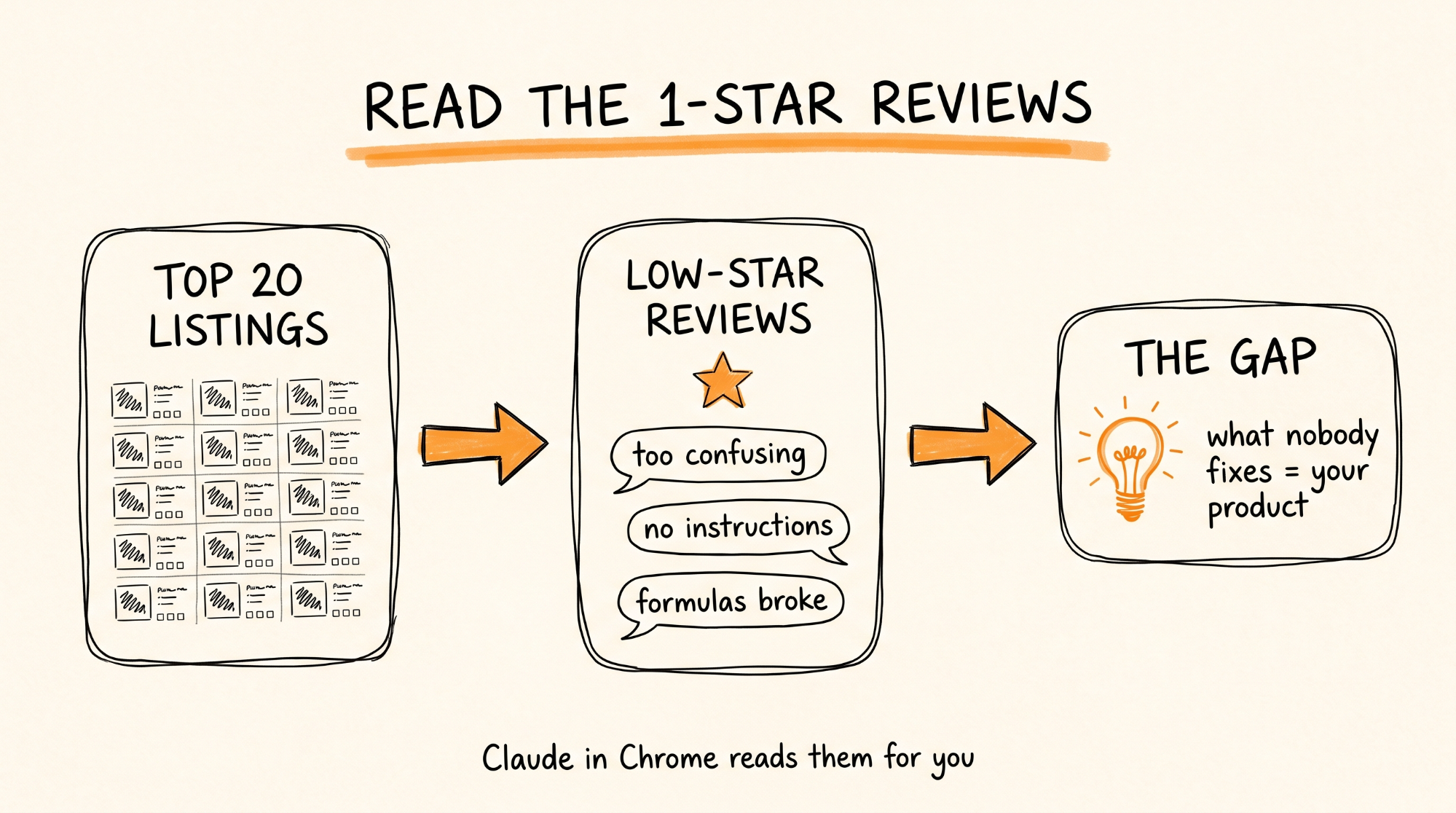
Open Etsy in Chrome, search your niche, and sort by Top Customer Reviews or Most Relevant. Then open Claude in Chrome and paste this:
I am researching the [NICHE] digital product niche on Etsy. Go through the top 20 listings on this search results page one at a time. For each listing, open it and read the title, price, number of reviews, the listing description, and the reviews. Sort the reviews by lowest rating first and read every 1, 2, and 3 star review you can find.
When you are done, give me:
1. A table of all 20 listings with price, review count, and the main thing each one promises.
2. The top 5 selling points that show up across the best sellers. What are buyers clearly paying for?
3. Every complaint from the low-star reviews, grouped into themes. For each theme, tell me how many listings it showed up on and paste 2 short example quotes.
4. The 3 biggest gaps: problems buyers keep complaining about that none of the top 20 sellers fix.
5. The price range buyers are clearly comfortable with.
Do not buy anything, message any seller, or leave the Etsy site.
Let it work through the pages. This takes 10 to 20 minutes. Keep it to the top 20 listings you would read yourself. Etsy's terms do not allow bulk automated scraping, so this is you and Claude doing research in your own browser, not a bot crawling the site.
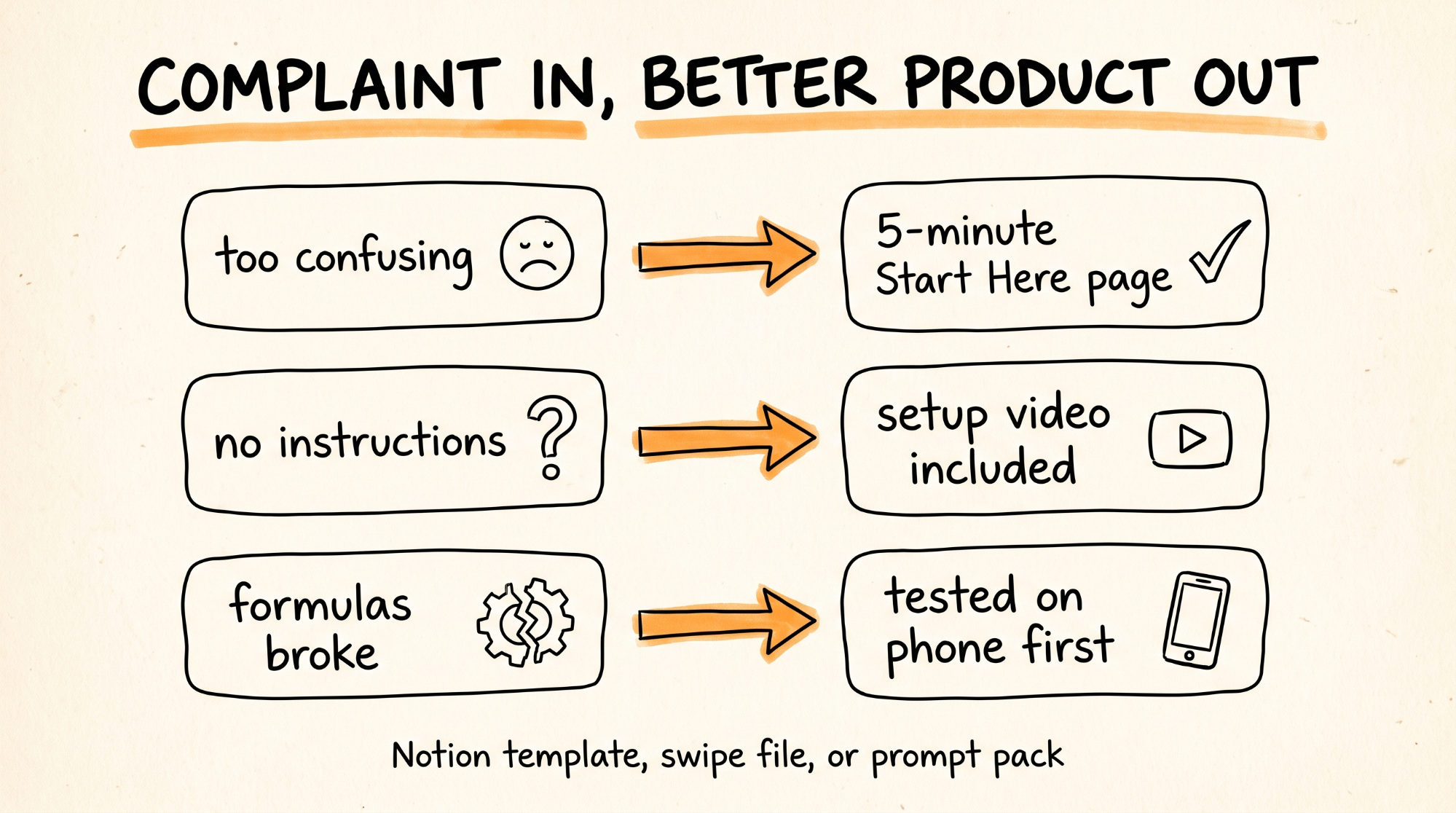
What you are looking for in the output is the complaint themes. That is your product. If eight different sellers get reviews saying "too confusing to set up" or "no instructions" or "the formulas broke," you just found what to build.
Step 3: Build the Better Product (Prompt 2)
Paste the full research output back into Claude (a regular chat, not the browser), then add this:
Based on this research, design a digital product for the [NICHE] niche that directly fixes the top 3 complaint themes and keeps the top 5 selling points buyers pay for.
Give me:
1. The product name and a one-sentence promise that names the complaint it fixes. Example: "The only budget tracker with a 5-minute video setup, because nobody should need a tutorial to use a template."
2. The full outline of what is inside, section by section.
3. For every complaint theme from the research, the specific feature that fixes it.
4. The actual content. If it is a Notion template, give me every page, database, property, and formula with exact names and settings so I can build it. If it is a swipe file or prompt pack, write every template or prompt in full, ready to paste. If it is a printable, write every page's content and layout.
5. A one-page "Start Here" guide that goes inside the product so buyers know exactly what to do first.
6. A suggested price based on the research.
Make it better than everything in the top 20, not a copy of any of them. Nothing from any existing listing should be reused.
Then build it. For a Notion template, recreate what Claude gave you in Notion, test every formula, then click Share, Publish, and enable "Allow duplicate as template." That duplicate link is what the buyer gets. For a PDF, build it in Canva or Docs and export.
Put the delivery on a PDF. Etsy delivers files, not links, so for Notion products, make a one-page PDF with a big "Click here to get your template" button that points to the duplicate link. Upload that PDF as the digital file.
Open it on your phone. Click every link. Have a friend try it cold. If they get stuck, your buyers will too, and that is the exact one-star review you are trying to avoid.
Step 4: List It the Right Way (Bonus Prompt)
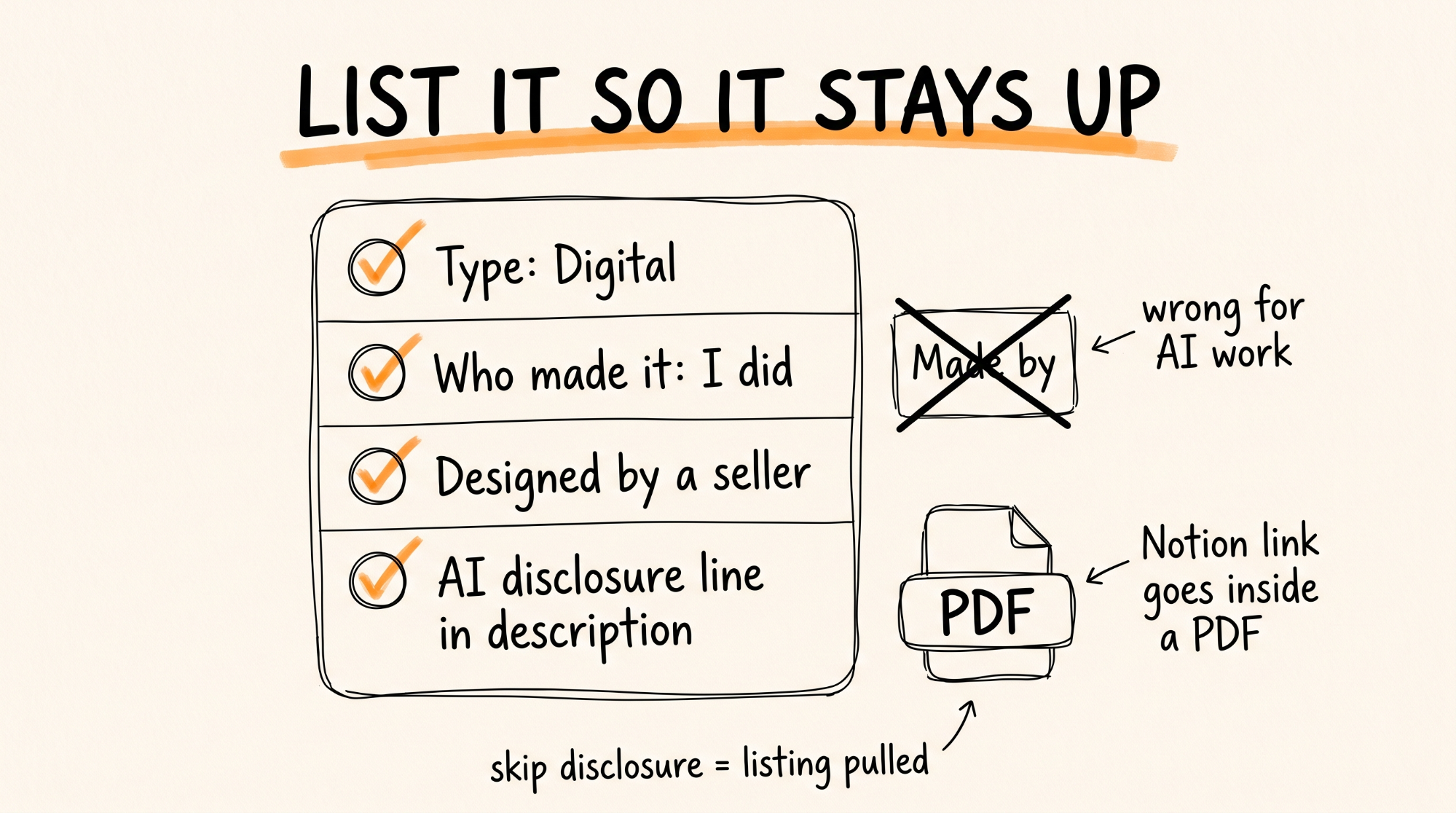
This is where most AI sellers get their listings pulled. Etsy allows AI-made digital products, but its Creativity Standards require you to disclose AI use and mark the listing correctly. Etsy has pulled thousands of undisclosed AI listings. Do this right from day one.
Paste this into Claude with your product details:
Write an Etsy listing for this digital product: [PASTE PRODUCT NAME, PROMISE, AND OUTLINE].
Give me:
1. A title under 140 characters that front-loads the main search phrase buyers use, then the benefit.
2. 13 tags, each under 20 characters, using phrases real buyers would type.
3. A description that opens with the problem it solves, then what is inside, then who it is for, then how delivery works (instant digital download, no physical item shipped).
4. A short honest line near the end disclosing that I designed this product and used AI tools to help create it.
5. Ideas for 5 listing images: a cover, a what's-inside preview, a before-and-after showing the complaint it fixes, a feature closeup, and a how-it-works image.
Write it for a buyer, not for a search engine.
When you create the listing on Etsy:
Set the type to Digital.
Under "Who made it," choose I did.
Under the Creativity Standards attribution, choose Designed by a seller. Not Made by. Designed by is the category for AI-assisted work you directed.
Keep the AI disclosure line in the description.
Upload your PDF as the digital file.
Price it inside the range the research showed. Your first listing does not need to be the cheapest. It needs to be the one that fixes the problem.
Step 5: Write the Videos (Prompt 3)
Etsy search traffic is slow for new shops. You do not wait for it. You make your own traffic with short-form video, and the research already told you what to say because the complaints are the hooks.
Paste the complaint themes into Claude and add this:
Write 10 short-form video scripts for Instagram Reels and TikTok to sell my [PRODUCT NAME] on Etsy. Each script should be under 30 seconds when read aloud.
Every script must:
- Open with a hook built from one of these real buyer complaints, in the buyer's own words
- Show the problem in one sentence
- Show how my product fixes it in two or three sentences
- End with: "Comment [KEYWORD] and I'll send you the link."
Give me 10 different angles: a frustration hook, a before-and-after, a "stop doing this," a "3 things I wish I knew," a comparison to what most people use, a day-in-the-life, a quick tutorial, a myth bust, a price hook, and a "nobody talks about this."
For each script also give me a one-line visual direction for what should be on screen.
Pick one keyword for the whole campaign. Something short and specific to the product, like PLANNER, BUDGET, or SCRIPTS.
Make the videos in Higgsfield using the visual directions Claude gave you, or film yourself on your phone scrolling through the actual product. Real screen recordings of the product often outperform polished AI video for templates because buyers want to see what they are getting.
Post one a day. Ten scripts is ten days of content.
Step 6: The Comment-to-DM Funnel
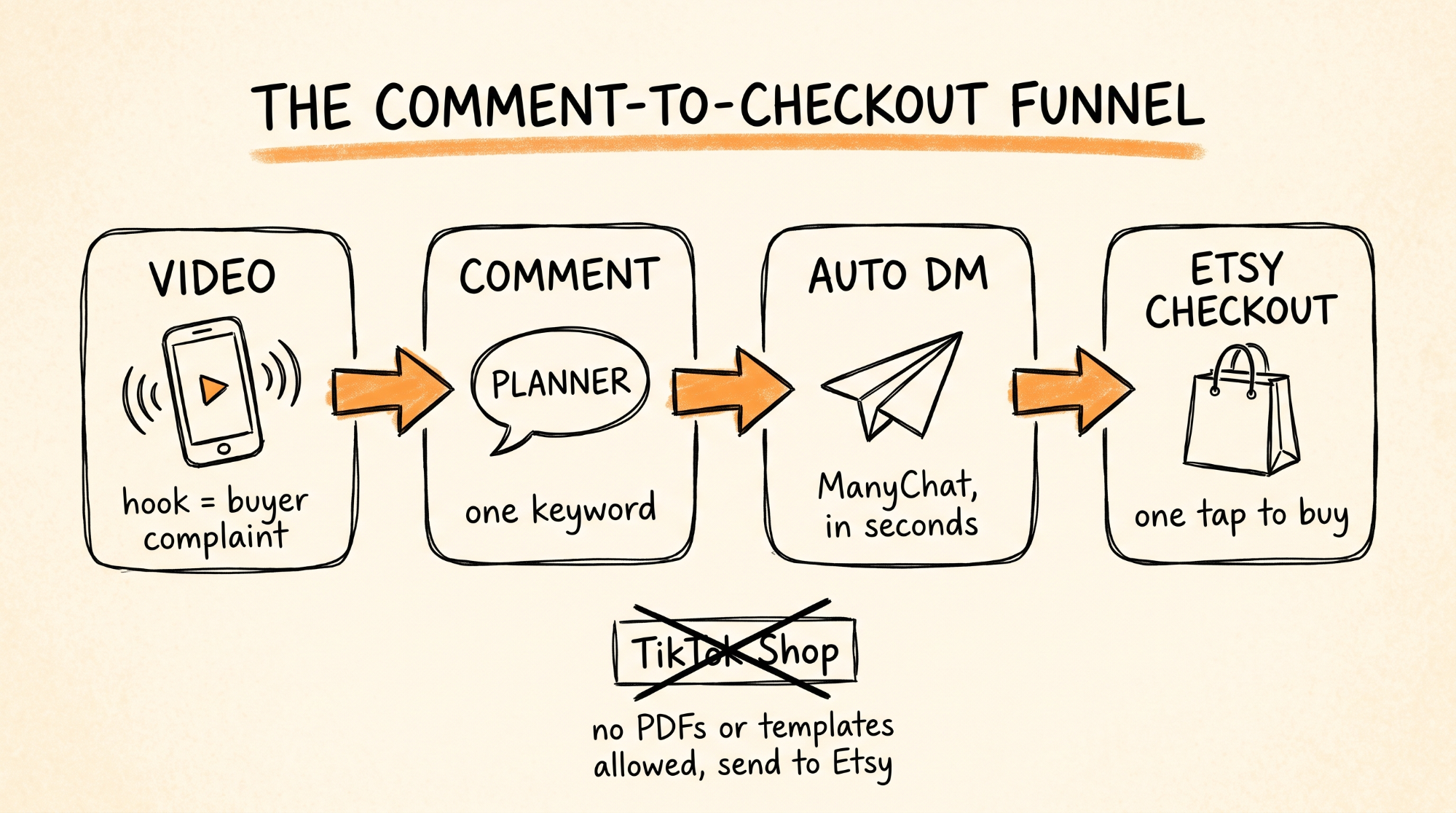
This is the engine. Someone comments the keyword, a DM with your Etsy link lands in their inbox within seconds, and they are one tap from checkout.
Instagram (the main channel):
1. Sign up at manychat.com and connect your Instagram Business or Creator account.
2. Create a new automation and choose "User comments on your post or reel" as the trigger.
3. Set it to any post, and enter your keyword.
4. Turn on the public reply so ManyChat replies to the comment with something like "Sent! Check your DMs."
5. Set the DM to a short message with a button that links to your Etsy listing. Example: "Here's the [PRODUCT NAME] I mentioned. It's the one that fixes [COMPLAINT]. Tap below to grab it."
6. Test it by commenting the keyword on your own post from a second account.
TikTok (with a catch): TikTok's comment-to-DM automation is limited for most US accounts right now. The workaround is to put the keyword on screen and say "DM me [KEYWORD]" instead of "comment." ManyChat supports inbound TikTok DMs on Business accounts, so when someone messages the keyword, the flow sends the link. You can also put your Etsy shop link in your bio.
One important thing. TikTok Shop does not allow templates, PDFs, or downloadable products unless you are invited into their Virtual Goods program. Do not list your product there. Use TikTok for traffic and send buyers to Etsy.
Step 7: Scale to 10 Listings
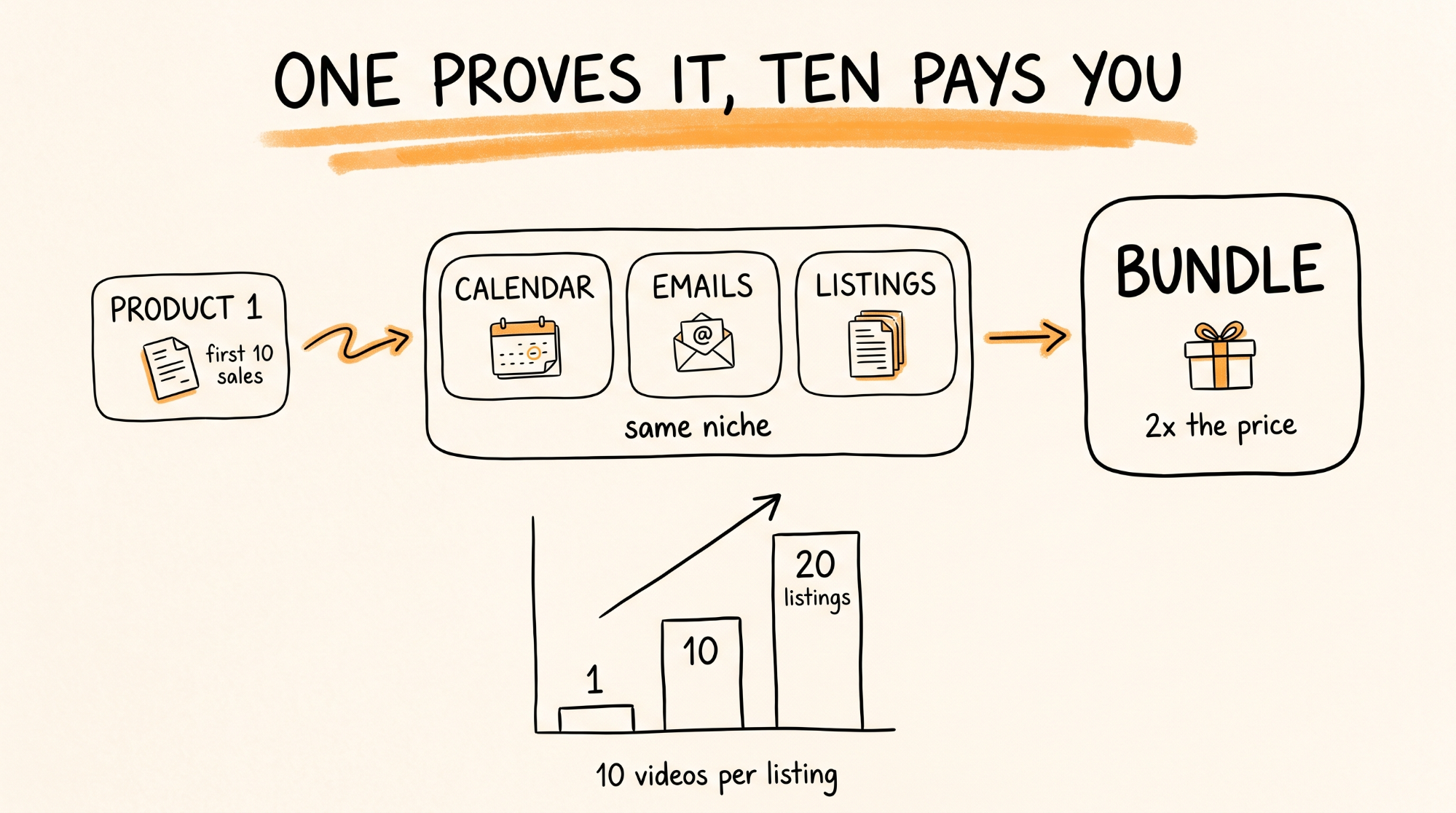
Once the first product gets its first 10 sales, you have proof. Now repeat.
Run Prompt 1 on a neighboring niche. If your real estate content calendar sold, research real estate listing description templates, then real estate email templates, then a bundle of all three.
Bundles are the easiest win. Three products you already made, one listing, priced at about double a single product.
Every new listing gets its own 10 videos. The keyword DMs the right listing.
The math again: 20 listings averaging 2 sales a day at $15 is $18,000 a month before fees. That is the path. Not one magic listing.
When Things Go Wrong
Claude in Chrome stops partway through the 20 listings. Tell it to pick up from the last listing it finished. If it keeps stopping, run it in two batches of 10.
Etsy removed your listing. Almost always an AI disclosure issue. Check the attribution is set to Designed by a seller, the AI disclosure line is in the description, and nothing in your product copies another seller or uses a protected brand or character. Fix it and relist.
You are getting views but no sales. Your cover image is not showing the fix. Make image one show the complaint and your solution side by side.
People comment but do not get the DM. On Instagram, the account must be Business or Creator, and the post must be public. On ManyChat's free plan, check you have not hit the contact limit.
A buyer says the Notion link does not work. The page is not published or "Allow duplicate as template" is off. Fix it, then message the buyer the working link right away. That is how you turn a one-star into a five-star.
Someone copies your product. It happens. Keep improving it and keep making videos. The seller with the traffic wins, not the seller with the original file.
Rules to Remember
Research first. Build only what the one-star reviews are begging for.
Never copy a listing. Fix what it missed.
Disclose AI. Set Designed by a seller. Every listing, every time.
Test the product cold on your phone before it goes live.
The complaints are your hooks. Use the buyer's exact words.
TikTok for traffic, Etsy for the sale. Not TikTok Shop.
One product proves it. Ten products pays you.
You now have a system that finds what buyers want, builds a better version than the top sellers, and drives its own traffic without a single ad.
Don't want to figure this out alone? I walk members through every step inside the community. Join the Skool → skool.com/raycfu