
How to Clone Yourself with AI: The 4 Step System
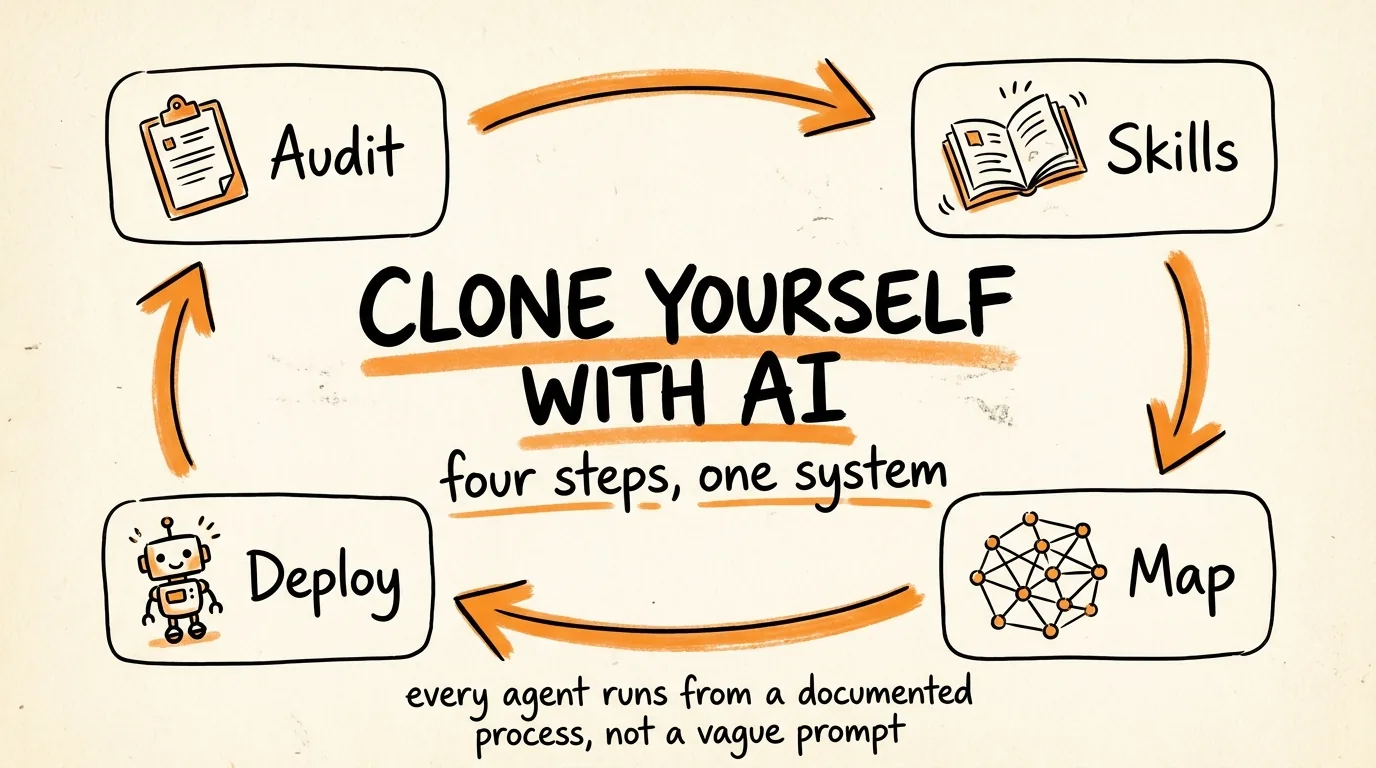
You are going to take every repeatable process in your business, document how you actually do it, turn each one into a reusable Claude skill, map them all in a visual command center, and then deploy agents that run them permanently.
The reason most AI setups fall apart in two weeks is that they are built on vague prompts instead of documented processes. This one lasts because every agent runs from a real skill file that captures exactly how you work.
Don't want to figure this out alone? I walk members through every step inside the community. Join the Skool → skool.com/raycfu
Step 1: Audit Everything You Do
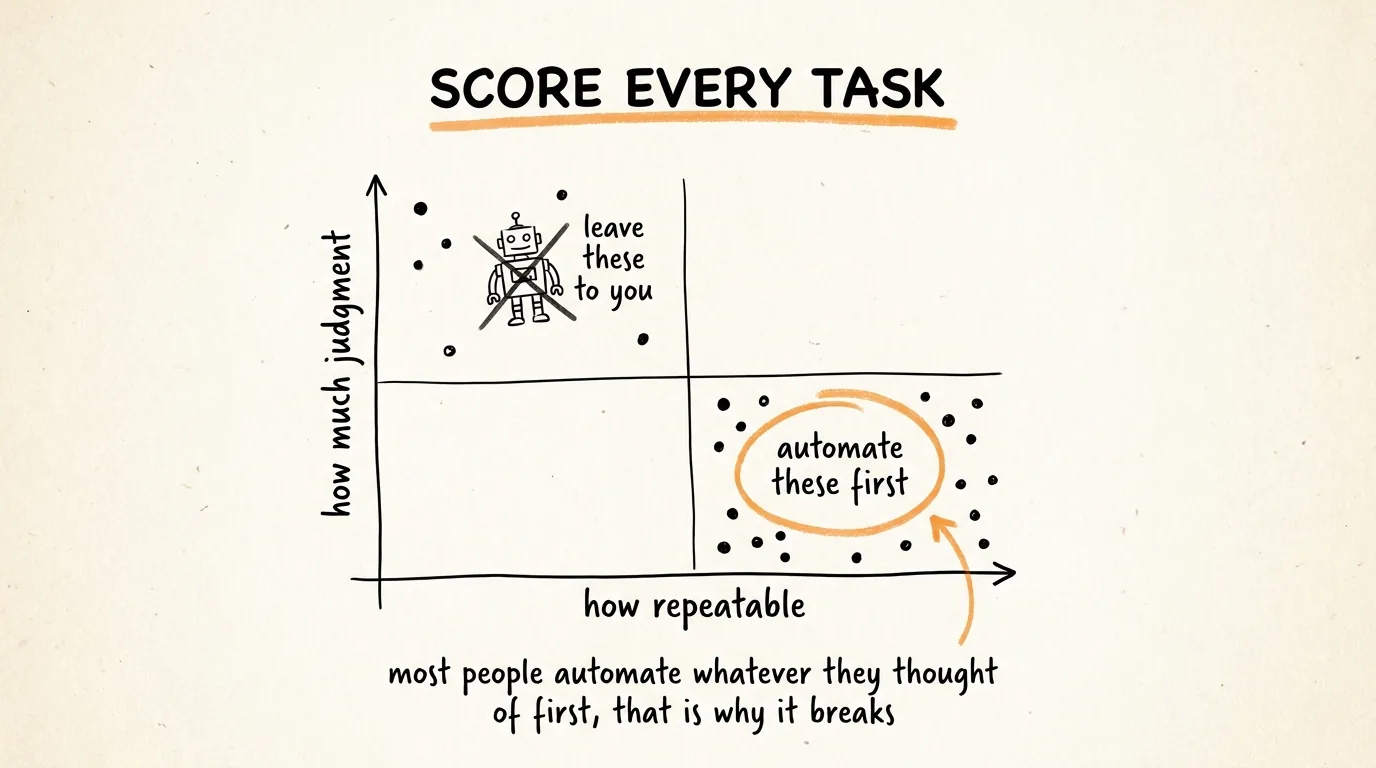
You cannot automate what you have not identified. So before you build anything, you get everything out of your head and onto a list, scored.
Do not write the list yourself. You will forget half of it, because the tasks you do on autopilot do not feel like tasks anymore. Let Claude interview you instead. Paste this:
Interview me about every recurring task in my business, one question at a time. Do not move on until each task is fully mapped.
For each task, find out: what triggers it, every step involved in order, which tools I use, how often I do it, and roughly how many hours a month it costs me.
Keep asking follow-up questions when my answer is vague or skips a step. If I say "then I just write it up," ask me what "write it up" actually involves.
When we have covered everything, produce a table scoring each task on two things: repeatability from 1 to 10, meaning how identical it is every time, and judgment required from 1 to 10, meaning how much of it depends on my taste, relationships, or decisions only I can make.
Then rank the tasks by automation priority: high repeatability plus low judgment goes first. Flag anything with high judgment as a bad automation candidate and say why.
The output is your build order. High repeatability, low judgment, that is where you start. Most people skip this step and automate whatever they thought of first, which is why their systems collapse. Automating a judgment-heavy task produces confident garbage, and automating a task you do twice a year is wasted effort.
Pick your top 3 from that list. That is your scope for the rest of this guide.
Step 2: Turn Your Workflows Into Skills
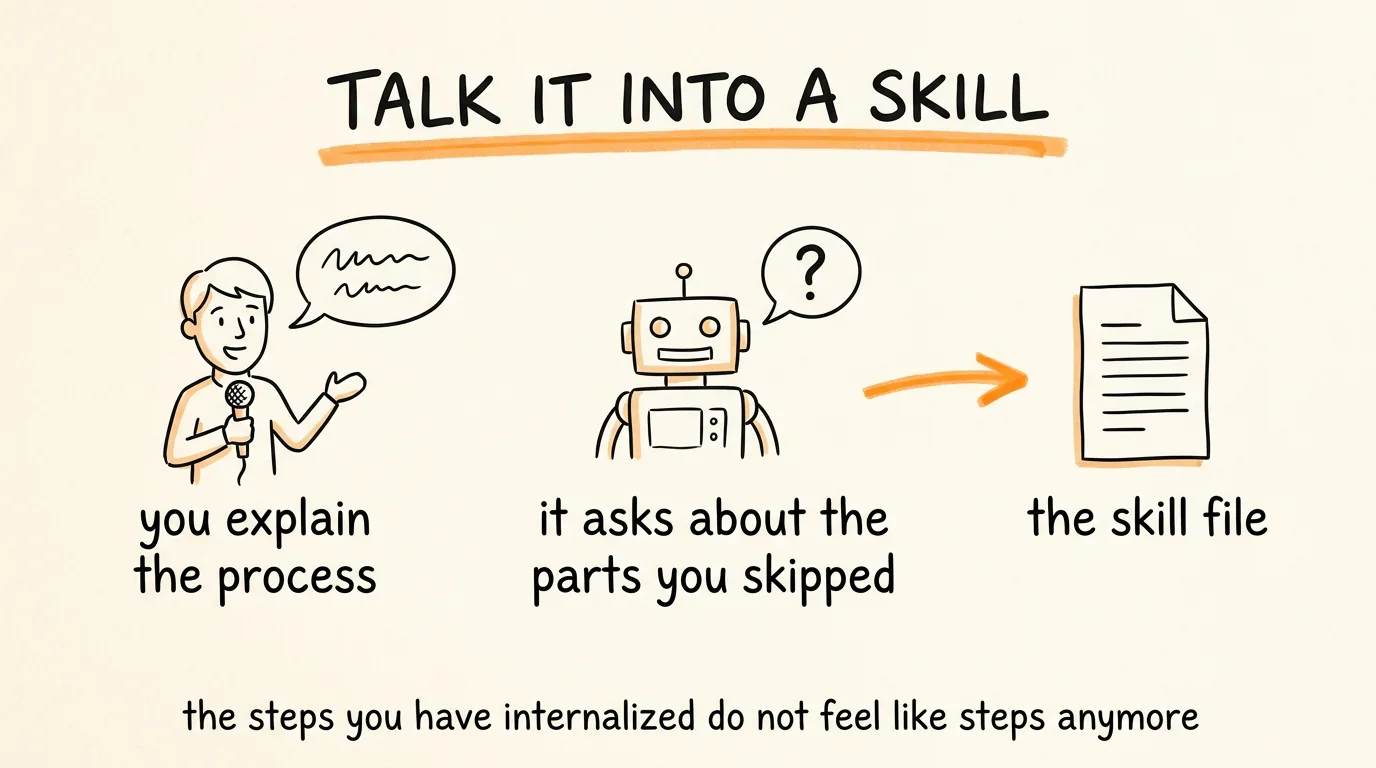
Now you turn each of those tasks into a reusable skill file, a document that captures how you specifically do that thing, so any agent can run it the way you would.
The fastest way is to talk it through. Open Claude, turn on voice mode, and explain your process out loud while it questions you. Use this prompt to set it up:
I am going to walk you through how I do [TASK] so you can turn it into a reusable skill.
Interview me while I explain. Every time I skip a step, gloss over a decision, or use a word that means something specific to me, stop and ask. I will skip things without realizing it, because the parts I have internalized do not feel like steps anymore. Your job is to catch those.
Specifically probe for: how I decide when this task is done, what makes a bad version of this output, what I check before I ship it, and the edge cases where I do something different.
When you have the full picture, write it as a skill file with: when to use this skill, the step by step process, my rules and standards, the mistakes to avoid, and a definition of done. Then show it to me so I can correct it.
That interrogation is the whole value. Talking through a process you know cold will surface things you have never articulated, and those unarticulated bits are exactly what makes your version of the work good.
There is a second option worth knowing: instead of explaining, record yourself doing the workflow and let Claude build the skill from what it observed. Same result, less talking, and it catches steps you would not have mentioned.
Either way, test the skill before you trust it. Run it on a real task and compare the output to what you would have produced. Every gap becomes a line you add to the file. Two or three rounds of that and the skill is genuinely yours.
By the end of this step you want at least a few skills you are satisfied with. Not twenty. A few, good.
Step 3: Build Your Visual Map
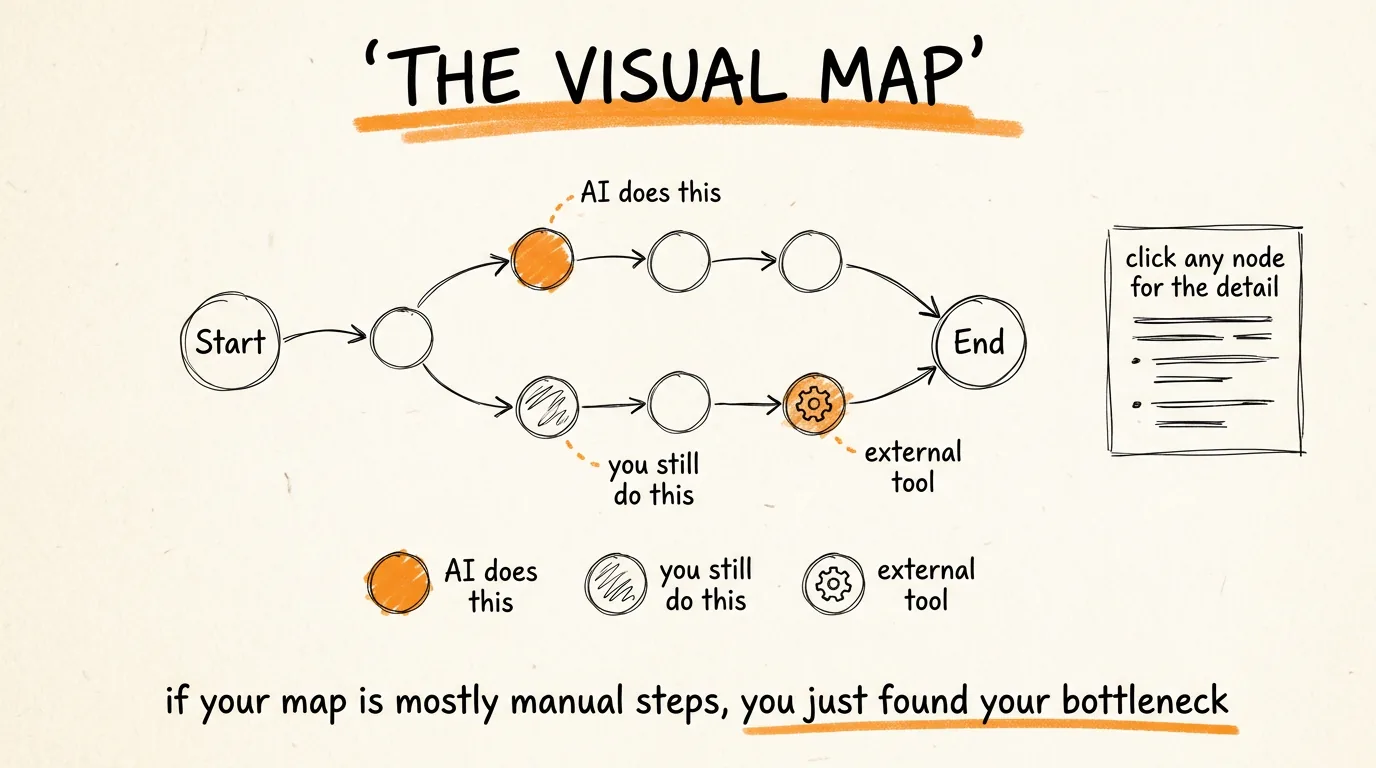
Here is the part most people skip, and it is the one that turns a pile of files into a system you can actually run.
An agent reads your markdown skill files perfectly well. You do not. Once you have more than a handful of workflows, keeping track of what runs where becomes genuinely hard, and you lose the thread of which parts are automated and which parts are still you.
So you build a visual map. Open Claude Cowork, drop in your skill files or point it at your specs folder, and paste this:
Read the spec file I've dropped in this folder and turn it into a single self-contained interactive HTML map.
Structure:
- One node per step in the process, connected left to right in execution order
- Branches where the process splits, converging where it rejoins
Colour system:
- Purple nodes for steps AI executes
- Yellow nodes for steps requiring manual human input
- Green nodes for external tools (name the tool on the node)
Interactivity:
- Hovering a node highlights all its connections
- Clicking a node shows its full detail in a side panel: trigger, tools used, expected output, and whether it needs approval
- Mark review and approval points clearly
Style: dark background, clean sans-serif, high contrast. Readable at a glance without zooming.
Output as one HTML file with all CSS and JS inline, no external dependencies. Then save it into this folder.
The color system is doing more work than it looks. When you see your workflow laid out and it is mostly yellow, you have just learned that you are still the bottleneck in a process you thought you had automated. That realization is worth the whole exercise.
Three things the map forces, which is why it is not just decoration. It makes you think critically about where AI is actually doing work versus where you are. It forces your process into explicit ordered steps, because you cannot draw a map of something you have only half defined. And it gives you one command center for the whole business instead of a folder of documents you never open.
Keep the HTML files locally, or deploy them somewhere like Vercel if you want them accessible from anywhere.
The Folder Structure That Holds It Together
Your skills need somewhere to live, and your agents need context about your business to work from. Two folders:
A business brain folder, holding everything you want your agents to know. Meeting notes, financials, positioning, client details, past work. This is the context layer, and every agent reads from it.
A specs folder, holding all the skills, specs, and SOPs you built in step 2, plus the HTML maps from step 3.
Ask Claude to build the structure for you:
Create a structured business folder system for me with two top level folders: business-brain, for context my AI agents should know about my business, and specs, for my skill and SOP files. Suggest subfolders inside each based on how a solo business actually organizes information, and create a short README in each explaining what belongs there and what does not.
Step 4: Deploy the Agents
Now you put the skills to work. This is the easy part, and you have several options that combine well.
Claude Code agents. Drop your spec files into Claude Code and spin up agents that run those tasks on demand. Best for anything you trigger yourself.
Hermes. Feed it your spec folders for always-on monitoring, the work that needs to happen whether or not you are at your desk.
Loops. Use /loop inside Claude Code for cycles that run on a schedule and keep working toward a goal without you restarting them.
Use whichever fits the shape of the task, and mixing them is normal. The deployment tool is not the important part. The important part is that every agent is running from a documented process instead of a prompt someone typed once, and that is the entire reason this system holds up over months instead of falling over in a week.
Two rules when you deploy. Start with one agent, not all of them, and watch it for a week before you add the next. And keep a human approval point on anything that sends, publishes, spends, or touches a client, which is exactly what those yellow nodes on your map are for.
The Maintenance That Makes It Compound
A skill file written once and never touched decays, because your process changes and the file does not.
So every time an agent produces something wrong, do not just fix the output. Open the skill file and add the line that would have prevented it. That takes 30 seconds and it means the mistake never happens again. Over a few months this turns your specs folder into the most valuable thing you own, a written record of how your business actually works, which is also exactly what you would hand a new hire on day one.
Re-run the audit from step 1 once a quarter. New tasks accumulate, and some of the ones you automated will have changed shape.
The Recap
Audit everything you do and score it on repeatability versus judgment. Turn your top tasks into skills by talking Claude through them and letting it interrogate the steps you skip. Map them visually so you can see where AI is working and where you still are. Then deploy the agents from those skill files.
Audit, skill, map, deploy. That is how you clone yourself with AI.
Don't want to figure this out alone? I walk members through every step inside the community. Join the Skool → skool.com/raycfu