
How to Fine-Tune a Small AI Model on Your Own Data
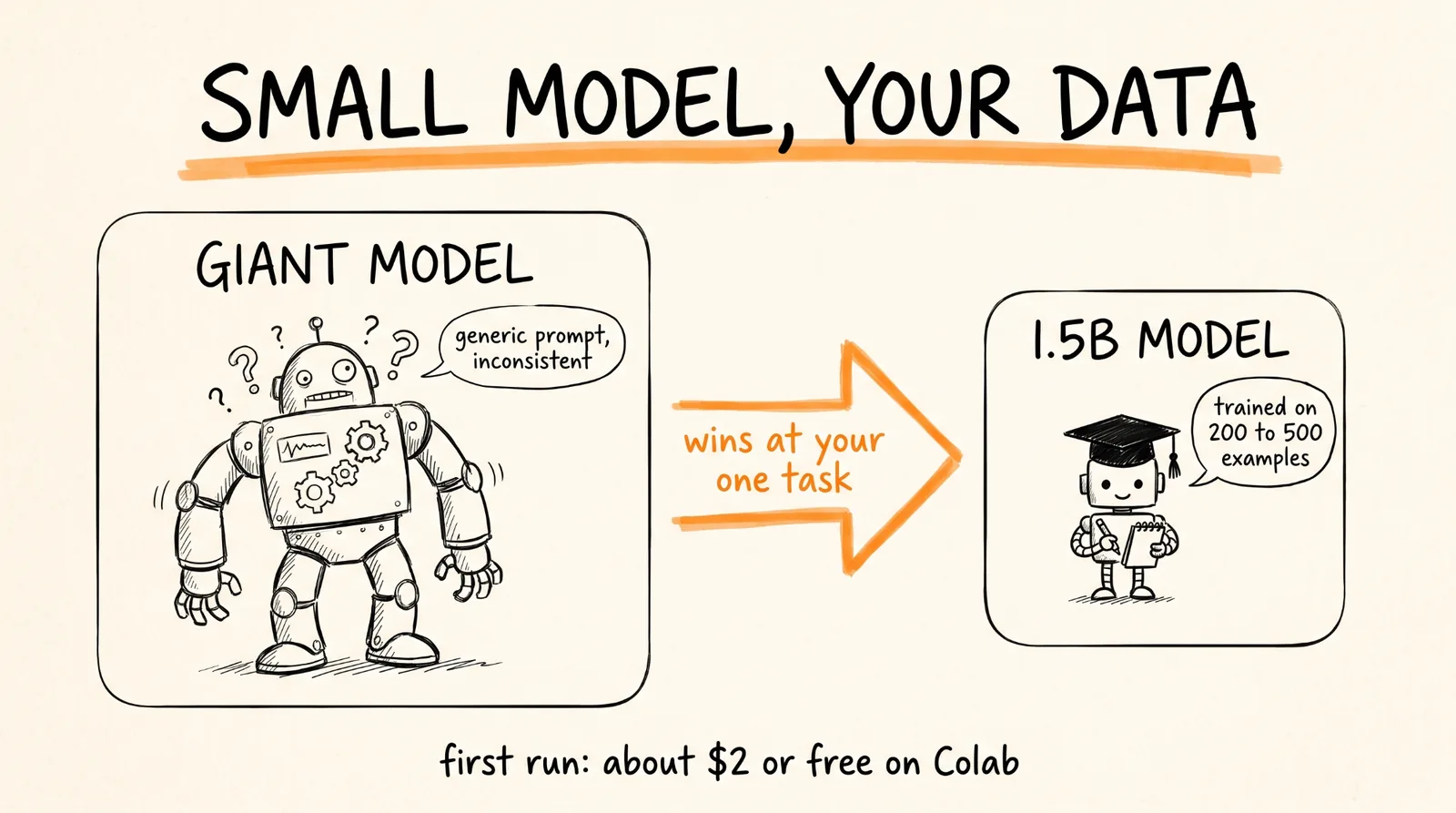
This guide walks you through fine-tuning a small open-source AI model on your own examples so it does one specific job better and more consistently than a giant model with a generic prompt. You get the full pipeline: when fine-tuning is worth it, picking a model, getting your data right, building the training set, training for free on Google Colab, testing it properly, and putting it online. Working code at every step. Your first training run costs a couple of dollars or less.
You do not need a 70-billion-parameter model, $100,000 in compute, or a machine learning team. A 1.5-billion-parameter model trained on 200 to 500 good examples can beat a frontier model prompted generically, at your one specific task.
Don't want to figure this out alone? I walk members through every step inside the community. Join the Skool → skool.com/raycfu
What Fine-Tuning Actually Does
Most people think fine-tuning makes a model smarter. It does not.
Fine-tuning makes a model consistently better at one narrow task. It locks in your tone, your structure, your vocabulary, and your rules, so you get the same quality output every time instead of whatever mood the model is in.
The example used throughout this guide is a model that takes a short startup description and writes clean funding-pitch copy. You give it this:
We help independent clinics reduce missed appointments with automated reminders, scheduling workflows, and patient follow-up. Raising a seed round to expand the product and sales team.
And it writes this:
Independent clinics lose revenue every week because appointment reminders and rescheduling are handled manually. Our platform gives clinics one workflow for reducing missed appointments without requiring additional administrative staff. We are starting with small and mid-sized clinics, where operational inefficiency is expensive but existing software is often fragmented.
Clean, grounded, and no made-up numbers. Swap in your own task as you follow along: support replies in your brand voice, product descriptions in your format, sales emails your way, or reports in your structure. The process is identical.
What You Need
A Google account, for free GPU time on Google Colab.
Python basics, or Claude Code to write the parts for you (there's a prompt for that near the end).
Somewhere between 200 and 500 good examples of the task done right. This matters more than anything else in the guide.
A Hugging Face account, for downloading the base model. It's free.
About a weekend for your first full run.
Step 1: Try Prompting First
Fine-tuning is not your first step. Before you train anything, build three baselines:
Baseline 1: a strong prompt, no training.
Baseline 2: a prompt plus retrieval, meaning you feed the model relevant documents or data at the moment you ask (often called RAG).
Baseline 3: a fine-tuned model.
Only start fine-tuning once your prompt-only version fails at something specific you can name.
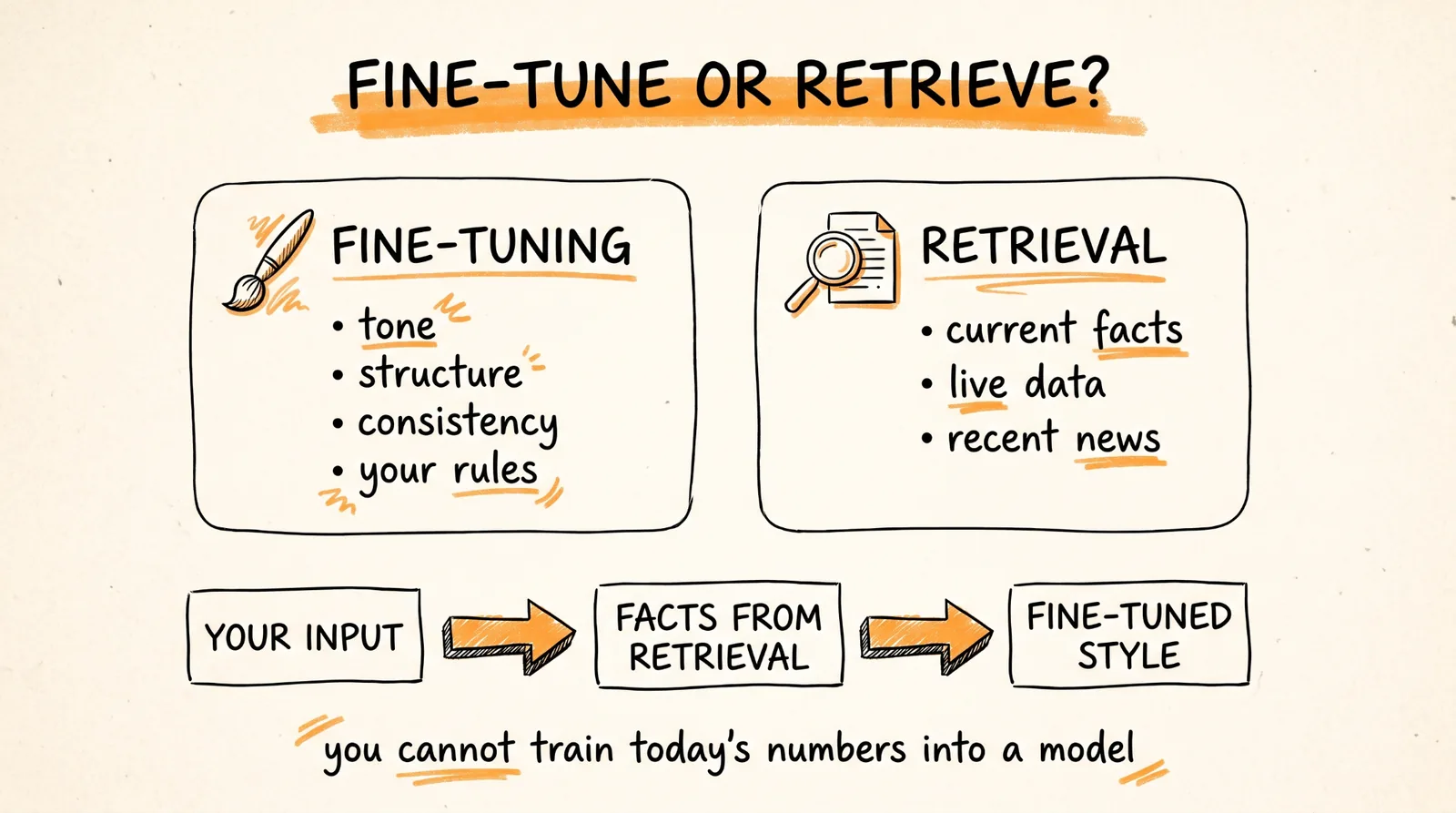
Here's the rule for choosing. Fine-tuning improves tone, structure, consistency, domain vocabulary, and how well the model follows your rules. It does not give the model new facts. If your output needs current market data, live prices, or recent news, that's a retrieval job, not a training job. You can't train today's numbers into a model.
The setup that works for most real products: your input, then optional retrieval for facts and evidence, then the small fine-tuned model for style and structure, then plain-text output.
Step 2: Pick a Small Base Model
Start between 0.5 and 3 billion parameters. Good options:
Qwen/Qwen2.5-1.5B-Instruct (start here)
Qwen/Qwen3-0.6B
HuggingFaceTB/SmolLM2-1.7B-Instruct
This guide uses Qwen/Qwen2.5-1.5B-Instruct. It's small enough to train on Colab's free GPU and big enough to write useful business copy.
Do not start with 7B or 14B. Bigger models need more GPU memory, train slower, cost more to run, and are more likely to just memorize a small dataset. Start small, and only move up if the small model fails your tests.
Step 3: Get the Rights to Your Data
This is the step everyone skips, and it's the most dangerous one.
Public does not mean you have permission to train on it. Before you download a single file, write down for each source who owns it, whether you have permission to train on it, and whether commercial use is allowed. Keep a simple record like this for every source:
source_record = {
"source_id": "my-source",
"source_url": "https://...",
"owner": "...",
"rights_status": "approved",
"commercial_use_permitted": True,
"rights_reviewed_at": "2026-09-17",
}
The safest data is data you already own: your own past emails, support tickets, proposals, posts, or reports. Start there.
If you share your project publicly on GitHub, share the code, not the data. Processing code, evaluation code, and dataset schemas can go public. Raw documents, customer data, and permission emails stay private.
Only download from an explicit list of approved URLs, never a blind crawl, and save a fingerprint (a SHA-256 hash) and a timestamp for every file so you always know exactly what went in.
Step 4: Extract and Clean the Text
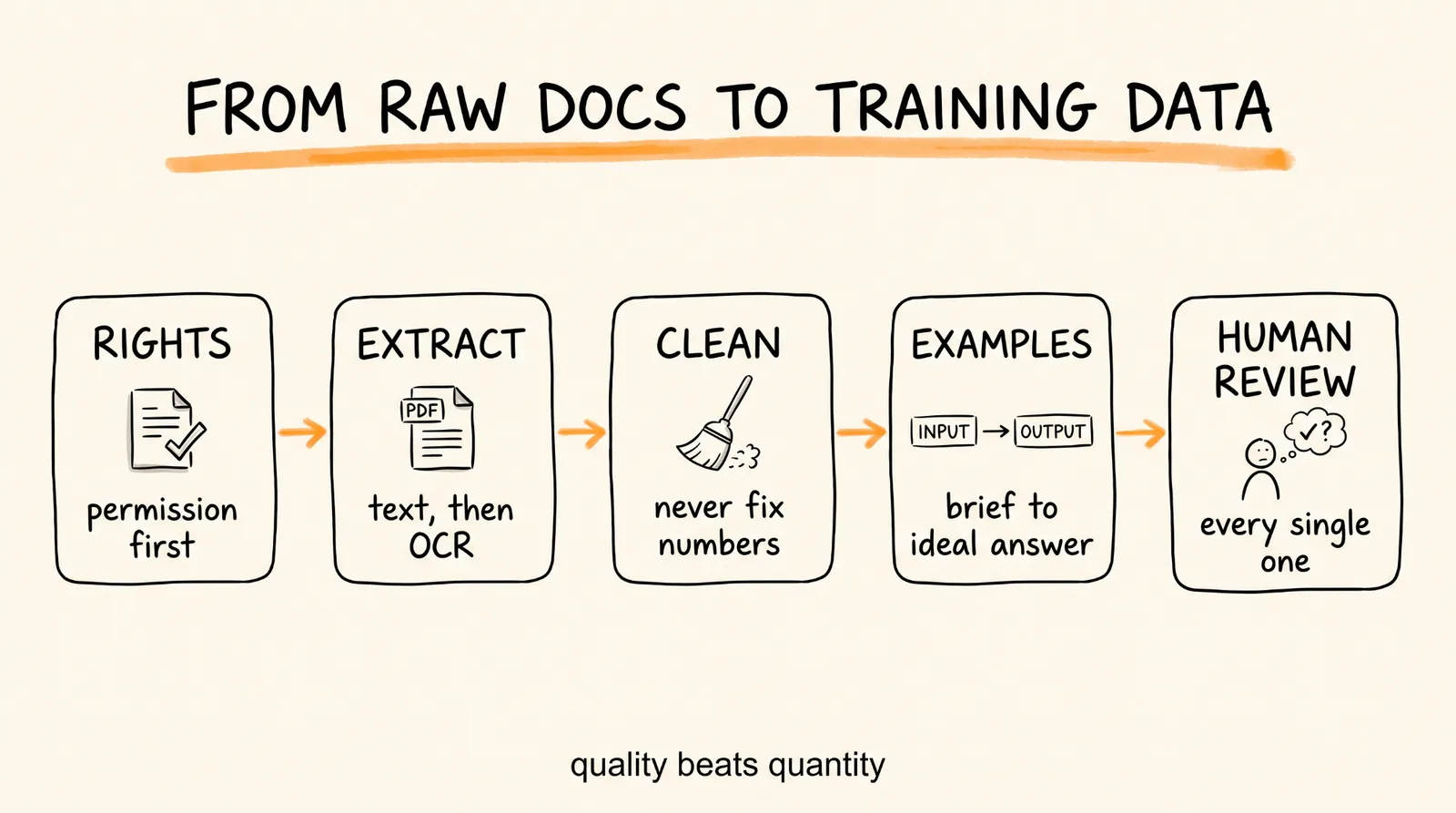
If your source material is PDFs, like pitch decks or reports, getting clean text out is harder than it looks. Charts, tables, tiny footnotes, and numbers inside images all trip up extraction.
Use a cascade:
1. Try normal PDF text extraction first.
2. If a page comes back nearly empty, run layout-aware OCR (tools like Docling or PaddleOCR).
3. If that still fails, try a second OCR tool or review it by hand.
Never silently drop pages that come back empty. Those are your hardest cases, and they show you exactly where your pipeline breaks.
Then clean the text, which means removing extraction junk, not rewriting it:
import re
import unicodedata
def clean_text(text: str) -> str:
text = unicodedata.normalize("NFKC", text)
text = text.replace("\x00", "")
text = text.replace("\u00a0", " ")
text = re.sub(r"[ \t]+", " ", text)
text = re.sub(r"\n{3,}", "\n\n", text)
return text.strip()
The most important rule in this step: never auto-correct numbers. If OCR turns $12.5M into $12.SM, send it to a human to fix. Do not let an AI guess. A model trained on wrong numbers writes fluent, confident, financially wrong output.
Step 5: Build the Training Examples
Raw documents are not training data. A page of a pitch deck might be a slogan, a chart, or a legal disclaimer. What you train on is the task itself: this input produces this output.
Every example is a short conversation in a format called JSONL, one example per line. It has three parts: a system rule, the input, and the ideal answer.
{"messages": [
{"role": "system", "content": "Write grounded English funding-pitch copy. Return plain text only. Do not invent metrics, customers, revenue, market size, or traction."},
{"role": "user", "content": "Startup brief:\nWe help independent clinics reduce missed appointments with automated reminders and patient follow-up.\n\nIndustry:\nHealthcare\n\nStage:\nSeed\n\nFundraising goal:\nExpand the product and sales team."},
{"role": "assistant", "content": "Independent clinics lose revenue and staff time when appointment reminders and rescheduling are handled manually.\n\nOur platform brings these workflows into one system, helping clinics improve patient communication without adding overhead.\n\nWe are starting with small and mid-sized clinics and will use the seed round to expand the product and strengthen distribution."}
]}
(In the actual file, each example sits on a single line.)
Keep the output in plain text. Don't force a slide count, JSON, or fields. Your app can format it however it needs later.
Build every example in this order:
1. Collect the source evidence.
2. Write a short input brief.
3. Draft the ideal output.
4. Check every claim in the output against the source.
5. Have a human review it.
6. Then add it to the dataset.
If the source doesn't back up a number, the number doesn't go in. Write "the company is focused on expanding early customer adoption" instead of inventing "40% month-over-month growth." The model learns whatever you show it, including made-up stats.
You need 200 to 500 of these, and quality beats quantity every time.
Step 6: Split by Company, Not by Page
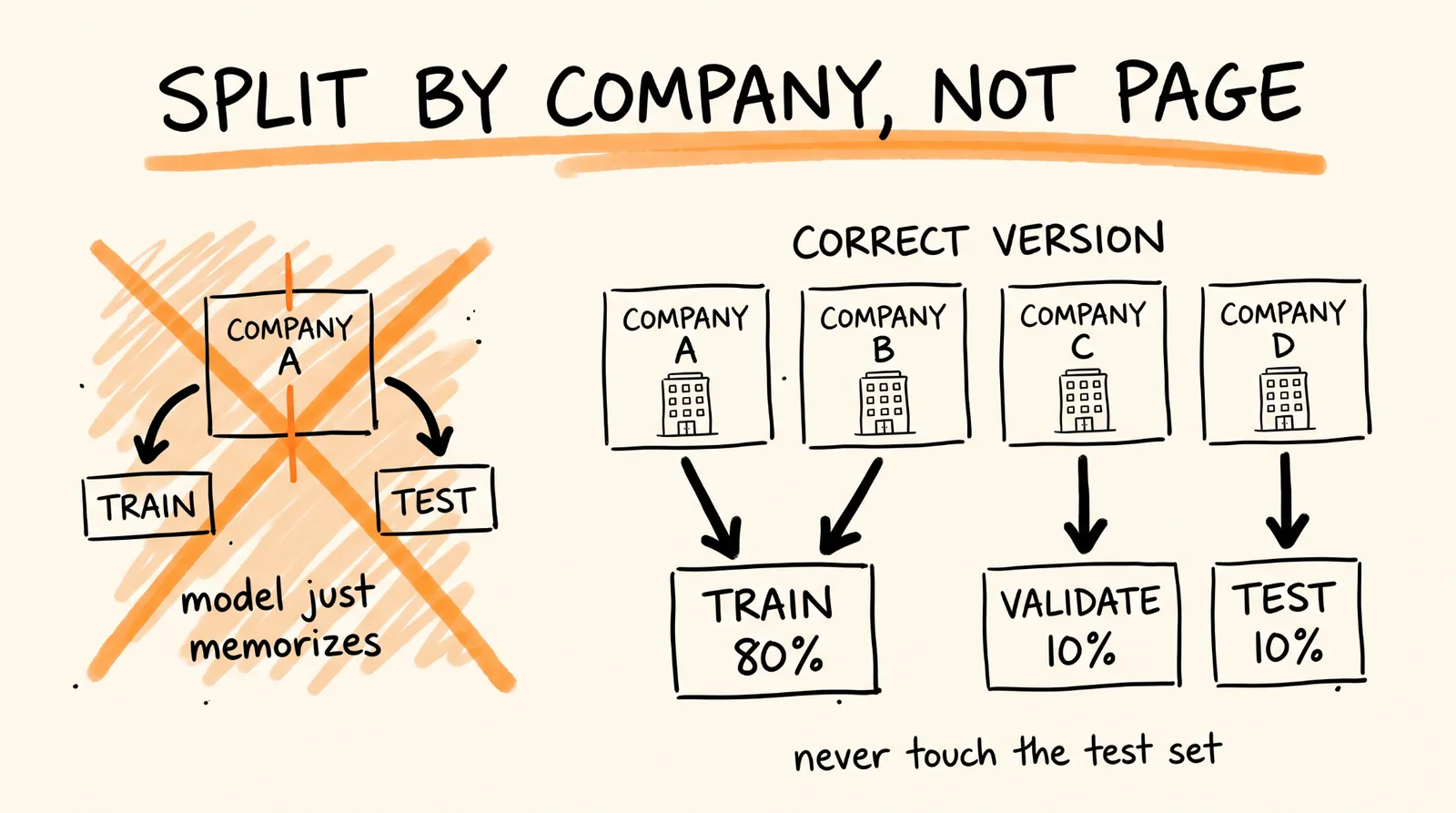
This is the data mistake that makes your test results meaningless.
If the same company shows up in both your training data and your test data, the model memorizes that company's language and looks like it's learning, when it isn't. So split by whole source, not by page or example:
Company A goes to training. Company B goes to training. Company C goes to validation. Company D goes to testing.
Aim for 80% training, 10% validation (to watch progress while training), and 10% testing (for the final verdict).
Save a list of which company went where, and never change the test set after you've looked at the results. Once you've graded against it, it's burned.
Step 7: Train for Free on Google Colab
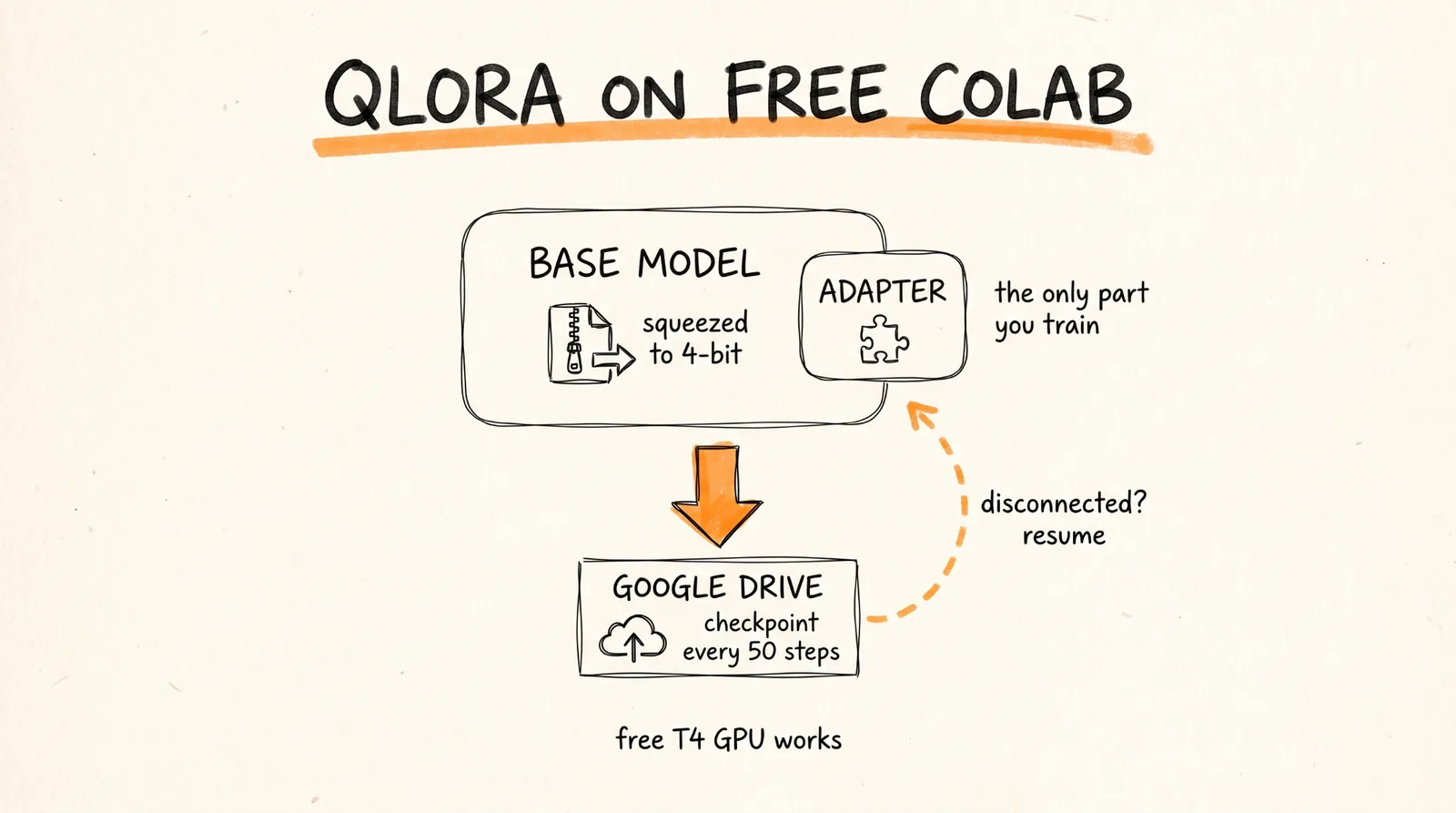
You'll use a technique called QLoRA. It loads the base model in a compressed 4-bit form and trains a small add-on (called an adapter) instead of the whole model. It uses a fraction of the memory of full fine-tuning and gets nearly the same results. That's what makes it possible to train on Colab's free GPU.
1. Go to colab.research.google.com, create a new notebook, and set Runtime to a GPU (the free T4 works).
2. Check your GPU:
!nvidia-smi
3. Connect Google Drive so your progress survives if Colab disconnects:
from google.colab import drive
drive.mount("/content/drive")
4. Install the libraries:
%pip install -U torch transformers datasets accelerate peft trl bitsandbytes sentencepiece safetensors
5. Upload your train.jsonl and validation.jsonl to a folder in your Drive, then run the training script:
from pathlib import Path
import torch
from datasets import load_dataset
from peft import LoraConfig
from transformers import AutoModelForCausalLM, AutoTokenizer, BitsAndBytesConfig
from trl import SFTConfig, SFTTrainer
BASE_MODEL = "Qwen/Qwen2.5-1.5B-Instruct"
DATA_DIR = Path("/content/drive/MyDrive/my-project/processed")
OUTPUT_DIR = Path("/content/drive/MyDrive/my-project/adapters/v1")
OUTPUT_DIR.mkdir(parents=True, exist_ok=True)
use_bf16 = torch.cuda.is_available() and torch.cuda.is_bf16_supported()
compute_dtype = torch.bfloat16 if use_bf16 else torch.float16
dataset = load_dataset("json", data_files={
"train": str(DATA_DIR / "train.jsonl"),
"validation": str(DATA_DIR / "validation.jsonl"),
})
tokenizer = AutoTokenizer.from_pretrained(BASE_MODEL)
if tokenizer.pad_token is None:
tokenizer.pad_token = tokenizer.eos_token
quantization_config = BitsAndBytesConfig(
load_in_4bit=True,
bnb_4bit_quant_type="nf4",
bnb_4bit_compute_dtype=compute_dtype,
bnb_4bit_use_double_quant=True,
)
model = AutoModelForCausalLM.from_pretrained(
BASE_MODEL,
quantization_config=quantization_config,
device_map="auto",
torch_dtype=compute_dtype,
)
lora_config = LoraConfig(
r=16,
lora_alpha=32,
lora_dropout=0.05,
target_modules="all-linear",
task_type="CAUSAL_LM",
)
training_args = SFTConfig(
output_dir=str(OUTPUT_DIR),
num_train_epochs=2,
per_device_train_batch_size=2,
per_device_eval_batch_size=2,
gradient_accumulation_steps=8,
learning_rate=2e-4,
max_length=2048,
packing=True,
gradient_checkpointing=True,
logging_steps=10,
eval_strategy="steps",
eval_steps=50,
save_strategy="steps",
save_steps=50,
save_total_limit=2,
bf16=use_bf16,
fp16=not use_bf16,
report_to="none",
)
trainer = SFTTrainer(
model=model,
args=training_args,
train_dataset=dataset["train"],
eval_dataset=dataset["validation"],
processing_class=tokenizer,
peft_config=lora_config,
)
trainer.train()
trainer.save_model(str(OUTPUT_DIR))
tokenizer.save_pretrained(str(OUTPUT_DIR))
It saves a checkpoint to Drive every 50 steps. If Colab disconnects at 95%, change the training line to this and run it again to pick up where you left off:
trainer.train(resume_from_checkpoint=True)
What the main settings mean, in plain English:
r=16 is the size of the add-on. Start here.
lora_alpha=32 controls how strongly the add-on applies. Twice r is a common default.
learning_rate=2e-4 is how big each learning step is. A good starting point.
num_train_epochs=2 means two passes through your data. Start low.
gradient_accumulation_steps=8 fakes a bigger batch on a small GPU.
One warning: do not keep adding training passes just because the training loss keeps dropping. The model can memorize your examples while getting worse at new ones. A lower training score does not mean a better model.
Before every run, print your library versions so you can reproduce it later:
import torch, transformers, trl, peft, platform
print(platform.python_version(), torch.__version__, transformers.__version__, trl.__version__, peft.__version__)
When you outgrow Colab, which can disconnect anytime and has limited GPU availability, move longer runs to a pay-per-second GPU provider like RunPod, Modal, Lambda, or Vast.ai. Check live prices before each run, since GPU rates change often.
Step 8: Test It Against Your Prompt-Only Version
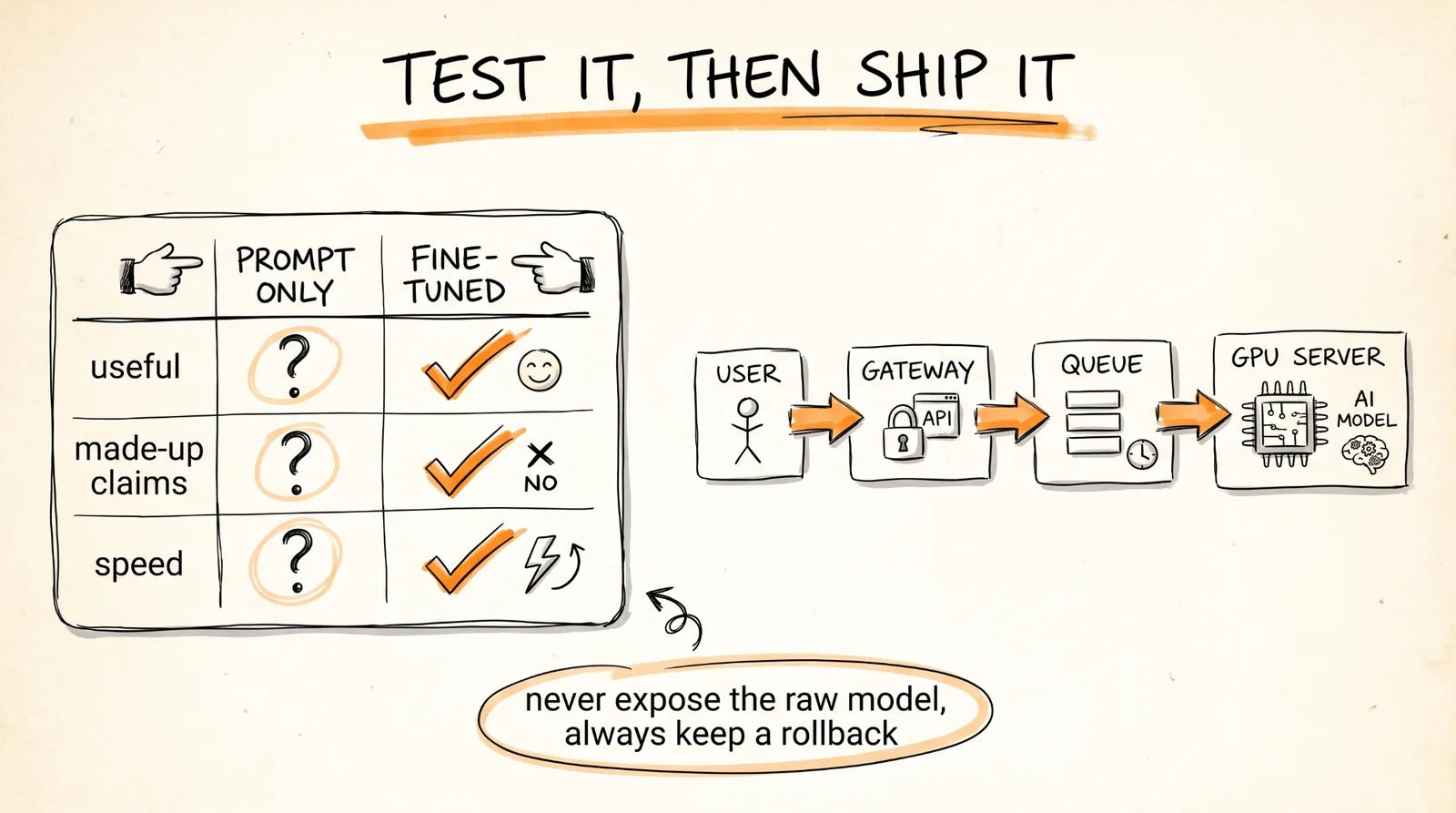
Don't judge the model by its training score. Judge it against what you were using before: the strong prompt from Step 1.
Run both on your untouched test set and score them on:
Usefulness (a human rating from 1 to 10)
Made-up claims (how often it states things the input didn't support)
Number accuracy (does every number in the output exist in the input?)
Follows the format (plain text, no forced structure)
Repetition
Speed and cost per request
Here's a simple check that catches invented numbers automatically:
import re
NUMBER_PATTERN = re.compile(
r"(?<!\w)(?:[$€£₹]?\s*)?\d[\d,.]*(?:\.\d+)?(?:\s*[%xXMBKmk])?"
)
def numeric_strings(text):
return {n.replace(" ", "") for n in NUMBER_PATTERN.findall(text)}
def unsupported_numbers(source, generated):
return numeric_strings(generated) - numeric_strings(source)
Any number in the output that isn't in the source is a hallucination. Catch it before your users do.
A good result looks something like this (example numbers, not a promise):
Prompt-only: useful copy 7.1/10, made-up claims 8%, number errors 3%, 2.4 seconds.
Fine-tuned: useful copy 8.0/10, made-up claims 2%, number errors 1%, 1.5 seconds.
Only claim an improvement if your test set stayed untouched the whole time. If you peeked at it while tuning, the results don't count.
Step 9: Put It Online
For real traffic, use vLLM, which serves your base model plus your add-on efficiently:
vllm serve Qwen/Qwen2.5-1.5B-Instruct \
--enable-lora \
--lora-modules mymodel=./artifacts/adapters/v1 \
--max-model-len 2048
Check the current vLLM docs before deploying, since these options change between versions.
For low traffic or testing, a simple FastAPI app that loads the model with the Transformers library works fine.
Never expose the raw model server directly to the internet. Put a small gateway server in front of it, which can be a cheap VPS, to handle HTTPS, logins, rate limits, and a request queue. The GPU machine only does the AI work.
Your setup: user, then HTTPS and login, then rate limiter, then queue, then the GPU model server, then the answer.
A small cheap VPS is perfect for the gateway job. It's the wrong machine for training or running the model itself.
Step 10: Monitor It and Retrain the Right Way
From day one, track speed, error rate, empty outputs, tokens per request, how often users retry, reports of made-up claims, and which model and add-on version answered each request.
Do not quietly collect user inputs to retrain on. Ask for explicit opt-in consent, and even then, strip out phone numbers, emails, names, private revenue figures, and other confidential details before storing anything.
Don't retrain every time new data comes in. Retrain when you have a meaningful batch of human-reviewed examples, a clear failure pattern to fix, a stable test set, and a way to roll back. A sensible path:
Version 0: the prompt-only baseline.
Version 1: 200 reviewed examples.
Version 2: 1,000 reviewed examples.
Version 3: a bigger dataset plus retrieval.
Record every version: base model, dataset fingerprint, number of examples, GPU hours, test scores, deploy date, known weak spots, and what to roll back to. Never deploy without a rollback plan.
Build the Pipeline With Claude Code
You don't have to hand-write every script. Open Claude Code in an empty folder and paste this:
I want to fine-tune Qwen/Qwen2.5-1.5B-Instruct with QLoRA on my own examples for this task: [DESCRIBE YOUR TASK, e.g. turning short startup briefs into funding-pitch copy]. Build the project in stages and stop for my approval between each:
1. Project structure: data/raw (gitignored), data/processed (gitignored), data/splits (manifests only), scripts, configs, notebooks, artifacts/adapters (gitignored).
2. A script that converts my examples into chat-format JSONL with a system rule, the user input, and the ideal assistant answer.
3. A script that splits examples by source or company, not by individual example, into 80/10/10 train, validation, and test, and saves a manifest of which source went where.
4. A Colab notebook that mounts Google Drive, installs the libraries, trains with QLoRA (r=16, alpha=32, 2 epochs, learning rate 2e-4, checkpoints every 50 steps saved to Drive), and can resume from a checkpoint.
5. An evaluation script that runs the fine-tuned model and a prompt-only baseline on the test set, and reports format compliance, repetition, latency, and any numbers in the output that do not appear in the input.
Never invent training examples. Use only the examples I provide.
That last line matters. You want Claude to build the machine, not fill it with made-up data.
What It Actually Costs
A first training run on a rented GPU at around $0.40 an hour, for about 3 hours plus an hour of retries, comes to roughly $1.70. On free Colab, it can be $0.
The expensive part isn't the first run. It's the experimenting: rebuilding the dataset after a bug, trying different settings, testing different base models, and running evaluations. Budget 5 to 10 times your first estimate.
When Things Go Wrong
Out of memory on Colab. Lower per_device_train_batch_size to 1, keep gradient_checkpointing on, or lower max_length. Confirm you're on a GPU runtime.
Colab disconnected mid-training. Reconnect, mount Drive, and run trainer.train(resume_from_checkpoint=True). This is why checkpoints save to Drive.
Great test scores, bad real-world results. The same source probably leaked into both training and testing. Re-split by company and test again.
The model makes up numbers. Your training examples contain unsupported numbers. Audit them with the number check from Step 8 and remove anything the source doesn't back up.
The output is repetitive or copies training examples word for word. You trained too long. Cut back to 1 or 2 passes, or add more varied examples.
The fine-tuned model isn't better than the prompt. Your examples aren't good enough or consistent enough, or this was a retrieval problem all along. Fix the examples before changing any settings.
Rules to Remember
Prompt first. Fine-tune only when prompting fails at something specific.
Fine-tuning teaches style and structure, not facts. Facts come from retrieval.
Start with a small model. Move up only if it fails your tests.
Get the rights to your data before you download anything.
Never auto-fix numbers. Humans review numbers.
200 to 500 reviewed examples beats thousands of messy ones.
Split by company, not by page, and never touch the test set.
Lower training loss does not mean a better model.
Always keep a rollback plan.
The highest-leverage improvement is almost never the settings. It's the examples.
You now have the full pipeline to turn a free, small open-source model into a specialist that does your one job better and more consistently than a giant model with a generic prompt.
Don't want to figure this out alone? I walk members through every step inside the community. Join the Skool → skool.com/raycfu