
How to Build a Motion Design Studio
With Opus 5.5
This guide walks you through turning Claude Opus 5.5 into a motion design studio that makes launch videos, product ads, and showreels entirely in code, with no After Effects and no animation skills.
Don't want to figure this out alone? I walk members through every step inside the community. Join the Skool → skool.com/raycfu
Why Most "One Prompt" Videos Look Mid
When Opus 5.5 launched, the timeline filled with jaw-dropping motion videos captioned "one prompt." Then everyone tried it and got the same thing: centered text on a gradient, everything fading in, a logo at the end.
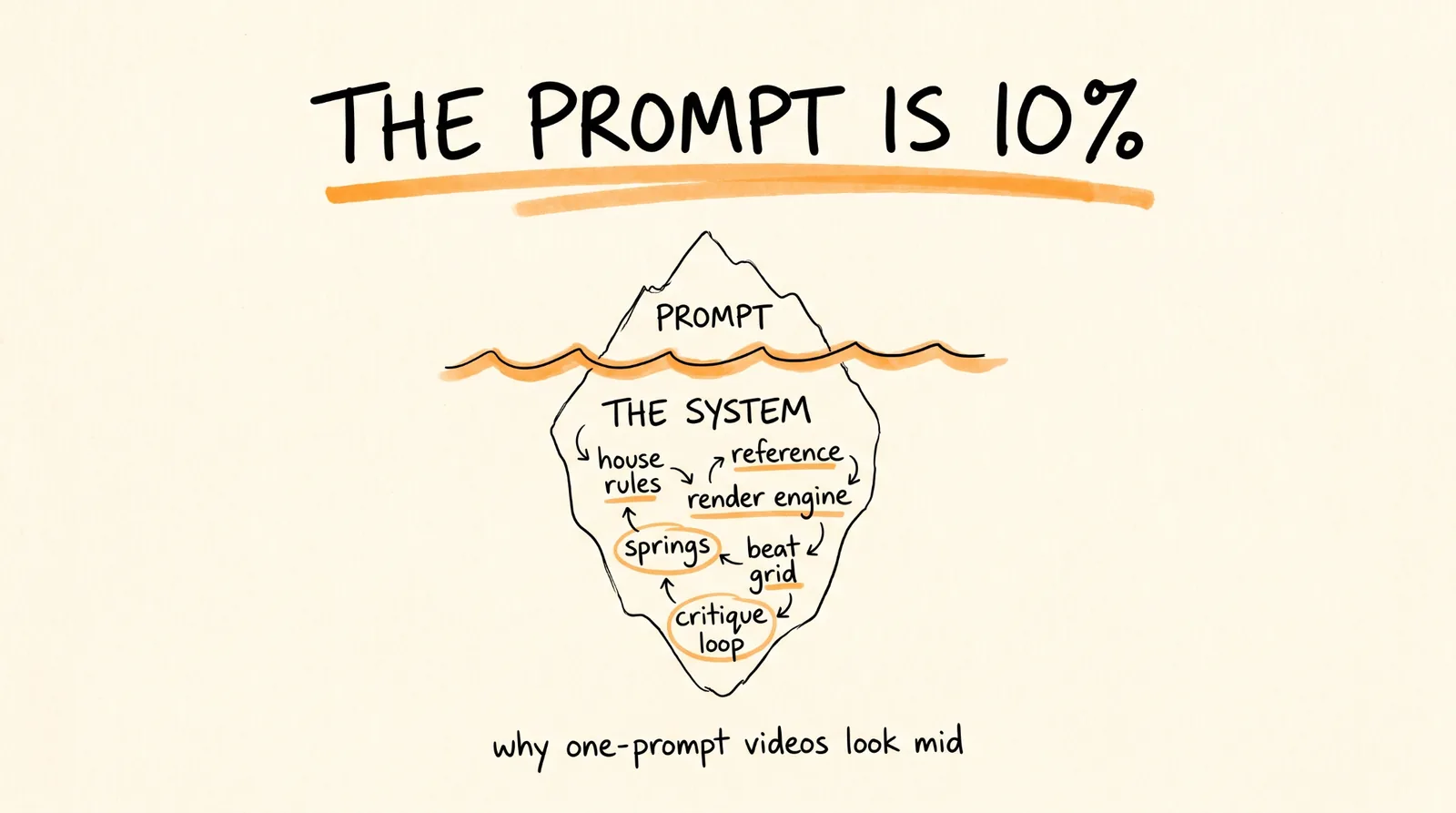
The gap is the setup around the prompt. Some viral videos really came from one sentence. Others came from a 9,500-character director's brief, a folder of skills, reference footage, and a 12-hour run where Opus reviewed and fixed its own work. As one member of the Claude Code team put it: the post says one-shot, the prompt is 10,000 characters with skills, examples, and keys.
The prompt is about 10% of the video. The other 90% is the system this guide builds.
How It Actually Works
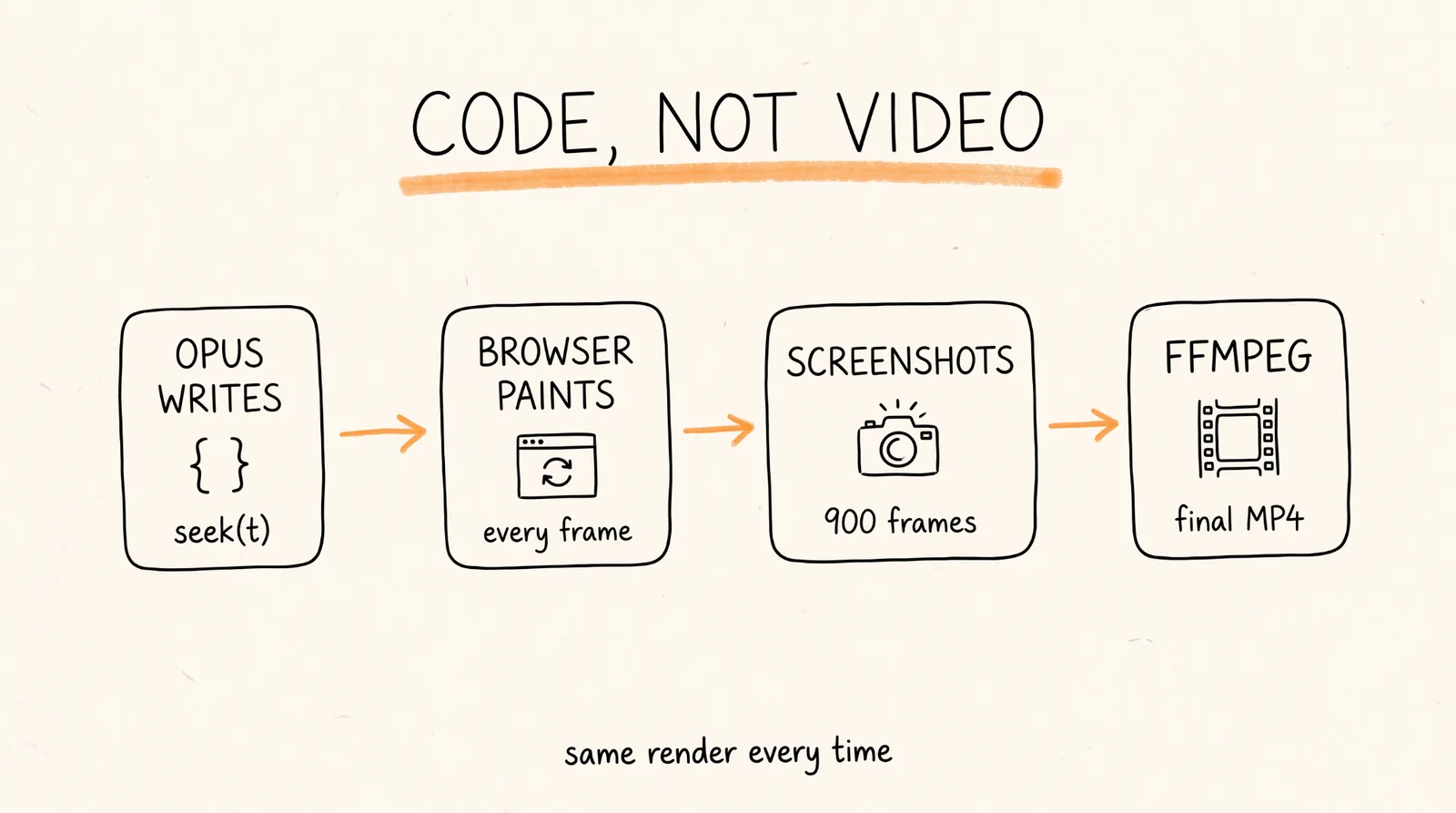
Opus 5.5 can't output a video file. It writes a program, and something else turns that program into frames.
The trick is one function, seek(t), that paints the exact frame for any moment in time. A headless browser calls it hundreds of times, screenshots every frame, and ffmpeg stitches the screenshots into an MP4. Because nothing depends on a live timer, the render comes out identical every time, and changing one shot is a one-line edit plus a re-render.
What You Need
Claude Code with access to Opus 5.5. The chat app can write an animation, but only Claude Code can render it, listen to it, and look at its own frames. That feedback loop is what separates great videos from mid ones.
A Mac or Linux computer.
About 10 minutes for setup.
Optional: an ElevenLabs API key for voiceovers, and a music track if you don't want Opus to compose one.
Step 1: Install the Studio
Run these in your terminal:
# 1. Node, ffmpeg, and Python for music analysis
brew install node ffmpeg python
pip install numpy librosa soundfile
# 2. A project folder and a headless browser
mkdir motion-studio && cd motion-studio && npm init -y
npm i -D playwright && npx playwright install chromium
# 3. Optional: framework skills, if you'd rather use a video framework
npx skills add remotion-dev/skills
npx skills add heygen-com/hyperframes
# 4. Start Claude Code on Opus 5.5
claude --model claude-opus-5-5
Inside Claude Code, type /model and set the effort level:
Medium for small fixes and re-renders.
xhigh for new videos. This is enough for most of what you've seen go viral.
max when the first 3 seconds have to carry a big launch.
Every viral one-shot ran on xhigh or max. The default medium setting is the most common reason first tries look flat.
Step 2: Write the House Rules
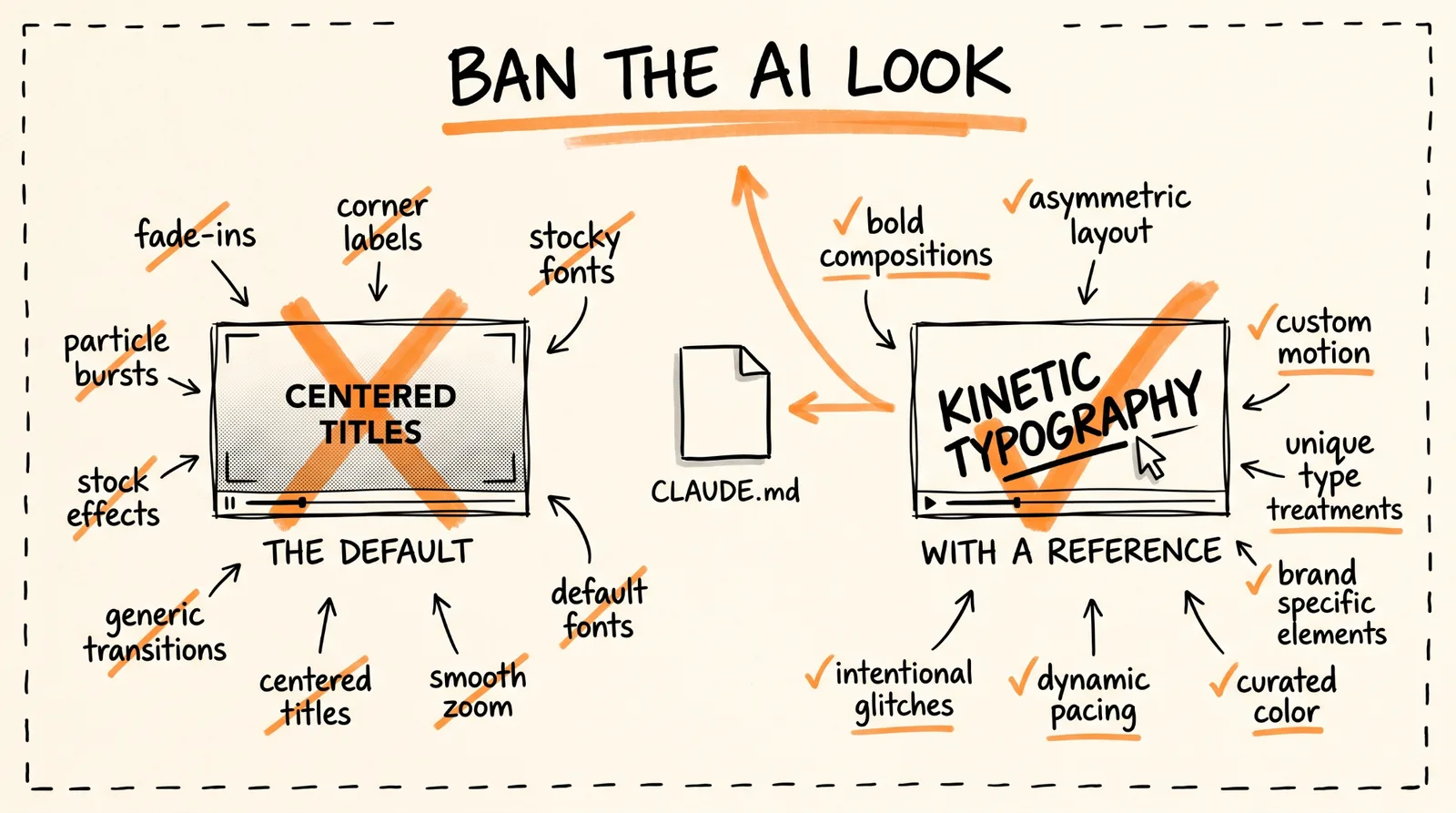
Claude Code reads a file called CLAUDE.md on every run, so rules you put there apply to every video you make in this folder without repeating them.
Create CLAUDE.md in your project folder and paste this:
# Motion studio rules
## Render contract
- Every film is a pure function of time: window.seek(t) paints frame t.
- No CSS transitions, no setTimeout, no requestAnimationFrame in render mode,
no state carried between frames. Seeded noise only, never Math.random.
- Render with node render.mjs. Encode H.264 yuv420p, CRF 16.
## Look
- Banned: centered title on a gradient, everything fading in,
corner labels and frame borders, glow on UI, generic particle bursts.
- One display font, one UI font. One accent color unless the brief says otherwise.
- Every 2 to 4 seconds something new must happen on screen.
## Sound
- Music and sound effects are synthesized in code unless a track is supplied.
- Place hits on the measured beat grid (beats.json). Loudness -14 LUFS.
## Loop before you show me anything
1. Render one frame per beat as a contact sheet and LOOK at it.
2. Score it 1-10 on: hook in first 2s, readability at phone size,
motion quality, variety, brand accuracy, sound sync.
3. Fix the 3 worst problems. Repeat until every score is 8+.
4. Only then do the full render.
The banned list is the most important part. It blocks the exact defaults that make AI video look like AI video.
Step 3: Set Up the Render Engine
The page (index.html) paints any moment on demand. The renderer walks through time, screenshots each frame, and pipes them into ffmpeg. Opus writes index.html for each video. You only need the renderer once.
Save this as render.mjs:
// node render.mjs --fps 60 --dur 15 --sub 4
import { chromium } from 'playwright';
import { spawn } from 'node:child_process';
import { mkdirSync } from 'node:fs';
const arg = (k, d) => { const i = process.argv.indexOf('--' + k); return i > 0 ? Number(process.argv[i + 1]) : d; };
const FPS = arg('fps', 60), DUR = arg('dur', 15), SUB = arg('sub', 4);
mkdirSync('out', { recursive: true });
const browser = await chromium.launch();
const page = await browser.newPage({ viewport: { width: 1080, height: 1920 }, deviceScaleFactor: 1 });
await page.goto('file://' + process.cwd() + '/index.html');
await page.evaluate(() => document.fonts.ready);
const vf = `tmix=frames=${SUB},select='eq(mod(n\\,${SUB})\\,${SUB - 1})',setpts=N/${FPS}/TB`;
const ff = spawn('ffmpeg', ['-y', '-f', 'image2pipe', '-framerate', String(FPS * SUB), '-i', '-',
'-vf', vf, '-r', String(FPS), '-c:v', 'libx264', '-crf', '16', '-pix_fmt', 'yuv420p', 'out/silent.mp4'],
{ stdio: ['pipe', 'inherit', 'inherit'] });
const total = Math.round(DUR * FPS * SUB);
for (let i = 0; i < total; i++) {
await page.evaluate((t) => window.seek(t), i / (FPS * SUB));
const png = await page.locator('#c').screenshot({ type: 'png' });
if (!ff.stdin.write(png)) await new Promise((r) => ff.stdin.once('drain', r));
if (i % (FPS * SUB) === 0) console.log(`rendered ${i / (FPS * SUB)}s / ${DUR}s`);
}
ff.stdin.end();
await new Promise((r) => ff.on('close', r));
await browser.close();
The --sub 4 setting renders 4 tiny steps per frame and blends them, which gives you real motion blur. Your page needs a canvas with id="c" and a window.seek function, and Opus will build both because the house rules require it.
Then test the whole setup with the famous one-liner. In Claude Code:
make a dynamic 15-second motion graphics video that shows what an incredible motion designer you are, like it's your showreel for a résumé. go all out.
Why that one sentence works: "showreel for a résumé" sets a genre Opus already knows (fast cuts, a new technique every shot, best work first). It makes the model the subject, so there's no product to get wrong. And 15 seconds is short enough to finish in one pass. The catch: hundreds of people used this exact prompt, so the results all look alike. Use it to test your setup, then move on to the real work below.
Step 4: Point It at a Real Product
This is where it becomes useful. Three extra ingredients turn a generic reel into a launch video: the product's URL, an instruction to use the real screenshots and logo, and music.
Paste this, filling in the brackets:
Make a dynamic 20-second motion graphics video for [PRODUCT] ([URL]), with the energy of a motion designer's showreel. Go all out.
Assets
- Visit the site. Use real screenshots (Playwright), the real logo, real colors and fonts.
Save everything to ./assets and list what you found before you animate.
- Never redraw the product UI from imagination. Crop and animate the real thing.
Story (one beat each, 2 to 4 seconds)
1. Hook: the problem in 5 words of huge kinetic type.
2. The product appears, the UI assembles itself piece by piece.
3. Three features, each as a UI moment with a cursor doing a real action.
4. One number that proves it works: [A REAL METRIC].
5. Logo lockup + [CALL TO ACTION].
Sound
- Original music, 120 BPM, synthesized in code. UI clicks and whooshes on the beat.
Format: 1080x1920 (9:16) first, then 1:1 and 16:9 from the same timeline.
Before the full render, show me a contact sheet of one frame per beat.
Two tips:
Keep one Claude Code session per brand. Your second video for the same product comes out much faster, because the renderer, music, and assets already exist.
For a voiceover or talking mascot, put your API key in a .env file and tell Opus "the ElevenLabs key is ELEVENLABS_API_KEY in .env." Never paste a real key into a prompt, especially one you might screenshot.
Step 5: Give It a Reference
Without a reference, Opus falls back to its defaults. With one, it copies pacing, type, and transitions from something you already love. Naming or showing a style works far better than describing one.
Three ways to give it a reference:
A frame: screenshot one frame of a video you love. Say what to take (colors, type, texture) and what not to take (the subject).
A video: give Opus the file and have it pull out frames and study the pacing shot by shot before writing any code.
A library: a folder of your own images or past work. Nobody else can copy a reference that's yours.
Good places to find references: launch videos from companies you admire, Dribbble's motion section, and your competitors' launch films.
Prompt:
Reference: ./refs/launch.mp4
1. Extract one frame every 0.5s with ffmpeg. Study them.
2. Write ./docs/style_guide.md: palette (hex), type (family, weight, spacing),
shot lengths, transition types, camera moves, texture, how text enters and exits.
3. Write ./docs/shotlist.md for a [DURATION]s video about [SUBJECT] in THAT style.
Take the grammar of the reference, never its content, logos, or characters.
4. Show me both files. Wait for my OK before any code.
Specify the look and the rules, not the coding library. Let Opus pick the technique unless you need a specific framework.
Step 6: Write a State List, Not a Vibe
The most-saved prompt of the whole trend wasn't a one-liner. It was a structured spec: inputs to ask for, a visual direction, a beat-by-beat list of what's on screen, build rules, and known problems to avoid.
The concept behind the best ones: a single shape that never cuts. One element morphs size, roundness, and color from state to state (a button, a loader, a chart, a menu), a cursor drives each change, and the last frame matches the first so it loops forever.
Template:
<inputs>
Ask me for: my product + URL, 8 to 12 UI states that tell its story, the real data shown
in each state, brand colors + fonts + one accent, a royalty-free track near 120 BPM, formats.
</inputs>
<direction>
Product-film UI motion. One container never cuts: every state is the same element changing
size, radius, and fill while its content swaps behind a short blur. A cursor drives every change.
Warm neutral canvas, one accent. Springs with at most a tiny overshoot.
Banned: bouncy easing, glows, gradients on UI, particle bursts, dead time.
</direction>
<structure>
120 BPM, 8 bars, something happens on every beat.
logo → button → email field (typed) → loader → success check → dashboard card
→ chart draws itself → tooltip → command menu → notification → logo.
</structure>
<build>
1. One HTML file, one canvas, window.seek(t). No CSS transitions, no timers, no carried state.
2. Closed-form springs. A value with many targets = sum of one spring per change.
3. Text inside a morphing container enters after the morph starts, leaves before the next one.
4. Beat grid from the track. Start on a downbeat. UI sounds on measured peaks.
5. Render at 60 fps, 4 subframes per frame, blended for motion blur.
</build>
<gotchas>
The last frame must equal the first, cursor position and speed included.
</gotchas>
<start>
Ask for the inputs, then show me the state list on the beat grid before writing code.
</start>
Step 7: Make the Motion Feel Expensive
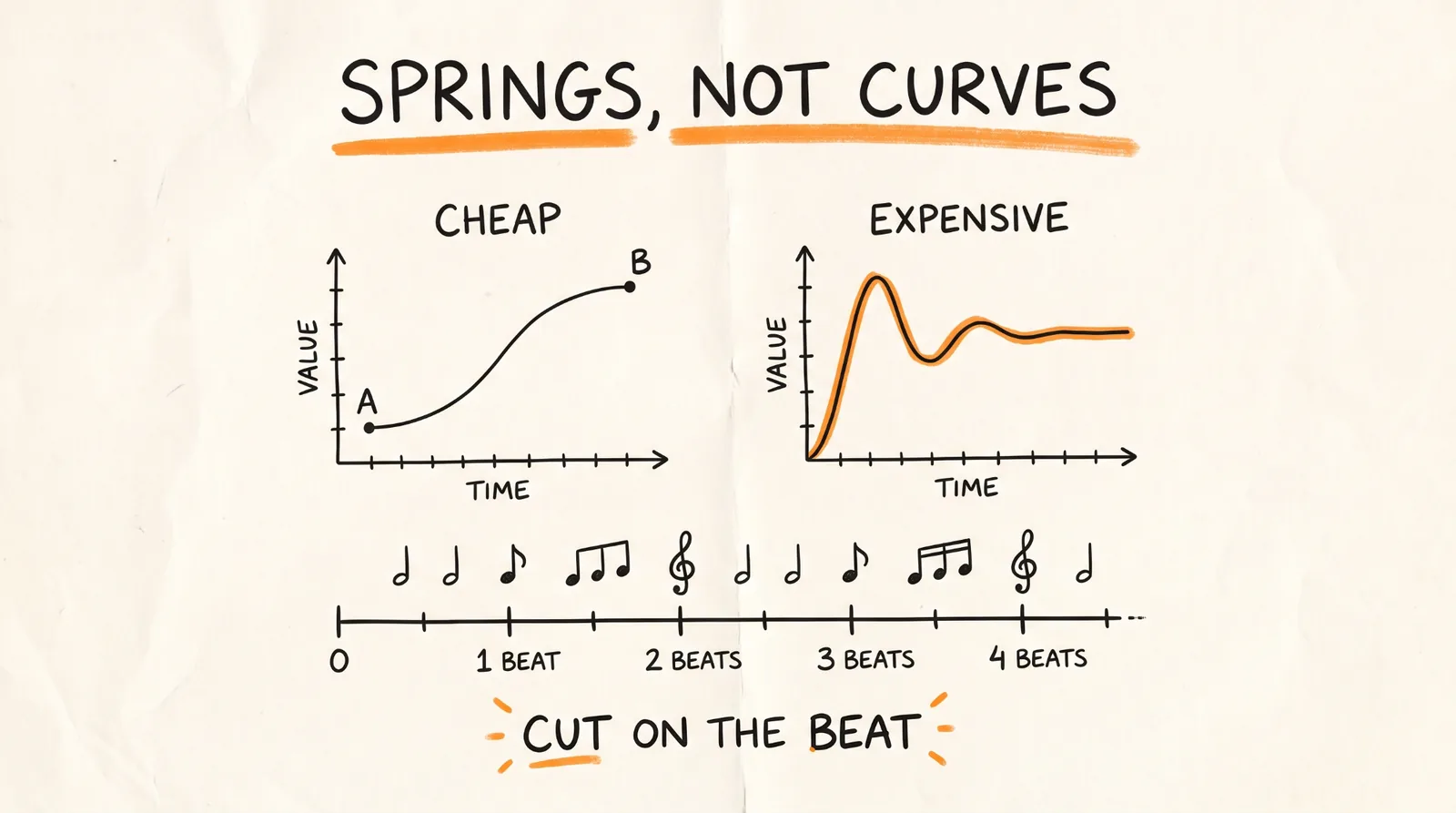
Cheap motion slides from A to B on a fixed curve. Expensive motion has weight: it speeds up, overshoots a hair, and settles. That's a spring.
The trick most people miss: when something changes target several times (a cursor moving around, a box resizing), you don't restart the spring. You stack one spring per change, each starting at its own time. The motion stays smooth, and Opus can still draw any frame instantly without replaying everything before it.
Save this as lib/motion.js:
export const clamp = (x, a = 0, b = 1) => Math.min(b, Math.max(a, x));
// Damped spring from 0 to 1, as a pure function of time
export function spring(t, k = 170, d = 26) {
if (t <= 0) return 0;
const w0 = Math.sqrt(k), z = d / (2 * w0);
if (z < 1) {
const wd = w0 * Math.sqrt(1 - z * z);
return 1 - Math.exp(-z * w0 * t) * (Math.cos(wd * t) + (z * w0 / wd) * Math.sin(wd * t));
}
return 1 - Math.exp(-w0 * t) * (1 + w0 * t);
}
// keys: [[time, value], ...]. One spring per change, stacked.
export function track(t, keys, k = 170, d = 26) {
let v = keys[0][1];
for (let i = 1; i < keys.length; i++)
v += (keys[i][1] - keys[i - 1][1]) * spring(t - keys[i][0], k, d);
return v;
}
Then tell Opus:
Replace every easing curve with closed-form springs from lib/motion.js. Tiny overshoot on UI, none on type. Any value with more than one target uses track().
It refactors the whole file in one pass. Stiffer springs feel snappy (buttons, toggles). Softer ones feel heavy (big type, logos).
Step 8: Score It to the Beat
Sound is where AI video starts feeling like a film. Several of the viral videos had soundtracks composed entirely in code, and people assumed the music was added later.
If you have a track, measure it. Save this as beats.py:
import sys, json, numpy as np, librosa
y, sr = librosa.load(sys.argv[1], sr=None, mono=True)
tempo, frames = librosa.beat.beat_track(y=y, sr=sr, units="frames")
beats = librosa.frames_to_time(frames, sr=sr).round(3).tolist()
onset = librosa.onset.onset_strength(y=y, sr=sr)
peaks = librosa.util.peak_pick(onset, pre_max=3, post_max=3, pre_avg=3,
post_avg=5, delta=0.5, wait=10)
json.dump({
"bpm": float(np.atleast_1d(tempo)[0]),
"beats": beats,
"downbeats": beats[::4],
"hits": librosa.frames_to_time(peaks, sr=sr).round(3).tolist(),
}, sys.stdout, indent=1)
Run it with: python beats.py song.wav > beats.json
The animation then reads beats.json: screen changes land on beats, big moments on downbeats, and sound effects on the hits.
If you don't have a track, let Opus compose one. Prompt:
Synthesize original music at 120 BPM in code, plus click, pop, thump, and whoosh sound effects. Write a cue list of every sound effect timed to the beat grid, mix it all to -14 LUFS, and combine it with out/silent.mp4 into out/final.mp4.
Only use music you have the rights to. Code-composed music or royalty-free tracks keep your videos safe to post.
Step 9: Make Opus Watch Its Own Frames
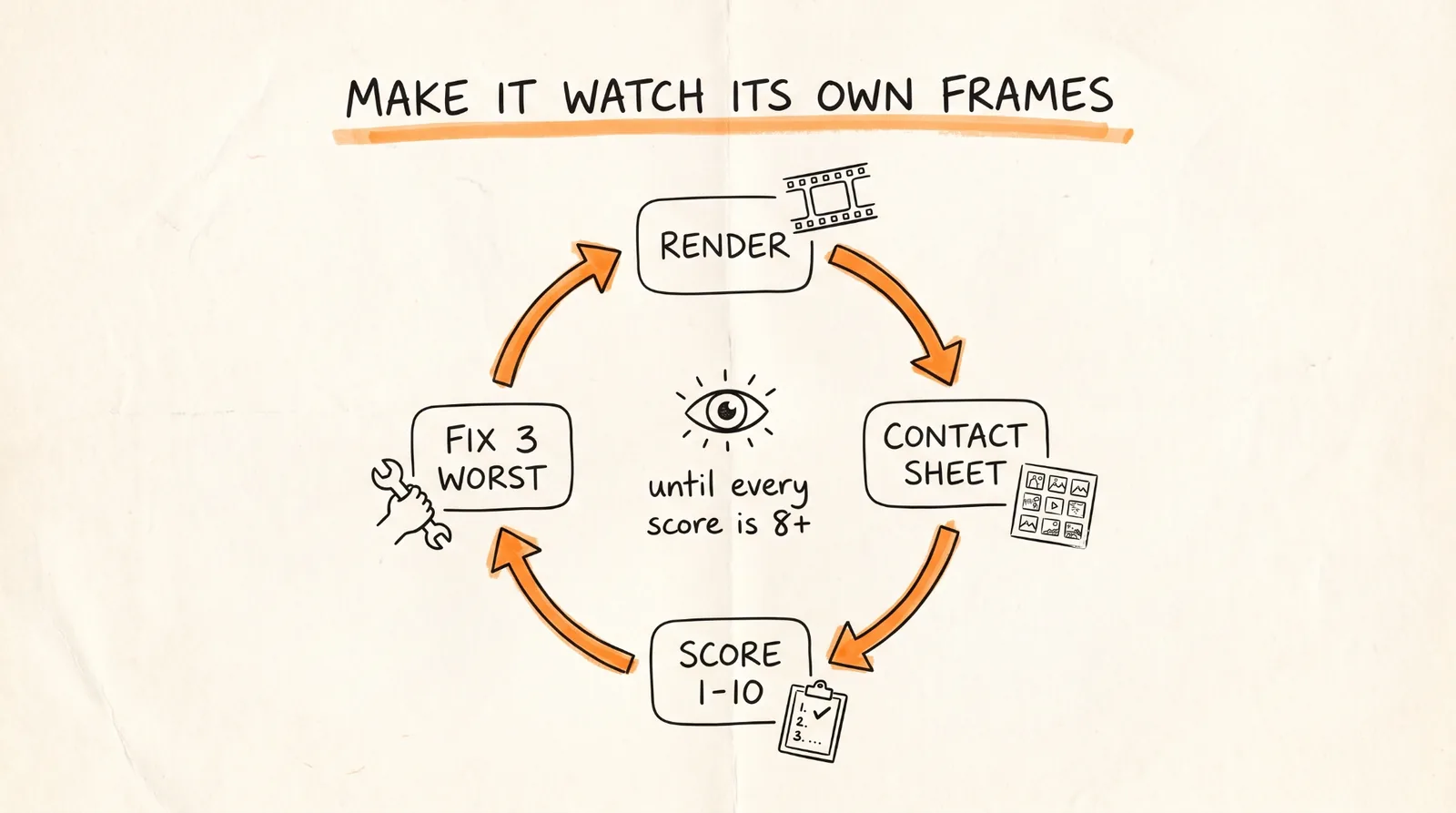
Opus 5.5 can read images, which means it can look at what it rendered. This one habit separates the videos that went viral from the ones posted with "it's a bit mid."
These commands turn a video into images Opus can review:
# Contact sheet: 2 frames per second, 6 across
ffmpeg -i out/final.mp4 -vf "fps=2,scale=270:-1,tile=6x5" -frames:v 1 out/contact.png
# Strip: 12 frames around a fast moment at 4.2s, to catch glitches
ffmpeg -ss 4.1 -i out/final.mp4 -vf "scale=320:-1,tile=12x1" -frames:v 1 out/strip.png
# Phone test: how it reads at 360px wide
ffmpeg -i out/final.mp4 -vf "fps=1,scale=360:-1,tile=5x3" -frames:v 1 out/phone.png
# Loop check: play it twice and watch the seam
ffmpeg -stream_loop 1 -i out/final.mp4 -c copy out/loop_check.mp4
Then the critique prompt:
Open out/contact.png, out/strip.png and out/phone.png and look at them properly.
Be a harsh motion director, not a proud author.
Score 1-10: hook in first 2s, readability at phone size, motion quality, variety
(new thing every 2-4s), composition, brand accuracy, sound sync.
List the 3 biggest problems with timestamps. Hunt for: text overlapping during swaps,
anything sliding instead of easing, corner labels and frame borders, centered-on-gradient
shots, blurry scaled text, a dead beat with nothing happening, a stutter at the loop seam.
Fix them, re-render only the affected seconds, show me the new contact sheet and new scores.
Run at least 3 rounds. One of the most impressive hand-painted shorts from the trend took 163 model calls and nearly 7 hours. Iteration is the method, not a failure.
Step 10: The Overnight Director's Brief
For a longer film, like a music video or a story, you don't describe a video. You hire a crew. The best long-form pieces came from briefs with the same structure:
The film in one line: the story and the feeling at the end.
References: video, song, images. What to keep, what to push.
Tools and keys: skills to load, APIs available, and a budget.
Look: colors, type, texture, camera style, banned looks.
Beat sheet: timestamps, a hook in the first 2 seconds, a payoff every 3 to 5 seconds.
Workflow gates: plan, stills, rough cut, full animation, polish, sound, render. No skipping.
Critique loop: score every shot, fix the 3 worst problems, repeat until everything is 8+.
Deliverables: final MP4, loop check, poster frame, contact sheet, clean source code.
Template:
You are the director, animator, sound designer, and render engineer for a [DURATION] film
made in code. Treat this as a multi-session production. Don't rush to a final render.
## The film in one line
[LOGLINE. What the viewer should feel at the end.]
## References and inputs
- ./refs/ : [video / frames / image library]. Take the grammar, never the content.
- ./audio/track.wav : use it unchanged. Measure beats with beats.py first.
- APIs in .env: [KEYS]. Budget: [$X]. Be economical.
## Look
[3-5 lines: palette, type, texture, camera language. Banned looks.]
## Beat sheet
0:00-0:02 hook: [the single most striking image]
0:02-0:10 [act 1]
... a new visual payoff every 3-5 seconds
[END] the last frame sets up the first frame
## Workflow, with gates
1. Write docs/style_guide.md and docs/shotlist.md. Show me the shot list.
2. Build stills for every shot. Contact sheet. Critique.
3. Rough cut at low resolution with placeholder audio. Fix pacing before polish.
4. Full animation, polish pass, sound pass, final render.
5. For long films, write docs/ANIMATION_GUIDE.md first, then split chapters across
subagents so they all code in the same style.
## Critique loop (every shot, at least 3 rounds)
Render stills, score 1-10, log scores and the 3 biggest problems in docs/review_log.md.
Fix. Repeat until all are 8+.
## Deliverables
out/final.mp4, out/loop_check.mp4, out/poster.png, out/contact.png, README.md
Start it before bed. The best example from the trend was 5 minutes of dictation and 12 hours of Claude working on its own.
Step 11: Package It as a Skill
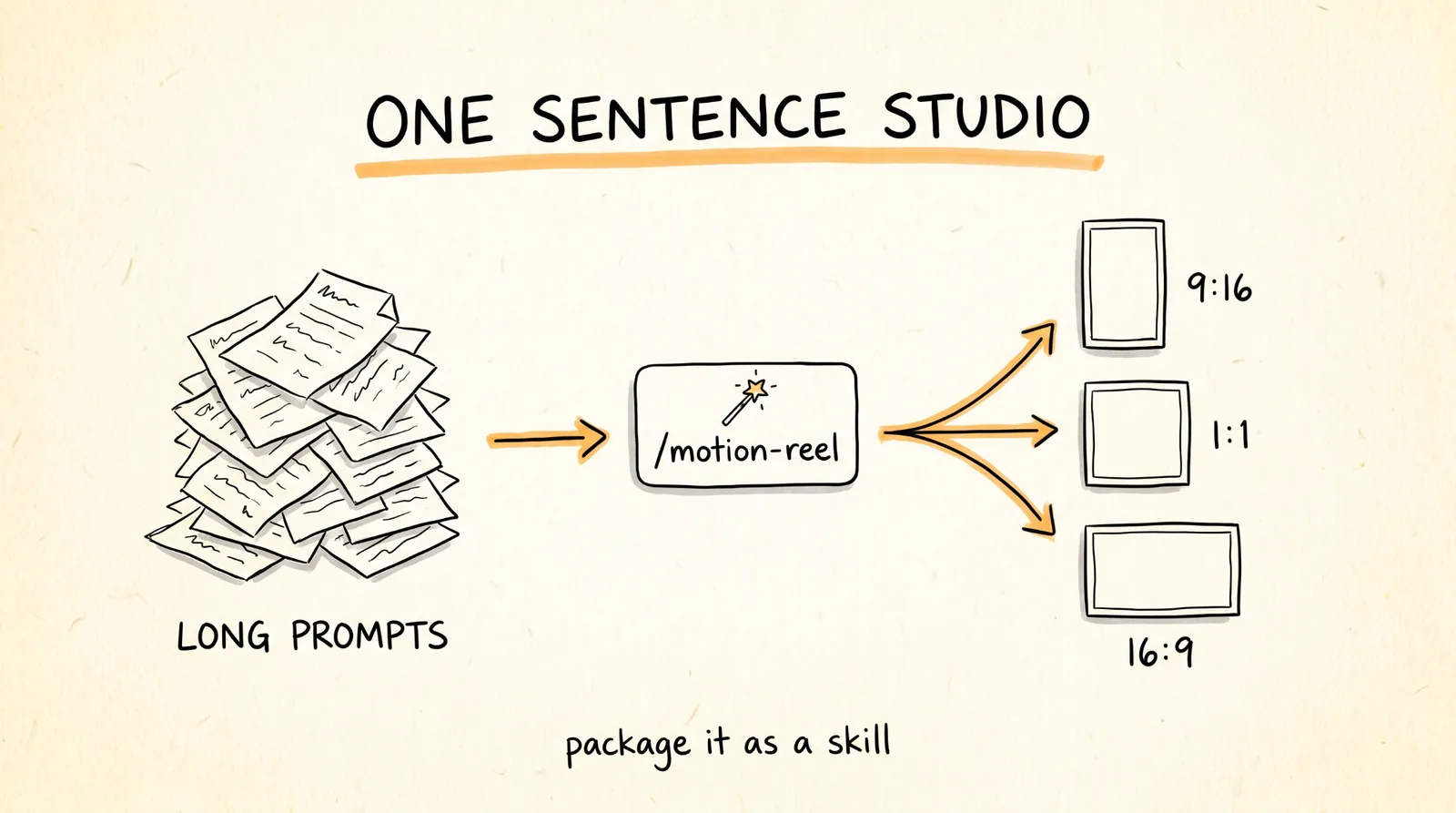
Once your pipeline works, turn it into a skill so the next video is one sentence. Create .claude/skills/motion-reel/SKILL.md:
---
name: motion-reel
description: Make a product or showreel motion video rendered from code. Use when the
user asks for a launch video, showreel, product reel, animated explainer or motion ad.
---
# Motion reel
## Inputs to collect first
Product + URL, duration, formats (9:16 / 1:1 / 16:9), brand colors + fonts,
a reference (frame, video, or image folder), music (file or "synthesize").
## Pipeline
1. Gather assets from the URL with Playwright into ./assets. List them.
2. If a reference exists, write docs/style_guide.md from it.
3. Measure or synthesize music. beats.py → beats.json.
4. Write docs/shotlist.md on the beat grid. Show it and wait for OK.
5. Build index.html with window.seek(t) using lib/motion.js springs. Follow CLAUDE.md.
6. Contact sheet → critique → fix. 3 rounds minimum.
7. node render.mjs → sound → mix to -14 LUFS → out/final.mp4, all formats.
8. Deliver final.mp4, contact.png, poster.png. Say what you'd improve next.
## Hard rules
- Real product UI only. Never invent screens.
- No Math.random, no timers, no CSS transitions in render mode.
- Banned: corner labels, centered title on gradient, everything fading in.
Now the whole guide collapses into: /motion-reel for [URL], 20s, vertical, reference ./refs/frame.png
Step 12: Turn It Into a Service
Short launch videos are something businesses already pay agencies for, and with this pipeline you can deliver one in an afternoon. A simple offer: a 20 to 45 second product video with original music, optional voiceover, the product's real UI and features, a call to action at the end, every format, and up to 3 rounds of edits.
Price it based on the value to the client and what you can deliver, not on how fast the AI is. And always use the client's real product, logos, and footage with their permission.
When Things Go Wrong
It looks like every other AI video. Your CLAUDE.md banned list isn't loaded, or you skipped the reference. Give it a frame or video you love.
The motion feels cheap or floaty. Refactor to springs (Step 7), and check that effort is set to xhigh.
Text is blurry when it scales up. Render at full size and avoid scaling text up from small. Ask Opus to check the strip image at that moment.
The render changes every time. Something is using Math.random or a live timer. Ask Opus to find and remove it.
Fonts are wrong in the render. The page needs to wait for fonts to load before rendering. render.mjs already does this, so check that your fonts are actually loading.
The music and visuals drift apart. Re-run beats.py on the exact final track and re-time cuts to beats.json.
The first try was mid. That's normal. Run the critique loop 3 times before you judge it.
Rules to Remember
The prompt is 10% of the video. The setup is the other 90%.
Every frame is a pure function of time. No timers, no randomness.
Ban the AI defaults in CLAUDE.md: centered text on gradients, fade-ins, corner labels.
Always give it a reference. Take the style, never the content.
Real product UI only. Never let it invent screens.
Springs, not easing curves.
Cut on the beat.
Make Opus watch its own frames. 3 rounds minimum, every score 8+.
Keep API keys in .env, never in a prompt.
Package it as a skill so the next video is one sentence.
You now have a motion design studio that runs on Opus 5.5: a render engine, house rules that ban the AI look, prompts for every kind of video, a critique loop that fixes its own frames, and a skill that turns the whole thing into one sentence.
Don't want to figure this out alone? I walk members through every step inside the community. Join the Skool → skool.com/raycfu