
How to Replace Your Dev Team With 63 AI Agents
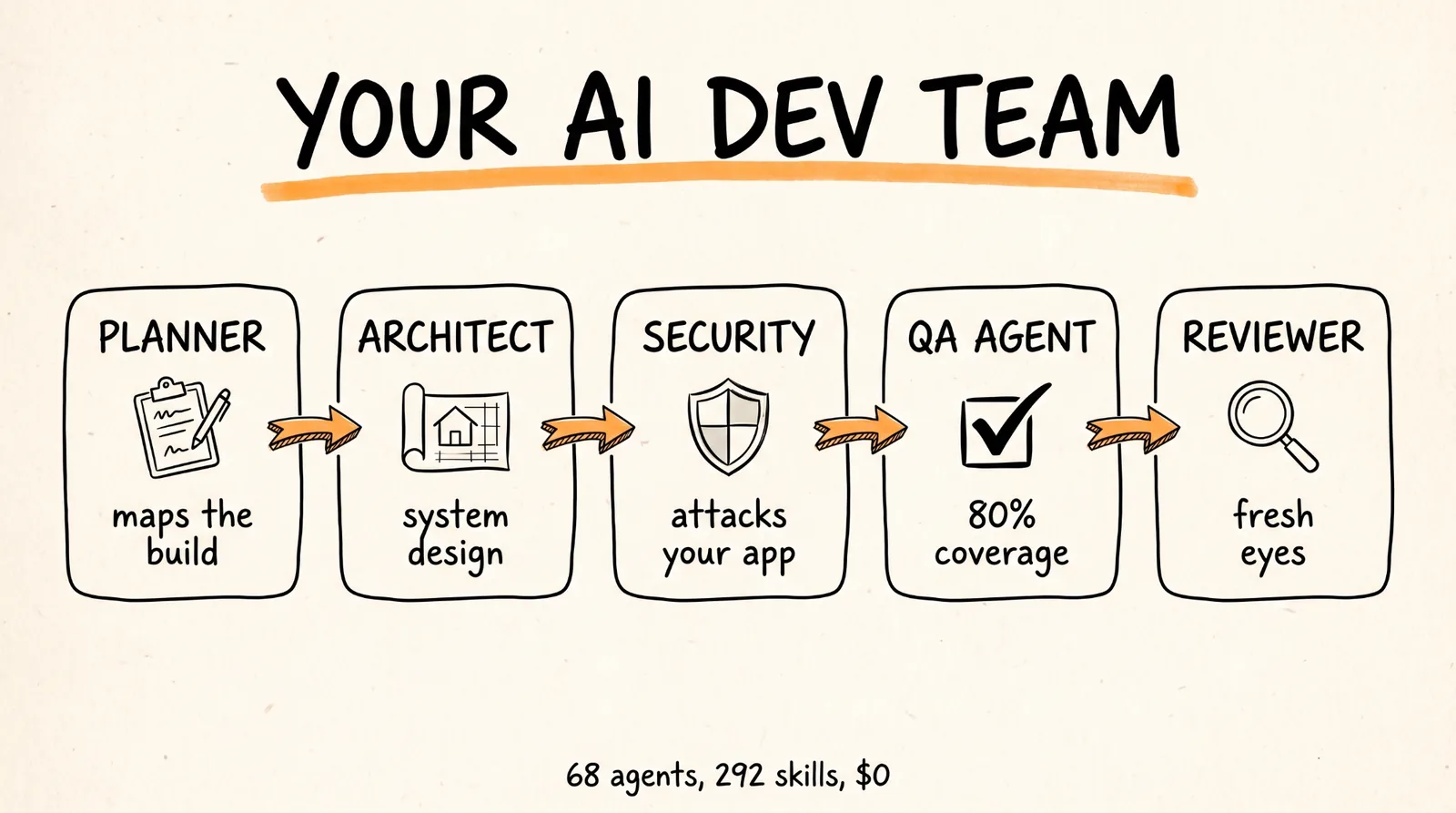
This guide walks you through installing ECC, a free open source system of 68 AI agents, 292 skills, and 94 commands that turns Claude Code, Codex, or Cursor into a full software engineering department. By the end you will have a planner, an architect, a security team, a QA agent, and a code reviewer all living inside your editor.
Don't want to figure this out alone? I walk members through every step inside the community. Join the Skool → skool.com/raycfu
What You Need
An AI code editor. ECC works best with Claude Code, has full support for Codex, and has a lighter adapter for Cursor. Pick one. You can install it into more than one editor, but only install it once per editor.
Node.js version 18 or newer. Check with node -v in your terminal. If you get an error, download it from nodejs.org.
Git installed. Check with git --version. Mac users already have it. Windows users can grab it from git-scm.com.
If you are on Claude Code, you need version 2.1 or newer. Run claude --version to check.
A project folder with some code in it. ECC is useless on an empty folder, the agents need something to plan, test, and attack.
The repo link: https://github.com/affaan-m/ECC
Step 1: Install the System
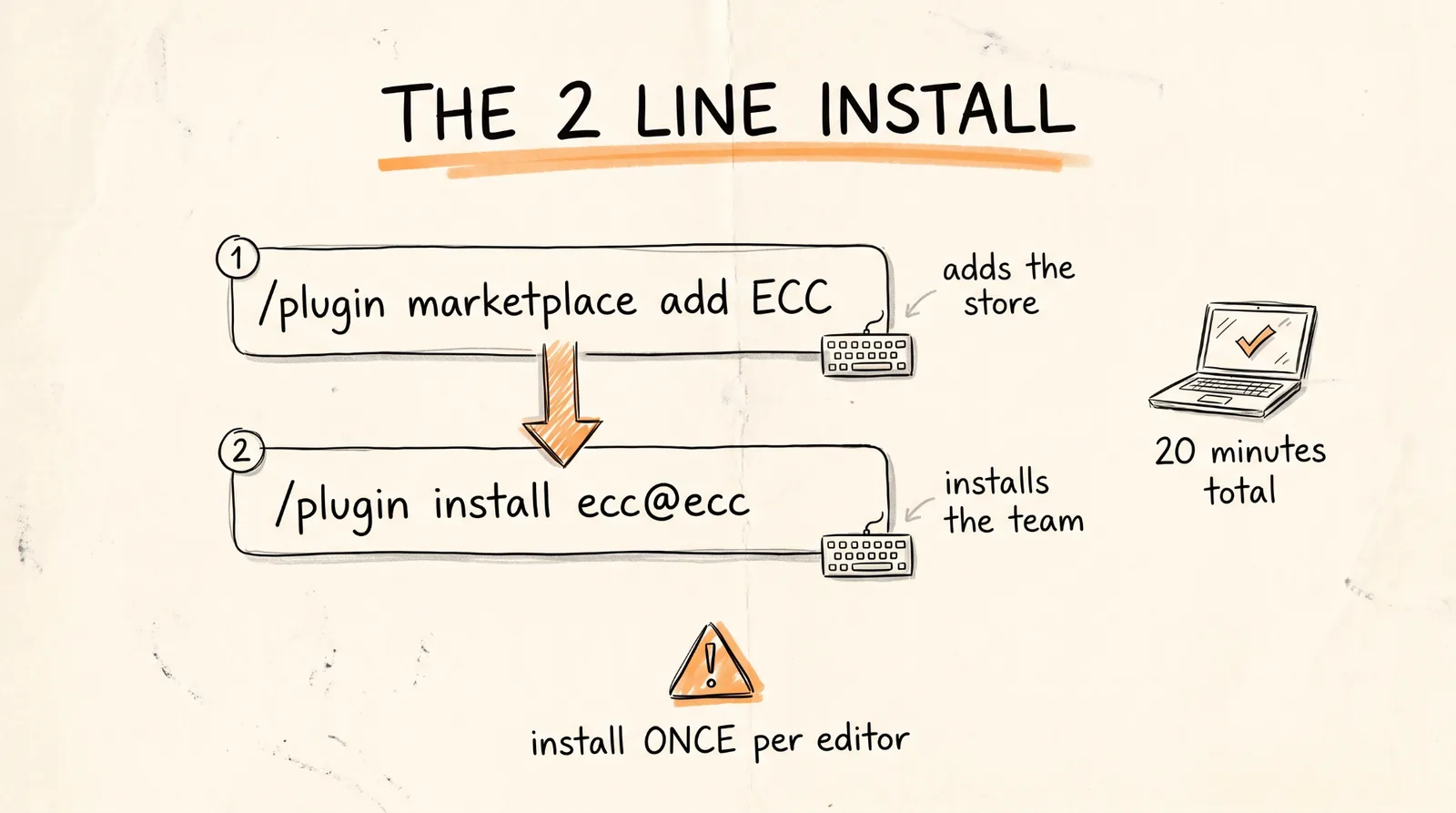
This is the part from the video. One command adds the marketplace, one command installs the plugin.
Open your project in Claude Code and type these two lines, one at a time:
/plugin marketplace add https://github.com/affaan-m/ECC
/plugin install ecc@ecc
That is it for Claude Code. The plugin pulls in all 68 agents, 292 skills, 94 commands, and the hooks that run in the background. Confirm it worked with:
/plugin list ecc@ecc
If you would rather have a wizard walk you through it (it also handles updates later), run this in your regular terminal instead:
npx ecc-universal@2.2.2 setup
Only pick one of these two paths. The number one cause of broken installs is people running the slash commands and then also running the wizard. Doubling up duplicates every skill and hook and you will get weird behavior.
If you use Codex, the commands are almost identical. Run these in your terminal:
codex plugin marketplace add affaan-m/ECC
codex plugin add ecc@ecc
If you use Cursor, you clone the repo and run the installer with the Cursor target:
git clone https://github.com/affaan-m/ECC.git
cd ECC
./install.sh --profile minimal --target cursor
Cursor gets a lighter version. The agents and skills come through, but the automatic hooks (the scripts that run in the background to enforce rules) are limited. If you want the full experience, use Claude Code.
Step 2: Install the Rules
Plugins cannot ship rules, so this part is manual. Rules are the always-on standards every agent follows, things like "write tests before code" and "never commit secrets." Without them the agents still work, but they behave like contractors with no company handbook.
Clone the repo and copy two rule folders, the common one plus the one for your language:
git clone https://github.com/affaan-m/ECC.git
cd ECC
mkdir -p ~/.claude/rules/ecc
cp -R rules/common ~/.claude/rules/ecc/
cp -R rules/typescript ~/.claude/rules/ecc/
Swap typescript for python, golang, swift, php, or arkts depending on what your project is written in. Only install the language packs you actually use. Rules load into every single session, so each extra pack eats context you could spend on real work.
The common rules include the 80 percent test coverage requirement, the security checks, the git commit format, and the guidance on when an agent should hand work off to another agent.
Step 3: Plan a Feature (The Architect Agent)
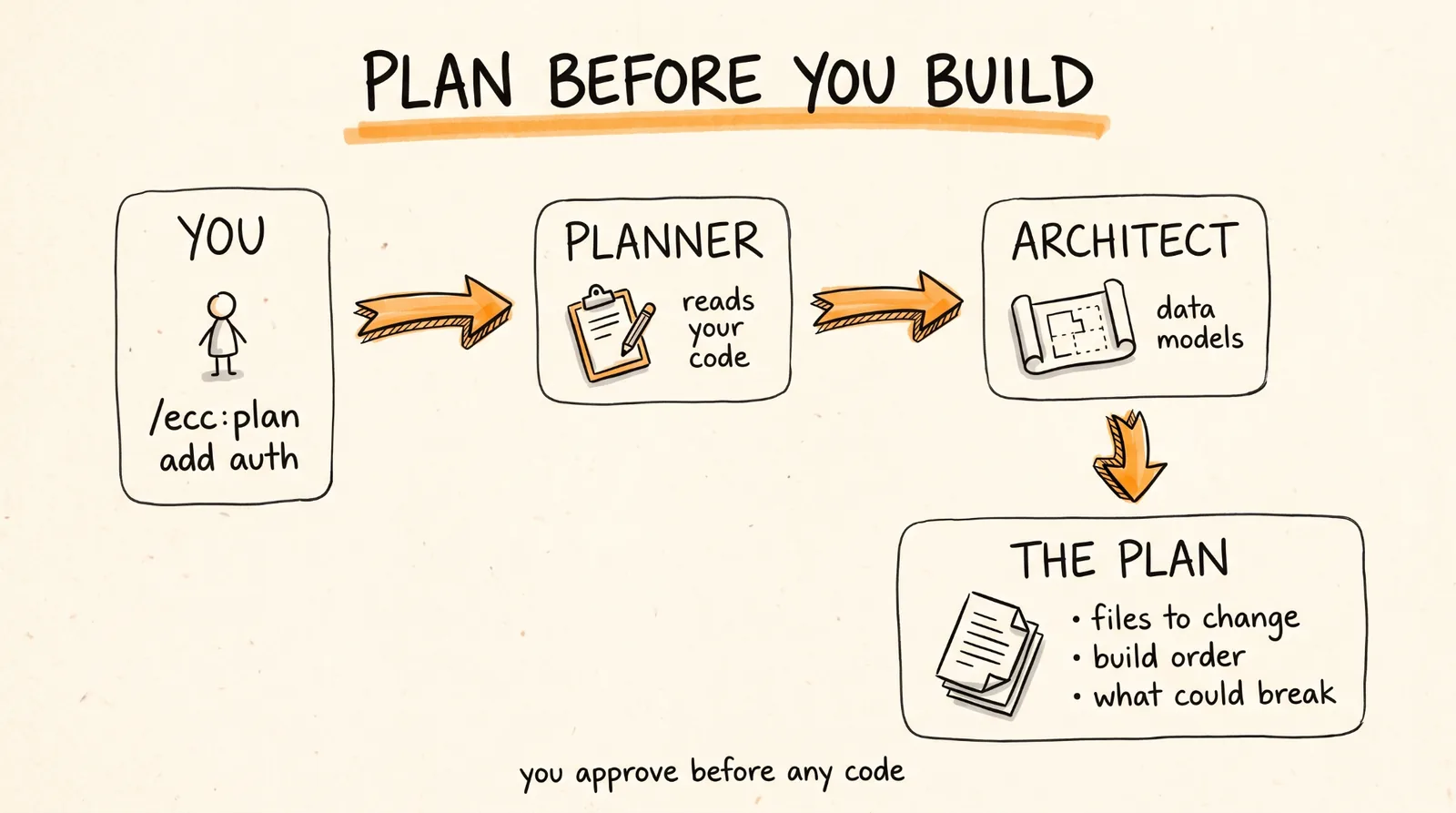
This is where the system starts to feel like a team. Instead of asking your AI to "add authentication" and watching it start writing code immediately, you make it plan first.
Type this in Claude Code, swapping in your own feature:
/ecc:plan "Add user authentication with OAuth"
The planner agent reads your codebase and produces an implementation blueprint: what files change, what the data models look like, what order to build things in, and what could break. For bigger changes it pulls in the architect agent, which handles system design decisions like database schema and how services talk to each other.
You review the plan before a single line of code gets written. Edit it, cut scope, or approve it. The plan becomes a saved document, not something that disappears into chat history.
On Codex the same command is $configure-ecc for setup, and the plan skill triggers when you ask it to plan. On a manual install the shorter form /plan works too.
Step 4: Secure Your App (The Security Team)
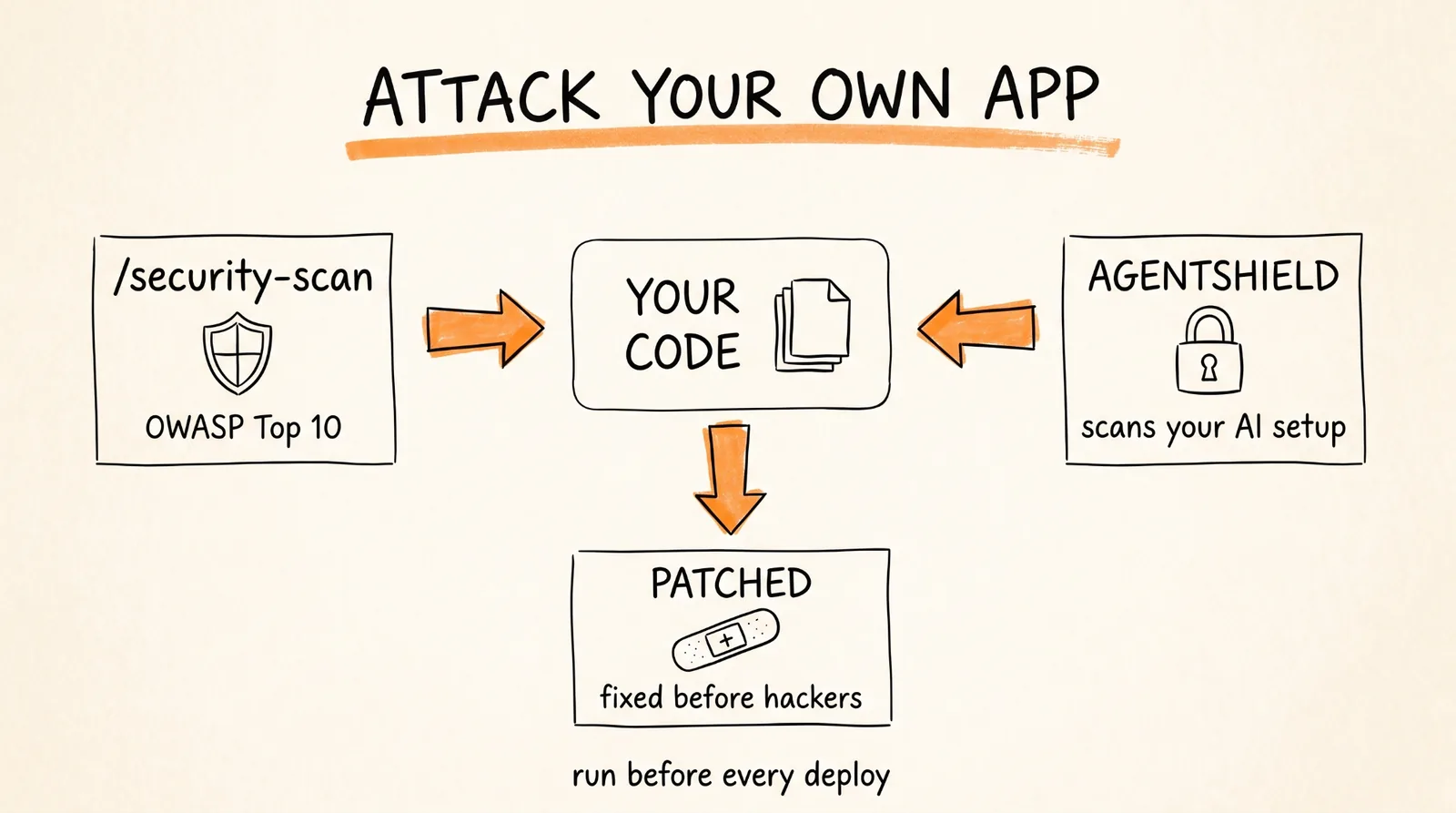
This is the one from the video where an agent team attacks your own codebase. Two pieces do this.
First, the security reviewer agent. Run:
/security-scan
It audits your code against the OWASP Top 10, which is the industry standard list of the most common ways apps get hacked: injection attacks, broken authentication, exposed secrets, that kind of thing. It flags each finding, explains why it matters, and proposes the fix. You approve and it patches.
Second, AgentShield. This one scans your AI setup itself, not your app code. It checks your prompts, hooks, MCP config, permissions, and agent files for things like leaked API keys or instructions that could be hijacked. It comes bundled, and you can run it standalone with:
agentshield scan --path .
Run the security scan before every deploy. It takes a few minutes and it is the cheapest security audit you will ever get.
Step 5: Test Until 80 Percent Coverage (The QA Agent)
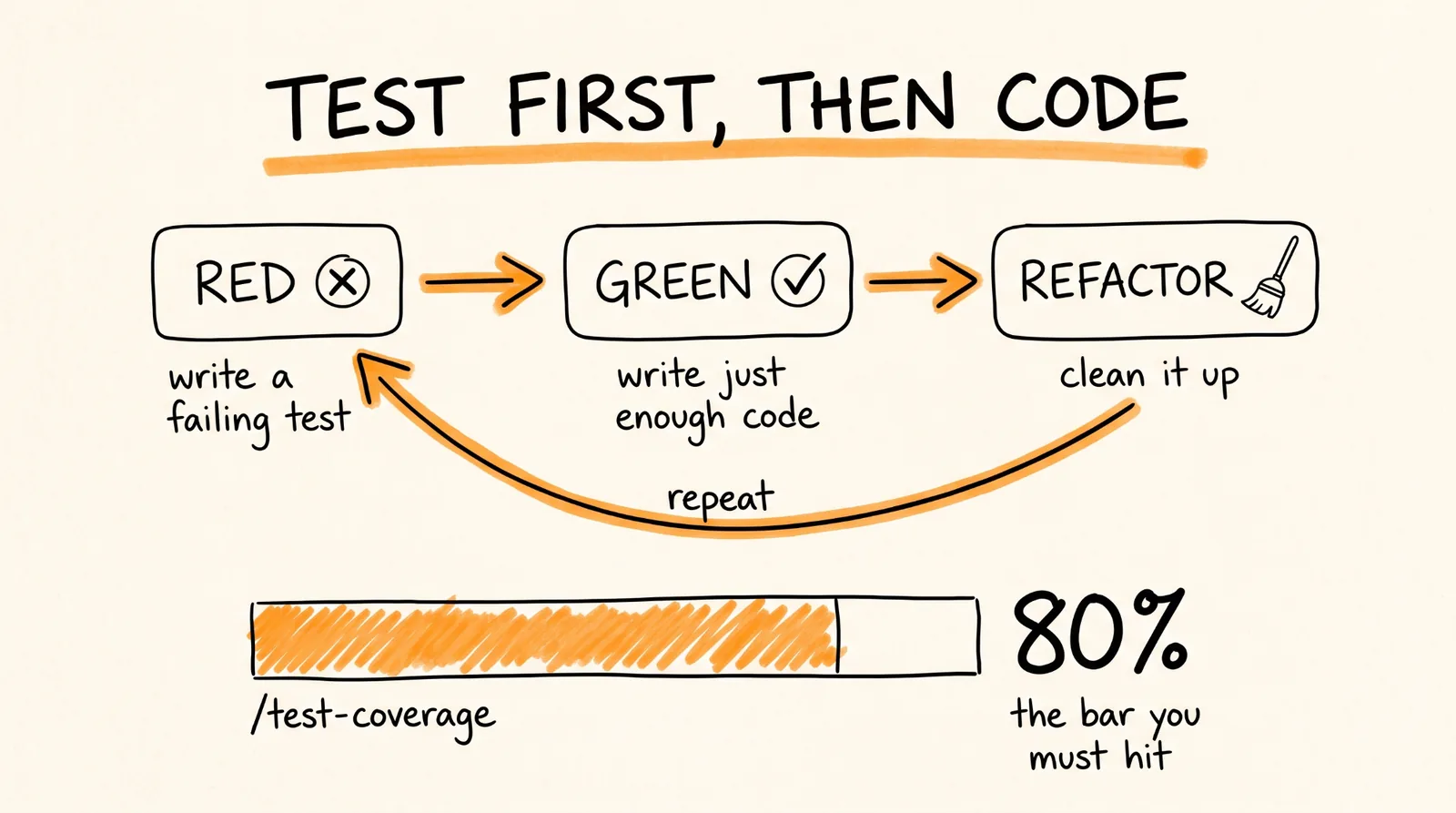
ECC ships with a test-driven development workflow that forces the order most developers skip: write the test first, watch it fail, then write the code that makes it pass.
Activate it by asking for it by name:
Use the tdd-workflow skill to build this feature
The tdd-guide agent takes over. It defines the interfaces, writes failing tests (the RED step), implements the minimum code to pass them (GREEN), then refactors. It will not let you skip ahead.
To check where you stand on coverage, run:
/test-coverage
The rules you installed in Step 2 set the bar at 80 percent. If you are under it, the agent keeps writing tests for the untested paths until you cross the line.
For full end to end testing, where the agent actually clicks through your app like a user would, ask for the e2e-testing skill. That brings in the e2e-runner agent, which uses Playwright to test real user flows like sign up, checkout, and password reset.
Step 6: Review and Ship
The last agent in the chain is the code reviewer. Run:
/code-review
Here is the important part: the reviewer runs in a fresh context. The same AI that wrote your code cannot review it fairly, it has all the same blind spots. A fresh reviewer looks at the diff cold and catches regressions and shortcuts the original session rationalized.
If your build breaks at any point, run:
/build-fix
The build-error-resolver agent reads the error output and fixes it. There are language specific versions too, so a Go project gets the go-build-resolver and a Rust project gets the rust-build-resolver.
To clean out dead code before shipping:
/refactor-clean
And to sync your docs with what you just built:
/update-docs
The Full Workflow, Start to Finish
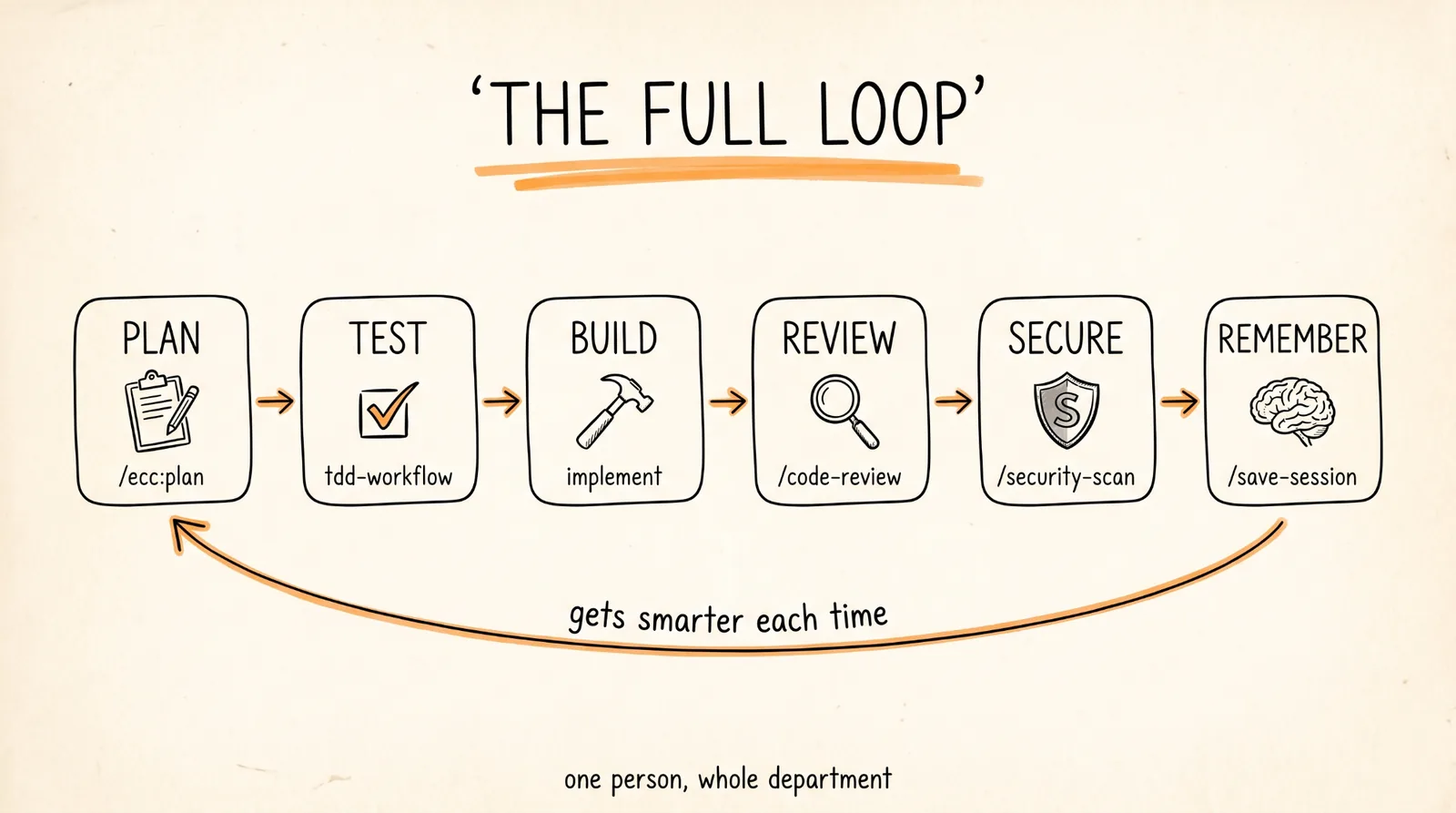
Here is the complete loop for a new feature, in order:
/ecc:plan "describe the feature"
Use the tdd-workflow skill
/code-review
/security-scan
/test-coverage
/build-fix (only if needed)
Plan, test, implement, review, verify. That is what a real engineering team does, and it is what a single person with ECC does now.
Step 7: Make It Remember
The part nobody talks about is that regular AI coding sessions forget everything when you close the window. ECC fixes this.
At the end of a long session, run:
/save-session
When you come back tomorrow:
/resume-session
The session gets distilled into a summary, not a giant transcript, so it loads fast and does not eat your context window.
There is also a continuous learning system. When you run:
/learn-eval
The system looks at what worked in your session, extracts the patterns, and saves them as "instincts" with a confidence score. Over time your setup literally gets better at your specific codebase. To see what it has learned:
/instinct-status
When Things Go Wrong
Skills or commands are showing up twice. You installed ECC two different ways. Remove the plugin from Claude Code, then run npx ecc-universal@2.2.2 uninstall, then reinstall once using one method.
Slash commands do not work after install. Restart Claude Code. Plugins load on startup. Also make sure you are typing /ecc:plan with the ecc prefix, the short /plan form only exists on manual installs.
The marketplace add command says the marketplace already exists. That is Claude Code, not ECC. Run the npx ecc-universal@2.2.2 setup wizard instead and let it sort out the conflicting scope.
Something feels off but you cannot tell what. Run these two:
npx ecc-universal@2.2.2 doctor
npx ecc-universal@2.2.2 repair
Doctor diagnoses, repair fixes files ECC manages without touching yours.
You are on Windows. The core works, but some optional features (the continuous learning daemon, certain shell scripts) need WSL or Git Bash. If you hit a shell error, that is why.
Rules to Remember
Install once per editor. Never stack methods.
Only install the rule packs for languages you actually use. Rules are always loaded.
Plan before you build. The /ecc:plan step is the whole point.
Review in a fresh context. Never let the session that wrote the code grade its own homework.
Run /security-scan before every deploy.
Save your session before you close the window.
The repo is at https://github.com/affaan-m/ECC. It is MIT licensed, free forever, and gets updates weekly. Star it so you can find it again.
You now have a planner, an architect, a security team, a QA department, and a code reviewer, and the whole thing cost you zero dollars and 20 minutes.
Don't want to figure this out alone? I walk members through every step inside the community. Join the Skool → skool.com/raycfu