
How to Build a Self-Correcting AI Loop
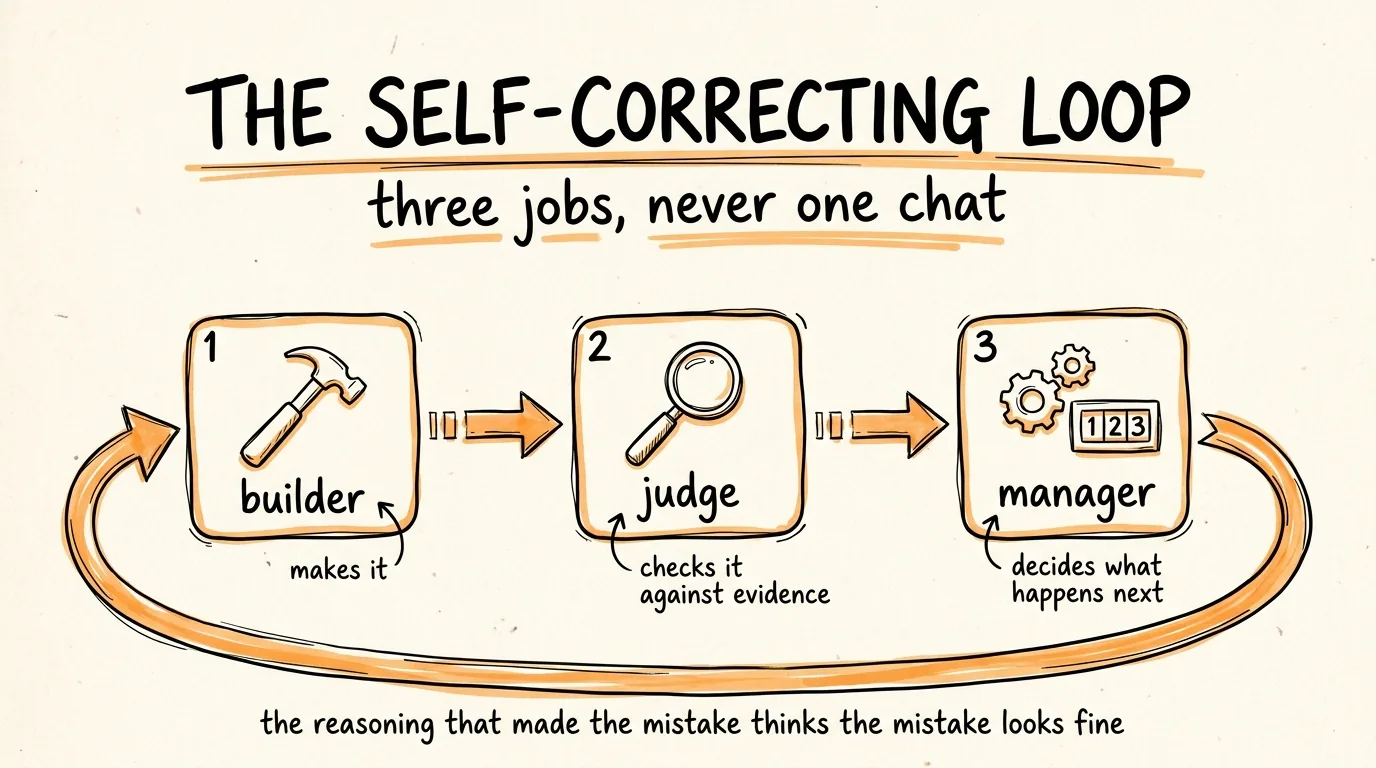
This is the full guide from the video. You are going to build a system that catches your AI's mistakes for you, by splitting the work across three separate jobs: a builder that produces the output, a judge that checks it against something real, and a manager that decides what happens next.
The whole thing rests on one idea. The reasoning that produced a mistake is the same reasoning that looks at the mistake and thinks it is fine. So you never let the thing that wrote the answer be the thing that approves it.
Don't want to figure this out alone? I walk members through every step inside the community. Join the Skool → skool.com/raycfu
Why Asking "Are You Sure" Does Not Work
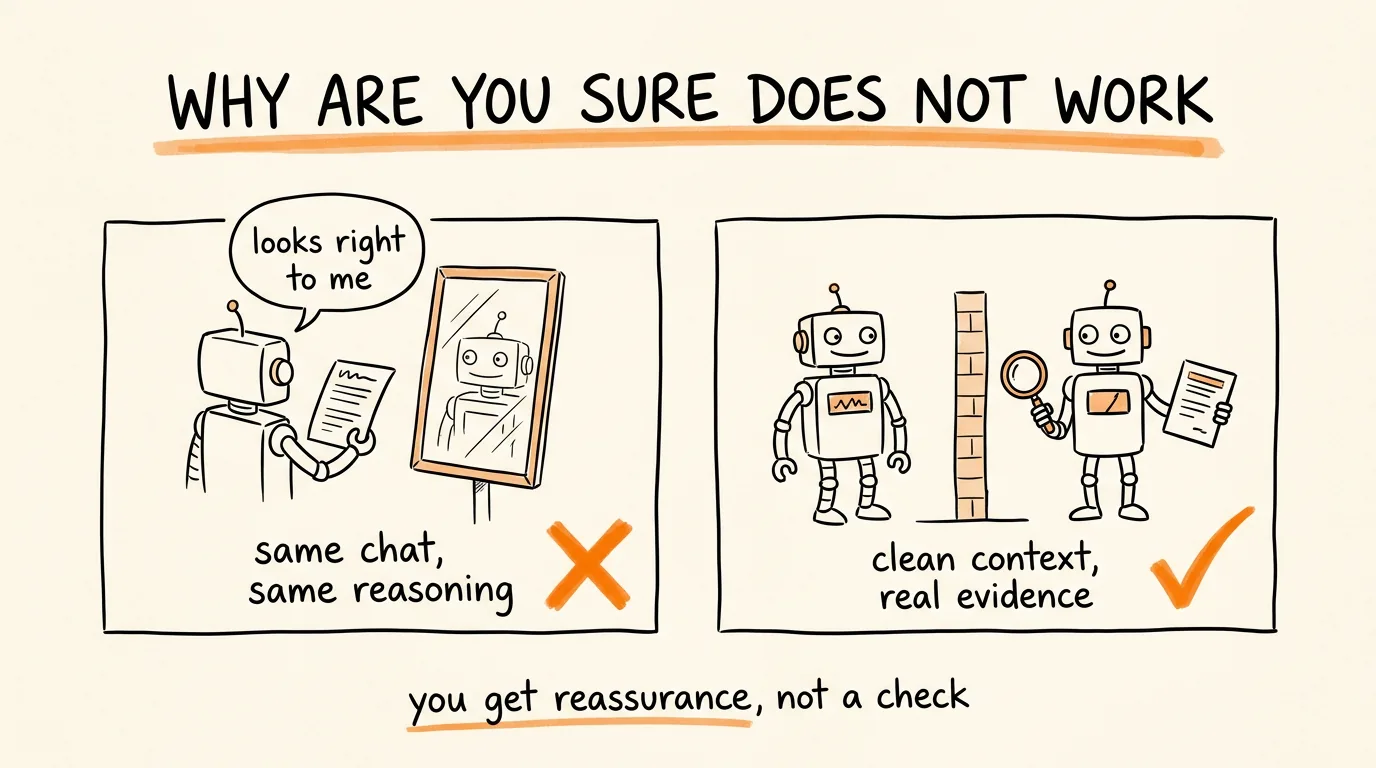
When you ask a model to check its own answer in the same conversation, you are not getting a review. You are getting agreement in a different font.
Everything that led to the error is still sitting in that context: the assumptions, the misread instruction, the wrong turn three steps back. A model asked to re-examine its own work from inside that context will find its own logic persuasive, because it is its own logic. What comes back sounds like verification and is actually reassurance.
Worse, "are you sure" is a social cue. It nudges toward a confident restatement rather than an honest audit, and you end up more certain about something that is still wrong.
So the fix is structural, not a better prompt. Separate the building from the judging, or you do not have a loop, you have one model talking to itself.
Step 1: Split the Work Into Three Jobs
Three roles, and none of them overlap.
The builder produces the output. That is all it does. It never assesses its own quality and it never decides whether it is finished.
The judge checks the output against evidence and returns a verdict. It never fixes anything, because a judge that rewrites becomes a second builder, and now nobody is checking.
The manager reads the verdict and decides what happens next: ship it, send it back with the specific reason, or stop and get you. This one should be code, not a model, and step 3 explains why.
The critical rule is that the judge gets a clean context. It sees the original requirements and the finished output, and nothing else. Not the builder's reasoning, not its explanation of the choices it made, not the conversation. Confidence is contagious, and a judge that reads the builder's justification is being sold to before it starts.
Here is the builder prompt:
You are the builder. Your only job is producing the output.
The task: [TASK]
The requirements: [LIST EVERY REQUIREMENT AS SOMETHING THAT CAN BE CHECKED]
Produce the output and nothing else. No explanation of your choices, no summary of what you did, no assessment of quality. Do not say whether you think it is good.
If a requirement is impossible or contradicts another one, stop and say which one and why, instead of guessing.
When you get a rejection back, fix only the specific issue named in it. Do not rewrite the parts that passed and do not add anything nobody asked for.
That last paragraph matters more than it looks. Builders that get a rejection tend to rewrite everything, which breaks things that were already fine and sends you round the loop again.
Step 2: Give the Judge an Answer Key
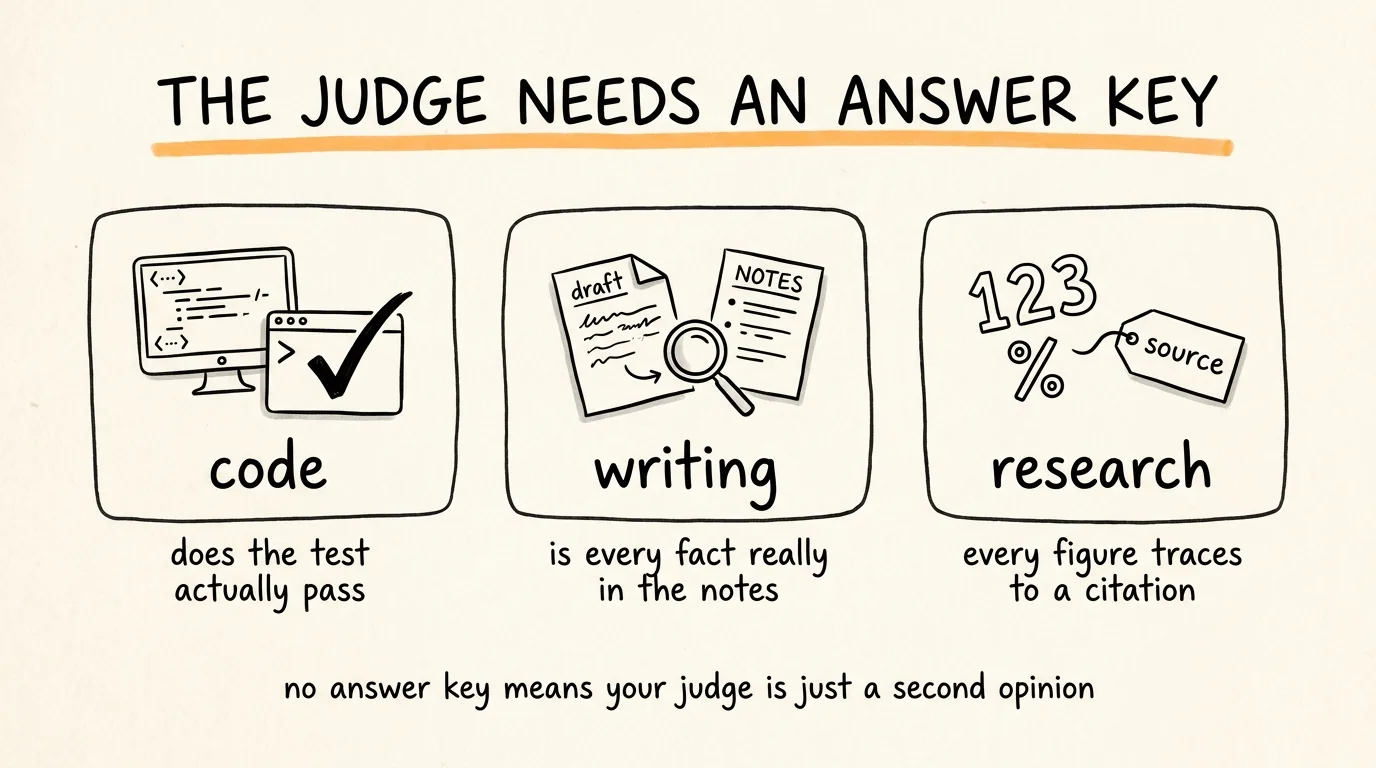
This is the step that separates a real loop from theater. A judge that just looks at the output and forms an opinion is another opinion. It needs something concrete to compare against.
For code, the answer key is running it. Does the test pass, does it compile, does the output match what it should be. The judge's job is not to read the code and feel good about it, it is to run the check and report the result.
For writing, the answer key is the source material. Put the original notes, transcript, or brief right next to the draft and verify that every claim in the draft actually appears in the source.
For data or research, the answer key is the citation. Every figure traces to a named source, or it does not pass.
For anything else, the rule holds: name the thing that makes a verdict checkable rather than arguable, before you write the prompt.
Here is the judge prompt:
You are the judge. You did not produce this and you have no stake in it. Assume it is wrong and find out how.
The original requirements: [PASTE THEM]
The output to check: [PASTE IT]
The evidence you check against: [THE TEST COMMAND, THE SOURCE NOTES, THE DATA, WHATEVER THE ANSWER KEY IS]
Go through the requirements one at a time. For each one, state whether the output meets it and cite the specific evidence, the line, the test result, the passage in the source. "It looks correct" is not a finding.
Then check for these separately: anything in the output not supported by the evidence, anything invented such as a fact, a number, or a name, and anything included that nobody asked for.
Output exactly one of:
PASS
FAIL, followed by a numbered list of what failed, where, and what the evidence says instead.
You may not fix anything, rewrite anything, or suggest wording. Report only. If it genuinely passes, say PASS plainly, do not invent problems to appear thorough.
Two rules in there earn their place. Requirement by requirement with cited evidence stops the judge from writing a vague vibe check. And "you may not fix anything" keeps the roles separate, because the moment the judge starts editing you have lost your only independent check.
Step 3: Set a Hard Stop in Code
Here is the part people get wrong, and it is the one that actually costs money.
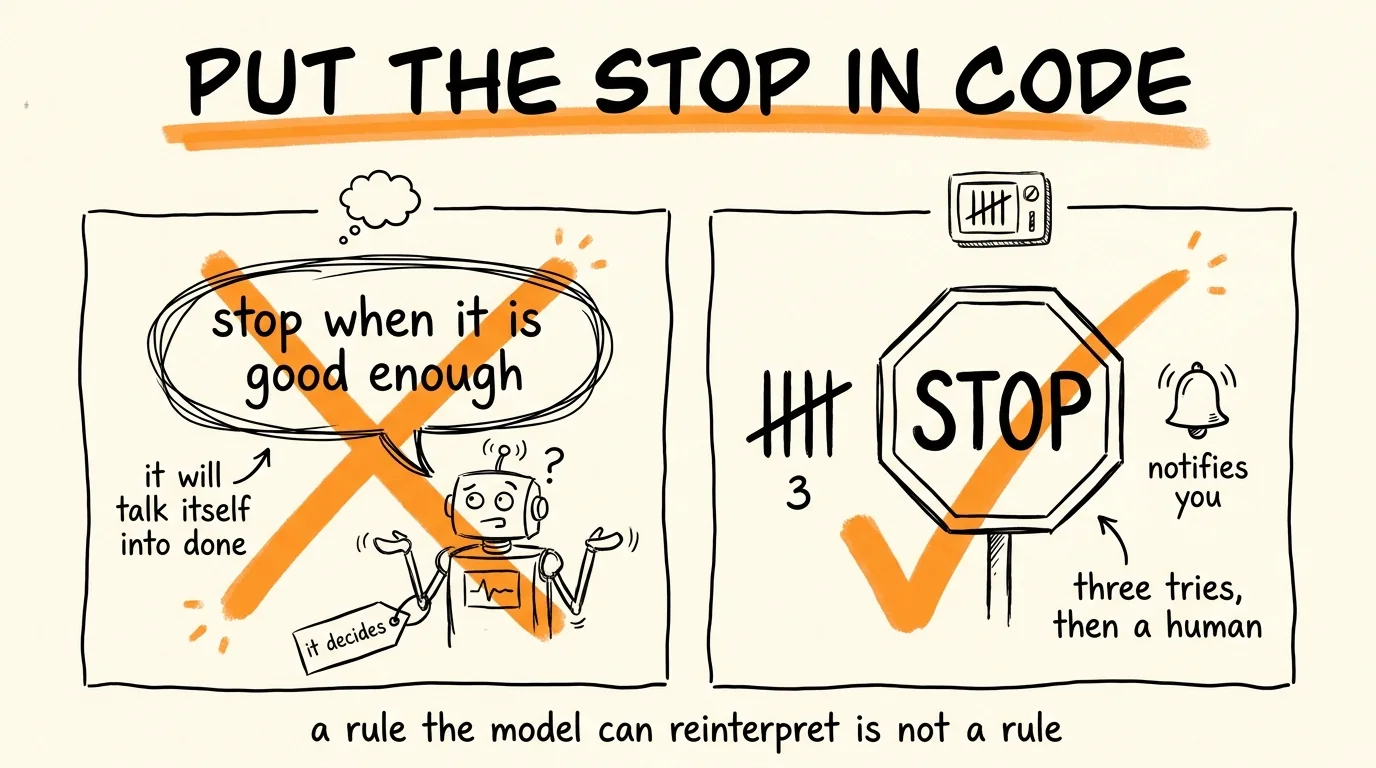
Writing "stop when it's good enough" in a prompt does not create a stop. It creates a judgment call, and you have handed that call to the same system you are trying to supervise. On a task it genuinely cannot finish, the model will reason its way to "this is acceptable now" just to be done, because concluding is easier than failing. You get a loop that declares victory on broken work, or one that grinds through attempt after attempt burning tokens.
So the stop lives outside the model, as a counter in code. Something this simple:
attempts = 0
max_attempts = 3
while attempts < max_attempts:
output = run_builder(task, requirements, last_rejection)
verdict = run_judge(requirements, output, evidence)
if verdict.startswith("PASS"):
ship(output)
break
attempts += 1
last_rejection = verdict
log(attempt=attempts, verdict=verdict)
else:
notify_human(task, output, all_verdicts)
Three attempts, then it stops and tells you, with the output and every verdict attached so you can see where it kept getting stuck. Three is the right default because a problem that survives three targeted rejections is almost never a wording problem, it is a problem with the requirements or the task itself, and more attempts will not find that.
Ask your AI to write this wrapper for whatever you are running it in. The important part is that the counter, the pass check, and the escalation are code, not instructions. A rule the model cannot reinterpret is the only kind of rule in this system.
Step 4: Log the Rejections So It Stops Repeating Them
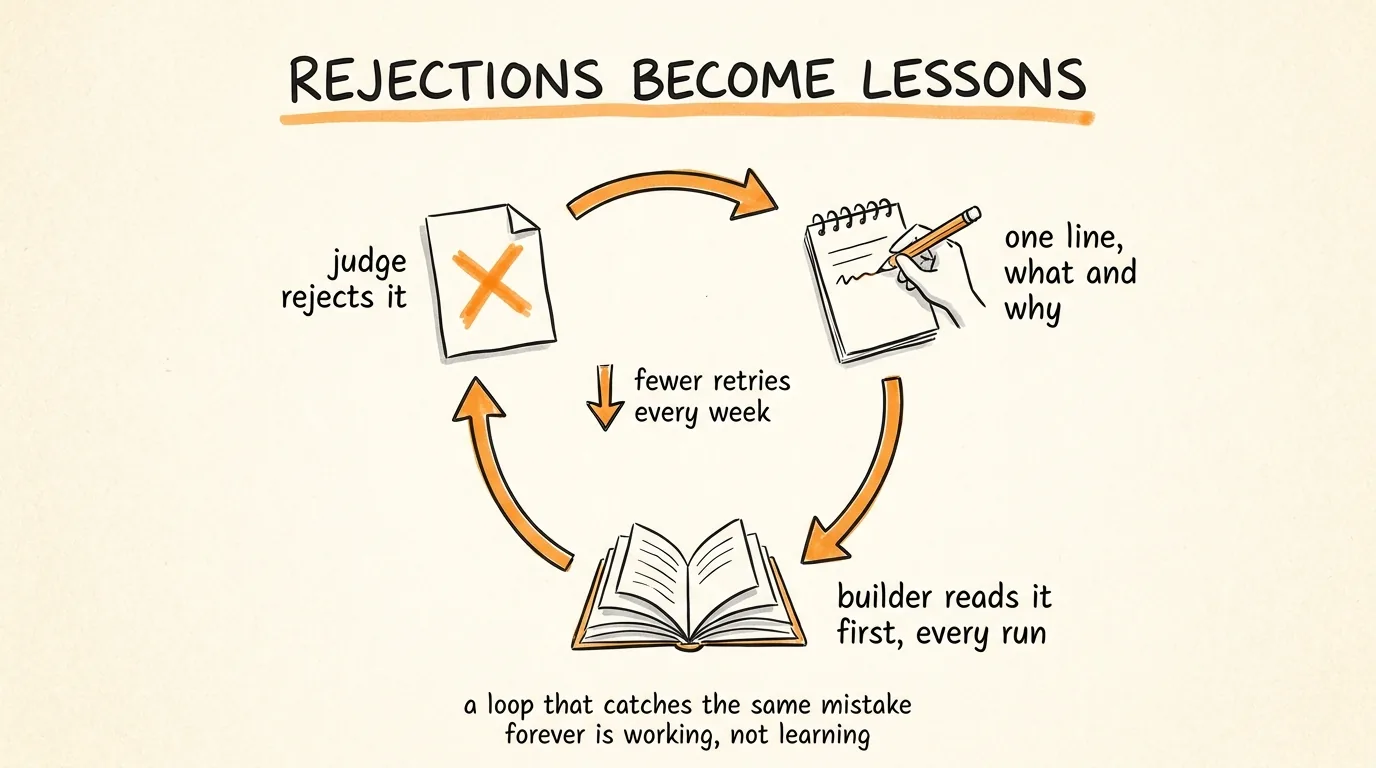
A loop that catches the same mistake every week is working, but it is not learning.
Keep a file called lessons.md, and every time the judge rejects something, append one line: what was produced, why it failed, and the rule that would have prevented it. Then have the builder read that file before every run.
Add this to the builder prompt:
Before you start, read lessons.md. These are mistakes that have already been caught, do not repeat them. When your work is rejected, append one line to lessons.md recording what you produced, why it was rejected, and the rule that would have prevented it. One line per lesson, never delete an entry.
After a few weeks the builder stops making the mistakes you already caught, the failure rate drops, and the loop starts costing less to run because fewer attempts are needed.
When Not to Build This
Loops cost more than a single pass, because every cycle is at least two model calls. Skip it when the task is a one-off, when you would review the output yourself anyway, or when you cannot name a real answer key. That last one is the hard gate. Without a concrete comparison, your judge is just a second opinion, and two opinions is not verification.
Build the loop when the task repeats, when the output is expensive to get wrong, or when the mistakes are the kind you would not notice reading quickly, wrong numbers, invented citations, a missed requirement in a long list.
The Rules to Remember
Never let the model that wrote something decide whether it is good. Different job, clean context.
The judge sees the requirements and the output. Never the builder's reasoning.
No answer key, no loop. Name the evidence before you write the prompt.
The judge reports, it never fixes. The builder fixes only what was named.
The stop is a counter in code. Three attempts, then a human. A stop the model can reason its way past is not a stop.
Log every rejection, so the same mistake never survives twice.
Don't want to figure this out alone? I walk members through every step inside the community. Join the Skool → skool.com/raycfu